AI Coding Assistant: What It Does and How Teams Use It
You open a repo, kick off one AI session to fix a bug, then start a second one because the first got stuck. Ten minutes later, both sessions have touched the same file, one has overwritten the other's change, and nobody can tell which diff came from which prompt. That's the starting point for understanding an AI coding assistant. The tool is useful, but the harder problem is running code, people, and assistants side by side without losing control.
An AI coding assistant is software that reads code, explains code, writes code, suggests tests, and helps debug. It usually shows up as an editor plug-in, a chat app, or a command-line agent. GitHub's Copilot moved from technical preview in June 2021 to paid general availability in June 2022, and by early 2024 it reportedly had more than 1.3 million paid subscribers and was used by over 50,000 organizations (GitHub Copilot's rollout and enterprise adoption). That kind of growth changed the job from “should we try this?” to “how do we keep it coordinated?”
A senior engineer's mental model helps here. Treat the assistant like a very fast teammate who can draft useful work, but who still needs task boundaries, review, and a record of what happened. The sections below cover what these tools do, where they fit, where they fail, and how teams keep them from stepping on each other.
Table of Contents
- What an AI Coding Assistant Does in a Developer's Day
- Core Capabilities and the Right Mental Model
- How Quickly AI Coding Assistants Became Normal
- Integration Patterns Teams Actually Use
- Where AI Coding Assistants Still Fall Short
- Security, Trust, and the Verification Gap
- A Coordination Layer for People and Agents
- Responsible Use Checklist for Teams This Week
What an AI Coding Assistant Does in a Developer's Day
The first sign that an AI coding assistant is becoming part of your day isn't a magical feature, it's friction. One agent asks for the project brief again, another starts editing a file you already opened in a different session, and you realize the tool can move faster than your process can absorb. That's why the practical question isn't whether these tools are useful, it's how they fit into a normal engineering workflow.
The jobs it handles
A good assistant can generate boilerplate, fill in repetitive functions, explain unfamiliar code, and suggest likely fixes when a test fails. In GitHub's controlled study, developers with Copilot completed a standardized coding task 55% faster than developers without it, but the same research still emphasized review, testing, and human judgment (GitHub's enterprise study on Copilot). That detail matters more than the speed figure. Fast output isn't the same thing as trustworthy output.
Practical rule: let the assistant do the drafting, then make a human own the decision to merge.
The assistant can also help with debugging by suggesting plausible causes, especially when the problem is local and well-scoped. It can draft tests, propose refactors, and explain why a snippet works the way it does. But it doesn't carry context from yesterday unless you put that context somewhere durable. Every fresh session starts with a partial view.
That's why many teams now use assistants as part of a system rather than as isolated helpers. One session writes code, another reviews it, and a third checks docs or tests. The tool isn't replacing the engineer, it's multiplying the number of things that can happen at once. The rest of this article is really about making that multiplication safe.
Core Capabilities and the Right Mental Model
Think of an AI coding assistant as a junior pair programmer who types quickly, reads fluently, and forgets almost everything between sessions. It can be very good at the next step, but it doesn't reliably remember the whole project unless you preserve that context outside the chat. That's the key mental shift. You're not asking for autonomy, you're asking for acceleration.
The four core jobs
The first job is generation. It can draft a function, a class, a test, or some boilerplate around an API. The second is explanation. If you hand it a dense module, it can often summarize what it's doing in plain language. The third is testing. It can help write unit tests or suggest the checks that ought to exist. The fourth is debugging. It can point to likely failure points and suggest a sequence of fixes.
Those capabilities are real, but they're different from older developer tools. Linters tell you that code breaks a rule. Language servers help with completion and navigation. An assistant goes further, it can reason over a request, produce a multi-line patch, and sometimes return a whole diff. That's also why the new agentic tools matter. They can work across several files, run commands, and come back with a change set rather than a single suggestion. For readers who want to explore that broader agent ecosystem, this overview of AI agents is a useful adjacent reference.
The hidden constraint
Every one of these tools still runs into the same wall, the context window. If the session gets too long, or the problem spans too many files, the assistant starts to forget earlier details or compress them into summaries. That's where teams get burned. They assume the tool “understands the repo,” when it only understands the pieces you've kept in view.
An assistant that forgets context is still useful, but only if the team treats memory as an explicit artifact.
That's the right model to keep in your head. The assistant is strong at local work, weaker at long-lived coordination. Once you accept that, the workflow choices get much clearer.
How Quickly AI Coding Assistants Became Normal
A developer opens a repo, sees Copilot suggestions in the editor, and treats them like any other tool in the workflow. That normalization happened fast. GitHub introduced Copilot as a technical preview in June 2021, made it generally available as a paid product in June 2022, and by early 2024 it had crossed from novelty into enterprise reality. The speed matters because teams began using the tools before they had clear rules for review, ownership, or attribution.
Adoption moved faster than governance
Stack Overflow's annual developer survey shows AI tool usage rising from 44% in 2023 to 62% in 2024 and 79% in 2025 (developer survey retrospective). The same survey reports that 50.6% of professional developers used AI tools daily in 2025, while 68% of respondents using out-of-the-box assistants chose GitHub Copilot. IDC also reported that 29.5% of organizations had been using coding assistants widely for at least one year.
Those figures explain why the pain shows up now. Once daily use becomes normal, the assistant stops being a side experiment and becomes part of delivery. That changes the questions teams have to answer. Who owns the task? Who reviews the output? Where does the handoff live?
Why the conversation changed
Many developers also moved from chat-only use to command-line and IDE-resident agents. The difference is practical, not cosmetic. A chat assistant answers a question. An agent can keep working through several steps, edit files, and test results without a human typing every change. That makes the system more capable, but it also makes coordination more important.
A faster assistant creates a sharper review problem.
If the tool can draft code in minutes, the team needs a place for approvals, handoffs, and verification. Otherwise, speed just moves uncertainty farther down the pipeline. The shift was not raw generation speed. It was the moment AI coding assistants became part of team accountability.
Integration Patterns Teams Actually Use
In practice, teams usually encounter four shapes of assistant integration. Each one fits a different kind of work, and each one fails in a different way. The mistake is trying to treat them as interchangeable. They're not.
IDE plug-ins and inline completion
An IDE plug-in works best for local edits, small refactors, and boilerplate. It sits where the code is, so the assistant can see open files, suggest the next line, and make small adjustments without switching tools. That's great for momentum, but it also encourages shallow context. If the task depends on a broader architectural decision, the assistant may produce something that looks right in the current file and wrong everywhere else.
Chat assistants and codebase questions
A chat assistant is better when the developer needs explanation, comparison, or quick brainstorming. Ask it what a function is doing, how two approaches differ, or what a test should cover, and it can be useful fast. The weakness is that it can drift into confident generalities if the repo context is thin. It's a conversation tool, not a source of truth.
CLI agents and multi-file changes
Command-line agents are the most operationally interesting. They can take a task, inspect the repo, run tests, and produce a diff that spans multiple files. That makes them a better fit for bug fixes, feature scaffolding, and repetitive maintenance work. They're also the easiest place for collisions to happen if two sessions touch the same task at once. Task allocation patterns for AI work matter more here than in the other modes.
CI and scheduled runs
The last pattern is agent use in CI or scripted workflows. Teams use it for repeatable checks, bulk updates, or repo-wide maintenance. It's powerful, but it should be narrow. Anything that touches production paths, security checks, or large refactors needs a tighter review loop than a scheduled job can provide.
MCP, the Model Context Protocol, is the emerging bridge that lets these assistants connect to project boards, design files, and external tools without custom one-off integrations. That's useful because it reduces friction, but it doesn't solve coordination by itself. If two agents are reading the same board and editing the same task, you still need a process that prevents them from colliding.
Where AI Coding Assistants Still Fall Short
A tool can generate code fast and still stumble once it has to work inside a real repository, touch several files, and satisfy the project's own tests. SWE-bench was built to measure that gap. It uses real GitHub issues from 12 Python repositories, and the agent has to change code until the repository tests pass (SWE-bench benchmark details). OpenAI later reported that GPT-4o resolved 33.2% of SWE-bench Verified samples, which shows the same pattern at a higher level, local generation can look strong while end-to-end repair still breaks down (OpenAI SWE-bench Verified results).
Repository work is harder than snippet work
A repository is not a blank page. It is more like a workshop with shared tools on the bench, and if one session starts editing a file after another session has already refactored it, the result can be a clean patch that no longer fits the current codebase. That is the practical failure mode teams run into. The assistant may follow the immediate instruction correctly and still miss the larger state of the project.
That is why task ownership matters. Teams need durable project context, clear boundaries for each task, and a record of what is unfinished. Without that coordination layer, two good sessions can duplicate effort, overwrite each other's changes, or keep working from an assumption that is no longer true.
What the benchmark implies in practice
The safer pattern is to keep the task small and explicit. Give the assistant one issue, one bounded target, and one verification path. If the change crosses several files, split the work so the dependency chain stays visible. If the codebase has local rules, brief the assistant on those rules before it edits anything.
If another person or another agent already owns the task, stop there. The hard part is not getting code out of the model. It is making sure that code fits the repository, the team's workflow, and the current source of truth.
Security, Trust, and the Verification Gap
Teams use AI coding assistants every day, and a large share of them are also finding security issues in AI-generated code. That tension is the point, because speed without verification only moves risk faster.
Productivity and risk show up together
Analysts have also found clear productivity gains from assistant use, which explains why adoption keeps spreading. IDC's 2025 DevSecOps survey, however, found a different pattern in review: 41.6% of respondents occasionally detected security issues introduced by AI-generated code in fewer than half of code reviews, 14.1% found them very frequently in most reviews, and 18.5% found them frequently in more than half (AI coding tools and production problems).
That is the verification gap. An assistant can draft code quickly, but a team still has to confirm that the code is safe, fits the system, and matches local rules. A useful way to think about review is to match the depth of checking to the risk of the change. Security-sensitive changes, architectural changes, and production-impacting changes need a person to sign off. Smaller edits still need tests and code review, but the review path can be lighter when the blast radius is small.
Provenance is now part of engineering
Provenance matters just as much as correctness. If a change came from a person, an assistant session, or a mix of both, that should be visible later. Otherwise debugging turns into archaeology. You need to know which session produced the diff, what context it had, and what was approved before merge.
If you can't trace the origin of a change, you can't really review the change.
That is why verification is also about accountability. The output has to be testable, reviewable, and attributable.
A Coordination Layer for People and Agents
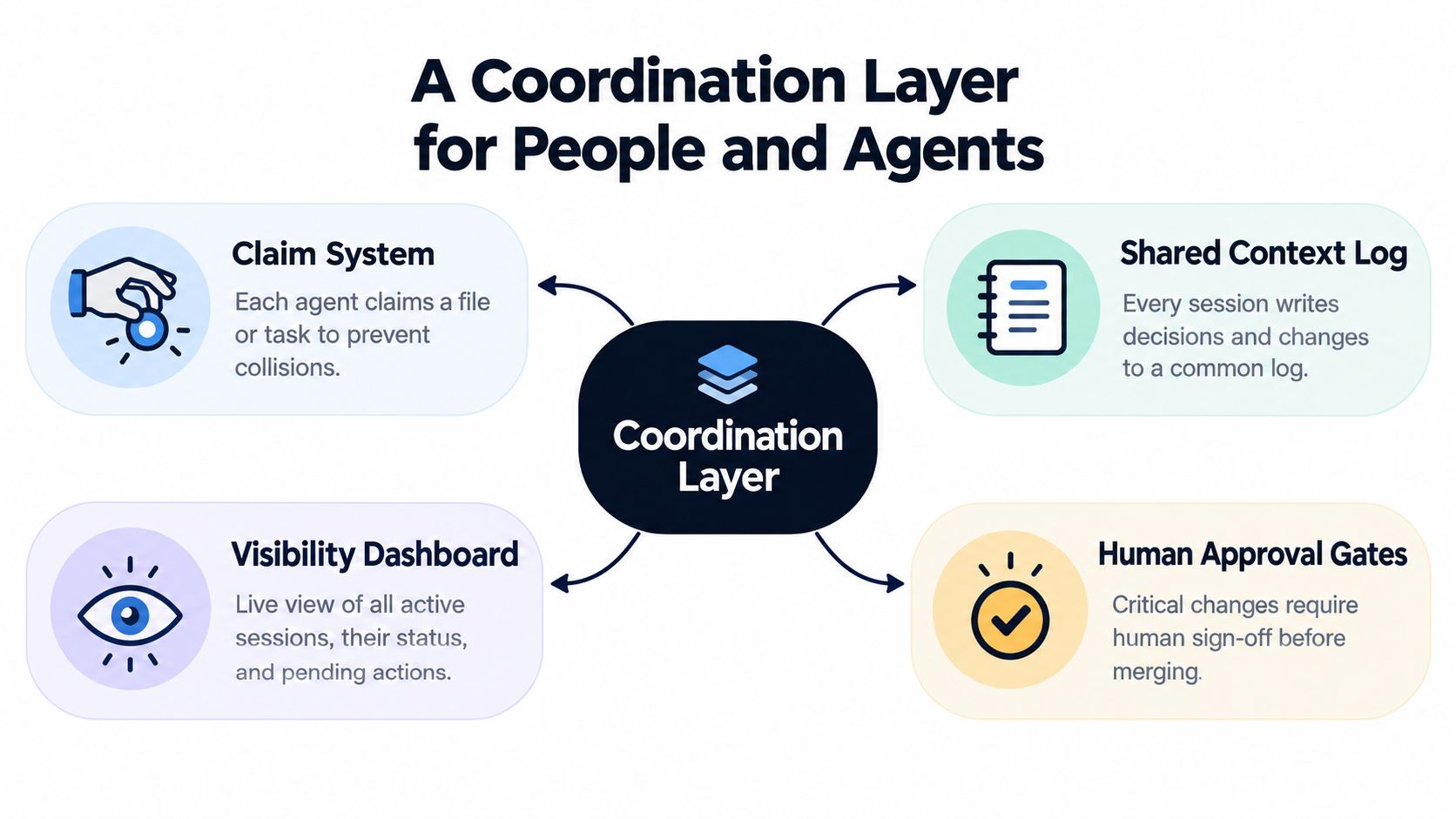
When a team runs several AI coding sessions in parallel, the need isn't more prompts. It's a coordination layer that prevents collisions, preserves context, and records who did what. Without that layer, agents can be useful and still produce chaos. The team needs a system that gives each session enough structure to work safely.
The primitives that keep sessions aligned
A claim system gives one session the right to work a task at a time. That prevents two agents from editing the same file or issue simultaneously. A shared context log stores decisions, unfinished work, and reasons so the next session doesn't start cold. A visibility dashboard shows what's active, what's blocked, and what still needs attention. Human approval gates keep critical changes from moving forward without a person signing off.
Those primitives are what a coordination-first board has to provide. General-purpose work trackers can list tasks, but they usually don't enforce ownership, session memory, or agent attribution. That's the practical difference between a board that tracks work and a board that coordinates people plus agents.
Why this matters more for small teams
JetBrains' 2025 survey of 24,534 developers in 194 countries found that 85% regularly use AI tools and 62% rely on at least one AI coding assistant, agent, or AI code editor, while leading concerns included limited understanding of complex logic, privacy and security, and AI's lack of context awareness (JetBrains Developer Ecosystem 2025). That combination makes coordination a first-class problem. The more routine the assistants become, the more important it is to keep their work readable and attributable.
Agencies, solo builders, and small product teams feel this fastest. They're the groups most likely to run several sessions in parallel and the least likely to have a big process layer protecting them. They need briefings, task claims, handoffs, and a durable activity trail. They also need a system that lets a session know who owns the task before it starts. That's what stops a fast assistant from becoming an invisible source of rework.
For teams that want a practical operating model, multi-agent coordination patterns are the right place to look next.
Responsible Use Checklist for Teams This Week
The safest teams don't ban assistants, and they don't trust them blindly either. They wrap the tool in a simple operating rhythm that keeps human judgment in charge. If you want a practical starting point, make these habits firm.
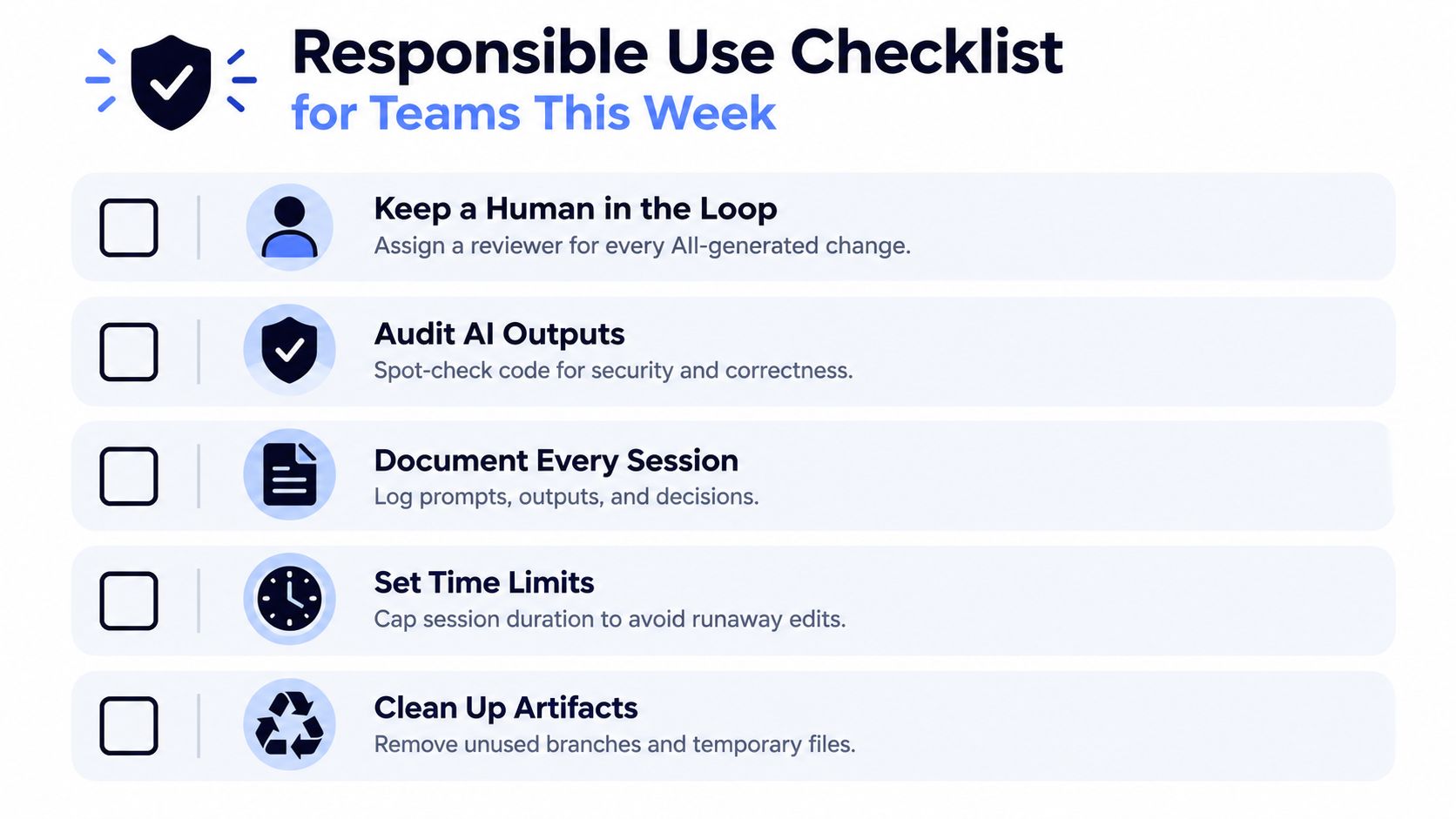
- Keep a human in the loop. Assign a reviewer for every AI-generated change, and make that person responsible for merge approval.
- Audit AI outputs. Spot-check code for correctness, security, and fit with the codebase, especially when the change touches auth, data handling, or deployment.
- Document every session. Save prompts, outputs, decisions, and handoffs where the next person or agent can read them.
- Set time limits. Keep sessions short enough that context doesn't drift and the assistant doesn't wander into unrelated changes.
- Clean up artifacts. Remove temporary branches, unused files, and half-finished experiments before they spread across the repo.
The team habits matter just as much. Pick a default assistant and model for each project so people aren't constantly re-litigating tools. Decide which tasks an agent may run unattended and which ones always need approval. Require attribution in commits or changelogs so AI work stays visible. Keep decisions and rationale in a place the next session can read.
The core idea is simple. An AI coding assistant is most valuable when it lives inside a workflow that protects human judgment. Teams that treat coordination, attribution, and review as product features will get much more out of these tools than teams that treat them as afterthoughts.
If your team is already using assistants in code, specs, or bug fixing, Projectify helps you coordinate those sessions instead of letting them collide. It gives people and agents a shared place to claim work, preserve context, and keep every change attributed. Visit Projectify to see how it can support AI coding work with clearer ownership and cleaner handoffs.
Give your AIs a desk.
One board for your team and Claude. Free for your first project.
Request access