Blog project briefing template project brief template project brief
Project Briefing Template: Free Format and How to Fill It
Get a ready-to-use project briefing template with fields, a filled example and a kickoff routine for people and AI agents.
You've kicked off the work, everyone nodded, and a week later you're discovering that done meant three different things to three different people. That's usually not a talent problem. It's a briefing problem, and it's worse now that an AI agent can build the wrong thing quickly and confidently. A good project briefing template fixes this before execution starts, then keeps people and agents aligned as the project changes.
Copy This Project Briefing Template and Its Fields
Say a four-person team and two Claude agents are adding CSV invoice export to a small billing tool. The first week goes to arguing about what done means. One developer expects a monthly file, finance expects reconciled totals, and an agent starts adding PDF because nobody said not to.
Treat the brief as a lightweight project charter completed before execution starts. It records the need, objectives, stakeholders, success criteria, constraints, risks, and expected outputs in labelled fields that a new contributor or agent session can scan fast.
The copy-ready skeleton
Paste these lines into your project overview, then fill them in order.
- Project: name in plain words
- Owner: one accountable role
- Problem: two sentences with evidence
- Objectives: metric, baseline, target, date
- Success criteria: a test someone can run
- In scope: committed work, one item per line
- Out of scope: explicit exclusions
- Deliverables: high-level outputs
- Sponsor, Owner, Approver: named decision rights
- Constraints: budget, dates, technical limits
- Dependencies: each with an owner
- Risks: each with an owner
- Assumptions: confirmed, proposed, or unknown
- Approval: approver and date
- Review cadence: when the brief gets checked
In the PMI 2024 project success study, 84% of projects defined success criteria upfront, which is why that field sits near the top instead of trailing at the end. You want the team arguing about the finish line before anyone builds toward their own version of it.
| Field | What to Write | Example Entry |
|---|---|---|
| Project name and owner | One name and one accountable role | CSV invoice export, owned by the product lead |
| Problem | The situation in two sentences with evidence | Finance admins re-run failed exports by hand; 14% of runs failed in March |
| Objectives | Measurable targets with baseline and date | Cut failed runs from 14% to under 3% by 30 June |
| Success criteria | An acceptance test someone can run | Export 500 test invoices and match every total to the ledger |
| Scope and out of scope | What is included and an explicit not-included list | Included: monthly CSV export. Not included: PDF and multi-currency |
| Deliverables | High-level outputs | Export endpoint, settings page, updated help article |
| Stakeholders and decision authority | Sponsor, owner, contributors and approver | Sponsor: COO. Approver: finance lead. Agents suggest, humans approve |
| Constraints and dependencies | Budget, dates and systems each item relies on | Six-week window; depends on ledger API v2 going live |
| Risks and assumptions | Each risk with an owner, each assumption marked confirmed or proposed | Risk: currency rounding bug found in test run, owner backend lead. Assumption (proposed): ledger API v2 releases by 16 May |
| Approval and review cadence | Who signs off and when the brief is reviewed | Approved by finance lead on 2 May; reviewed every Friday |
Fill the first five fields in about twenty minutes and stop for review. Mark anything unconfirmed as a proposal, not a fact, so nobody builds on a guess.
How to Write Goals and Scope Someone Can Test
A brief that says make exports better reads well and gives two people two different projects. One person optimises speed, another fixes failures, and both can claim they followed the brief. Testable language removes that escape route.
The visual below shows how a vague intention becomes a sequence you can verify.
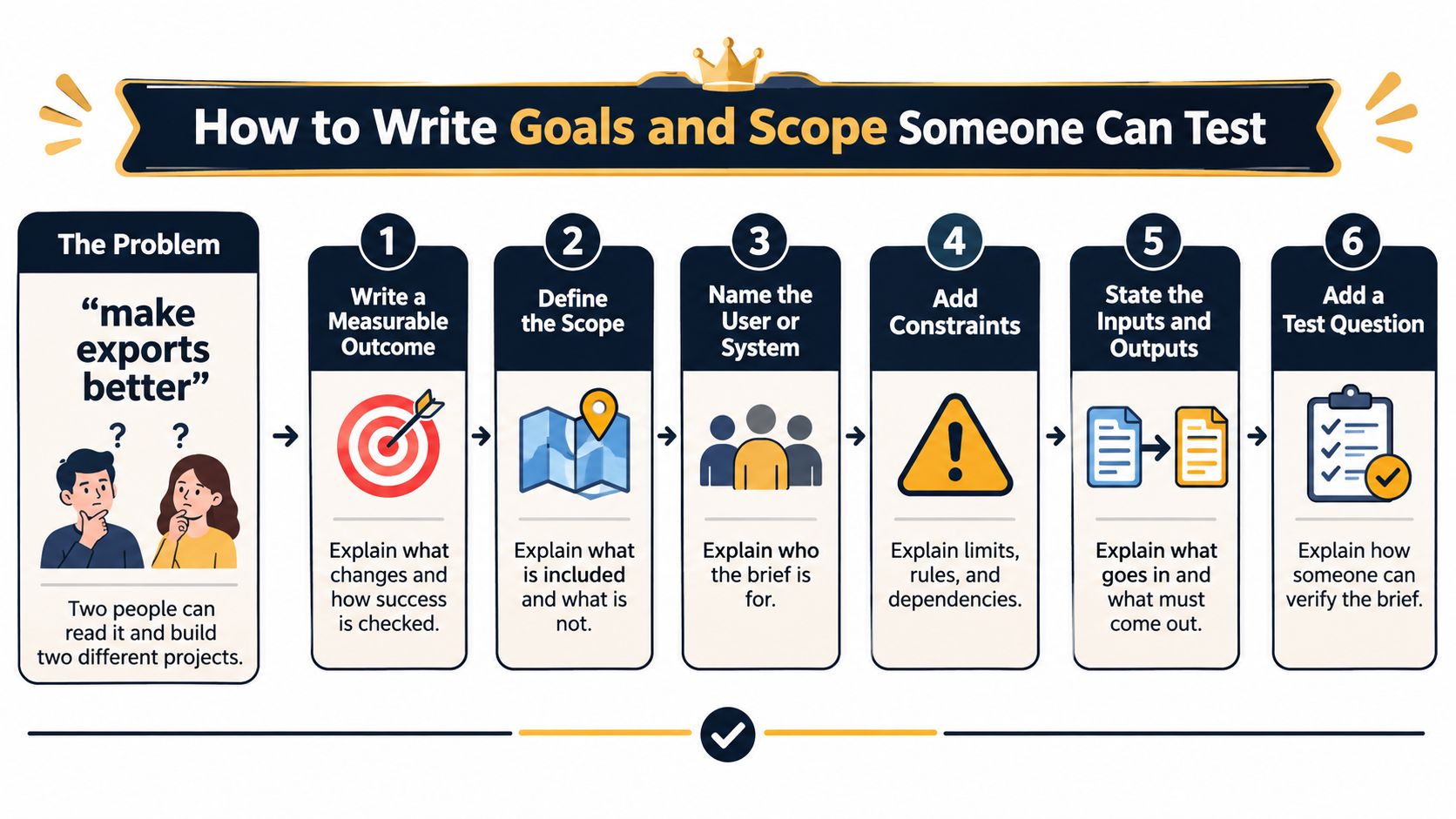
Six steps in template order
- State the problem with a baseline and its source. Write that 14% of March export runs failed in the error log, for example. An unsourced number gets argued over in week one, while a sourced one lets the team move on.
- Turn each objective into a metric, baseline, target, date, and measuring system. Cut failed runs from 14% to under 3% by 30 June, measured in the export log. The usual slip is writing improve exports, which has no finish line.
- Write acceptance criteria as a test anyone can run. Export 500 test invoices and match totals to the ledger without asking you what correct means. If you need sharper finish lines, these definition of done examples show the level of precision to aim for.
- List deliverables, then add at least three exclusions. Monthly CSV is in. PDF, multi-currency, and scheduled email delivery are out. Without that list, PDF slides in during week four and eats the deadline.
- Name one owner for every dependency and risk. The backend lead owns the rounding bug, and the API owner owns the ledger v2 release date. An unowned risk usually surfaces at the deadline, when it's most expensive.
- Tag every assumption. Mark ledger API v2 by 16 May as confirmed, proposed, or unknown. An untagged assumption gets built on as if it were a fact.
Practical rule: If a stranger can't run your success test without messaging you, it isn't a success criterion yet.
That fixed sequence, from business need and measurable objectives through scope, stakeholders, assumptions, and constraints, reflects the core charter elements in PMI guidance on the project charter. Follow it and the brief becomes an execution control, not reference material nobody trusts.
Free for one person. No card. Connected in a minute.
Briefing AI Agents So They Never Start Cold
A human reads a vague brief and asks questions. An agent reads the same brief and acts on it, so vague authority causes real damage. It might refactor shared code, change a schema, or rebuild work another session already finished.
The image below captures the shift from a messy human summary to structured operating context an agent can use safely.
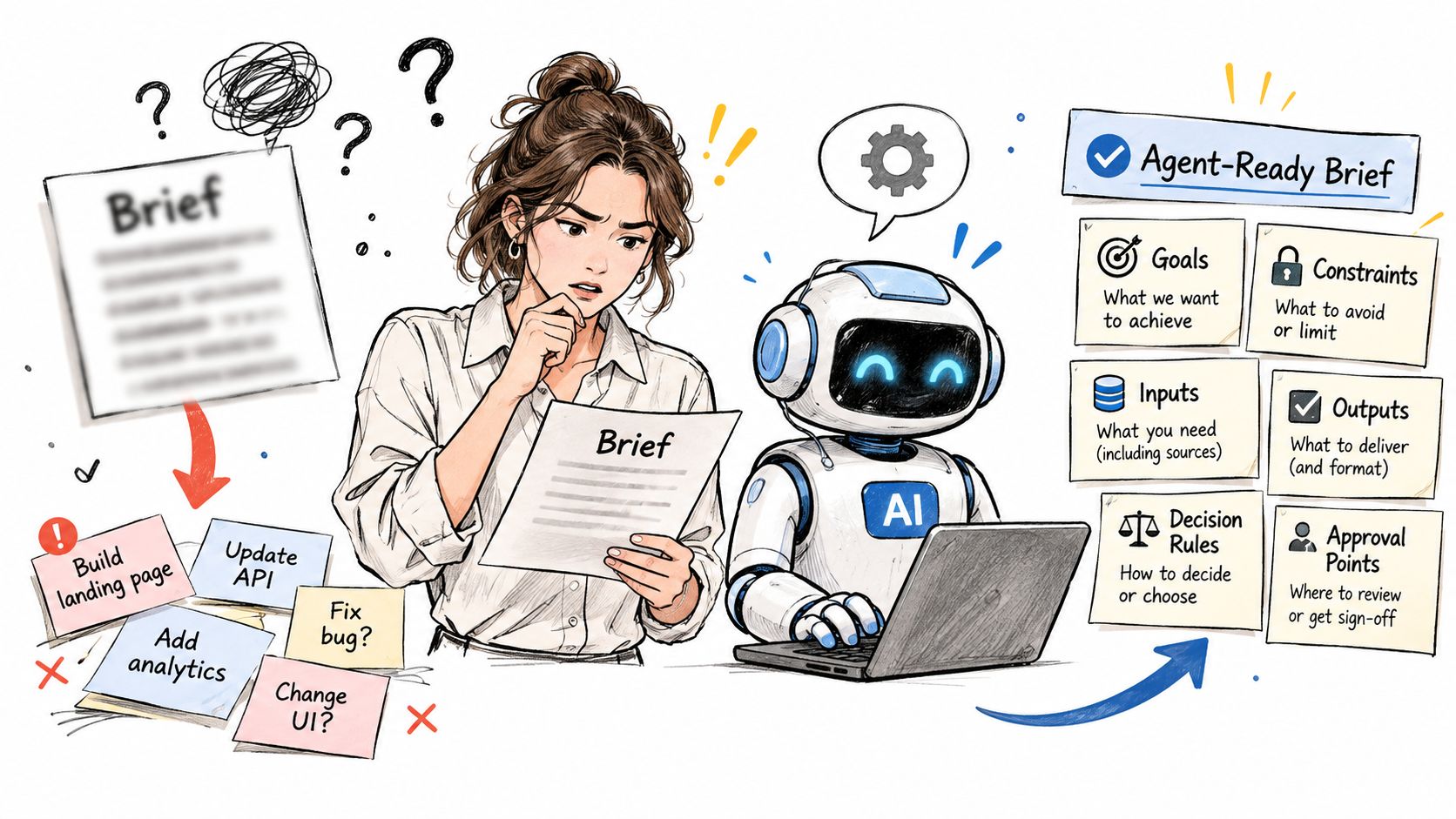
What an agent-ready brief adds
Beyond the human fields, state what the agent may change, what requires approval, which board, repository, or document is authoritative, how to claim a task, where to record decisions, and what evidence counts as completion. Completion evidence might be a passing export test, a linked pull request, or a screenshot of the settings page. Don't accept "done" as evidence.
Give every session context in the same order: the brief, the project rules, active work, open human requests, and the latest handoff. Rules come early because they need to override an agent's defaults. Write them as always and never statements that leave no room for interpretation.
- Always: keep amounts in integer cents through the export pipeline
- Never: change the ledger schema without human approval
Every session should end with a four-part handoff: what was done, what's unfinished, what comes next, and which tasks were touched. That format is short enough that agents will write it and specific enough that the next session can act on it.
The short video below is worth watching before you set up your own session routine.
Say a new Claude Code session picks up the rounding bug. It sees the task is already claimed, reads the handoff noting that totals drift by one cent on multi-line invoices, and continues from there. Without that context, it re-investigates from scratch and may overwrite the first session's fix.
Running a Kickoff Check With People and Agents
Run the kickoff as a test of the brief, not a status meeting. Share the brief at least a day before the session so people arrive with defects found, not first impressions. If the brief fails the test, you fix the document, not the people.
The checklist below sets out the sequence for a single meeting.
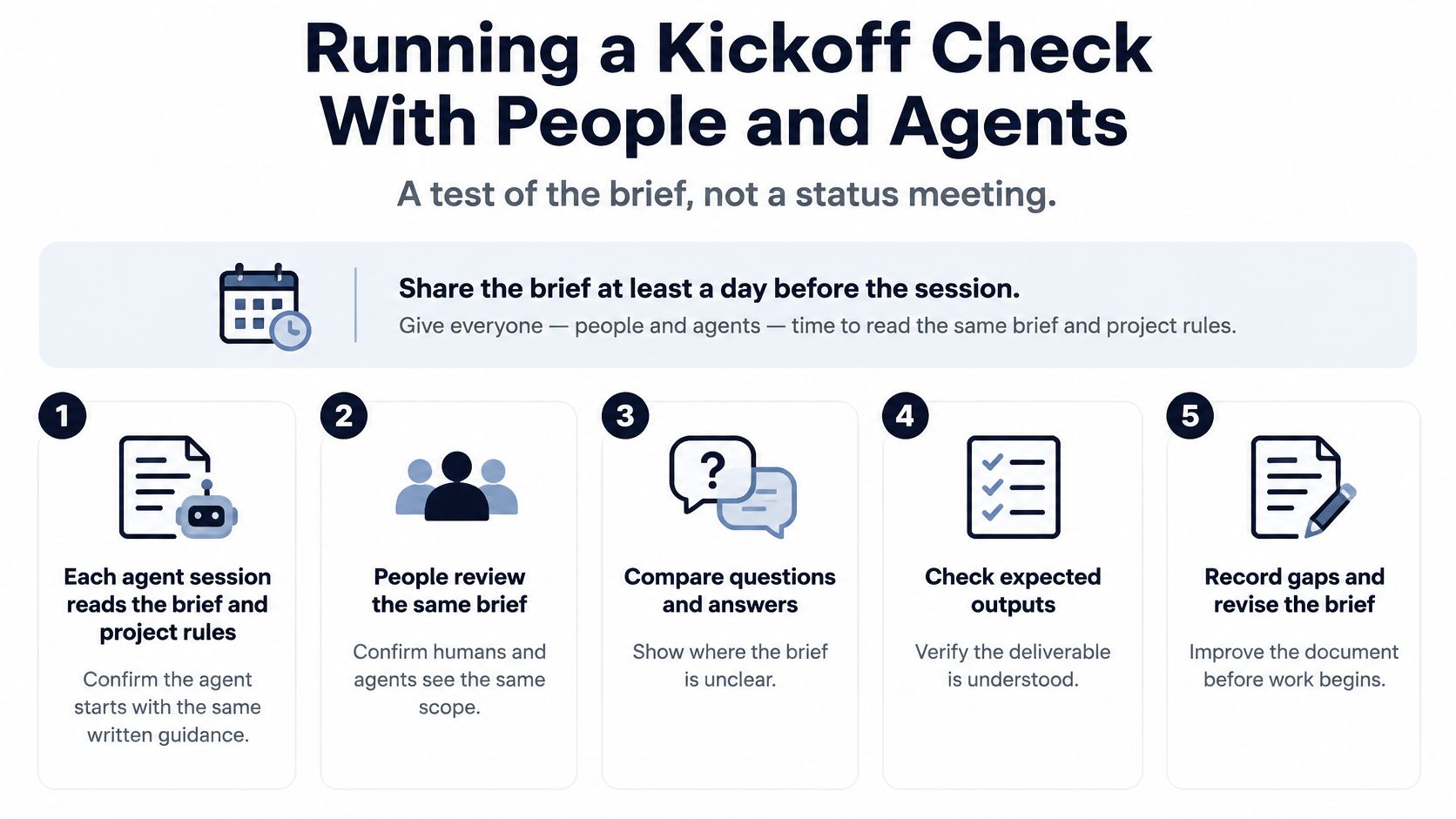
The kickoff sequence
- Each agent session restates the goal. It reads the brief and project rules, then summarises the objective in its own words. A wrong restatement exposes ambiguous wording immediately.
- Run the five-minute comprehension test. Ask a new contributor or agent to name the goal, owner, top constraint, acceptance test, and next executable task with no extra explanation. This catches two agents building against different acceptance tests.
- Record wrong or vague answers as brief defects. Don't correct them verbally and move on. The next session won't hear your correction.
- Revise the brief and re-run only failed questions. This keeps the loop fast and proves the edit worked.
- Turn each open question into a task. Give it one owner and a due date instead of leaving it in meeting notes. An approach to AI agent workflow automation only works when those questions become trackable work.
- Record approval and cadence. Note the approver, date, version, and review rhythm where everyone can see them.
This discipline matters because, in PMI research on project communications, 80% of projects meet original goals in organizations with highly effective communicators, compared with 52% where communication effectiveness is minimal. Short labelled fields, defined terms, and no contradictory dates make that communication retrievable.
Close by asking each agent session for its four-part handoff. The first session's output is then already in the format the next session will read.
Changing the Brief Without Losing Control
An approved brief drifts because work keeps moving while the document stays frozen. Within weeks, the team is executing against a scope nobody signed. The brief still looks authoritative, which makes the drift harder to spot, not easier.
A stronger template adds a status and version line, a named approval owner, a decision log, explicit non-goals, change triggers, and a handoff section. It also separates confirmed facts from proposals and unknowns, so an agent's suggestion isn't mistaken for a decision someone made.
A short brief without revision ownership can increase ambiguity rather than reduce it.
Most templates list fields but don't specify who may revise them, how decisions are versioned, or when a change needs re-approval, a gap visible in common formats such as the Craft research project brief template. I would close that gap with explicit triggers.
| Change | Approval Needed | Brief Fields to Update | Example |
|---|---|---|---|
| Deadline moves by under one week | Owner only | Constraints and review cadence | Ledger API release moves from 16 May to 23 May |
| Scope item added or removed | Approver before work starts | Scope, deliverables and decision log | PDF export proposed for addition |
| Success criteria changed | Approver and sponsor | Success criteria, objectives and version | Error target tightened from 3% to 2% |
| New risk found | Owner notified, no sign-off | Risks and assumptions | Currency rounding bug found in test run |
| Agent proposes a decision | Human accepts or rejects | Decision log with alternatives | CSV chosen over XLSX, alternatives listed |
Every material change should record who made it, which decision or task it affects, and whether approval was needed. A structured decision log template keeps that record separate from discussion, where decisions otherwise get buried and relitigated.
The goal isn't fewer words. It's clear ownership of change, so the brief stays trustworthy after the kickoff glow fades.
Briefing Mistakes That Stall Work and Their Fixes
The most common symptom is also the most expensive: two people build different things from the same brief. By the time you notice, you've paid for both versions and still need a third conversation to reconcile them. Most stalls trace back to a small set of fixable defects, not to effort or skill.
Use the table below as a diagnostic. Find your symptom, apply the one fix in its row, and re-run the comprehension test before work resumes.
| Symptom | Likely Cause | Fix |
|---|---|---|
| Two people build different things | Success criteria are missing or vague | Replace the criteria with a test that can be run |
| Work grows past the deadline | No not-included list | Add explicit exclusions and re-approve any scope change |
| An agent repeats finished work | Handoff missing or out of date | Require the four-part handoff at the end of every session |
| Brief is read but nothing moves | Open questions have no owner | Give each question one owner and a due date |
| Decisions get reversed later | Decisions mixed with discussion | Move each decision to the log with alternatives and date |
The failure I would check first
Briefs fail most often through stale status, not missing fields. The template can be perfect in week one and actively misleading in week five. A scope item was added in a chat thread, a date moved in a call, and the version line still claims everything is current.
Friday check: If the status line and version don't match the actual work, fix those two lines before you fix anything else.
Set a short Friday review where the owner compares the brief against active tasks, open questions, and the latest handoff. Update the version, log any decision, and re-tag assumptions that have been confirmed or disproven. It takes minutes when done weekly and hours of archaeology when skipped for a month.
Keep each fix to one action you can take this week. A brief that's current and slightly rough beats a polished one describing a project that no longer exists.
Brief Your Next Project Before Work Starts
You don't need a planning week. An approved brief and a first handoff can exist before the end of today, and that combination prevents most of the drift and duplication described in this guide. Three actions get you there.
First, paste the skeleton into your project overview and fill the first five fields in one sitting. Mark every unknown as a proposal. A brief that's honest about what it doesn't know is far more useful than one that hides guesses inside confident sentences.
Second, run the five-minute comprehension test with one colleague and one agent session. If either of them names the wrong goal, owner, constraint, acceptance test, or next task, fix the brief before anyone starts building. That five minutes is cheaper than a week of misaligned work.
Third, book a thirty-minute kickoff within the week. Send the brief a day ahead, record the approval with its date and approver, and put a Friday review in the calendar before the meeting ends. For the invoice export team, that means the brief, the agreed acceptance test, and the first handoff all exist before the first build starts.
Projectify gives each Claude agent a briefing at session start, including the brief, the rules, who is working, and the last handoff. Its project rules are lasting always or never instructions shown first in every briefing, before an agent's own defaults, so every session starts from the same approved intent instead of a cold chat window.
Put your next project briefing template where both your team and your agents will read it, with rules, decisions, and handoffs kept current beside the work. Visit Projectify to start your first briefed project today and have your first clean handoff by tonight.