Blog AI project management tools AI project management AI agent coordination
AI Project Management Tools Compared for Small Teams
Compare AI project management tools by briefings, claims and handoffs, with a feature matrix, metrics and a setup workflow for teams running AI agents.
McKinsey's 2024 global survey found that 72% of respondents said their organizations had adopted AI in at least one business function, up from roughly half annually over the previous six years. That's a useful signal for teams comparing AI project management tools: the question is no longer just whether AI can produce work, but whether people can coordinate, review and recover that work when several agents are involved. (McKinsey's 2024 global AI survey)
The right tool isn't necessarily the one that closes the most tasks. For a small team, look at recoverability: can someone pick up an unfinished task with its context intact, see who changed what, and review the work without loading one senior person with hidden cleanup? Establish a baseline before buying, then compare the workflow over a few weeks.
AI Project Management Tools at a Glance
AI project management tools fall into four categories, and choosing the right category matters more than picking a particular brand. The table compares category patterns, not vendor scores. Plans and features change, so check each product's current documentation before buying.
| Category | Example tools | Agents can claim work? | Best for | Main limit |
|---|---|---|---|---|
| Human-first suites with AI add-ons | Jira, Asana, monday.com, ClickUp | Usually no native claim | Teams that want one tool for everyone | Agent actions are often less visible |
| Docs-first workspaces with AI | Notion, Confluence | Usually no native claim | Specs, briefs and shared knowledge | Two agents can edit the same item |
| Agent-native coordination boards | Projectify | Yes, with claims that expire | Small teams running several agents | Smaller ecosystem and newer features |
| Single-user local agent kanban | Local agent boards on one machine | Only one user | Solo builders | Not built for team visibility |
The categories suit different operating models. A human-first suite is a sensible starting point when people already run the work in Jira, Asana, monday.com or ClickUp and AI mainly helps draft updates or summarize activity. Docs-first workspaces such as Notion and Confluence are a natural fit when the project's specifications and shared knowledge are the core of the workflow. But a place to store information isn't automatically a way to coordinate concurrent work.
Agent-native boards treat agents as participants in the project workflow, not just tools that read a board. Projectify, for example, supports task claims, briefings and attributed changes. A local kanban board can work for a solo builder who wants to track personal agent sessions, but it won't give a broader team a shared view.
In 2024, 45% of 211 project-management software users surveyed by Project.co said they had used AI in their project-management process, so many teams are already experimenting with AI in existing workflows. (Project.co's survey of project-management software users)
For a solo builder, team-level coordination may be unnecessary until someone else reviews the agent's output. As soon as agents and people need to work in parallel, the deciding question is: do your agents only need to read the board, or do they need to coordinate with each other and with people? Compare cost per seat and per agent on each vendor's current pricing page, because plan tiers and AI features change.
Feature Matrix for Briefings, Claims and Handoffs
A board that lists tasks doesn't necessarily coordinate agents. Before comparing features, be clear about what the team needs: a session briefing gives a person or agent the project context at the start; a task claim marks who is working on an item; and a handoff record makes unfinished work resumable.
Attribution identifies the person and agent behind each change. A decision log records context, the choice, alternatives and consequences. A shared pick-up queue offers the highest-ranked task that's free and unblocked.
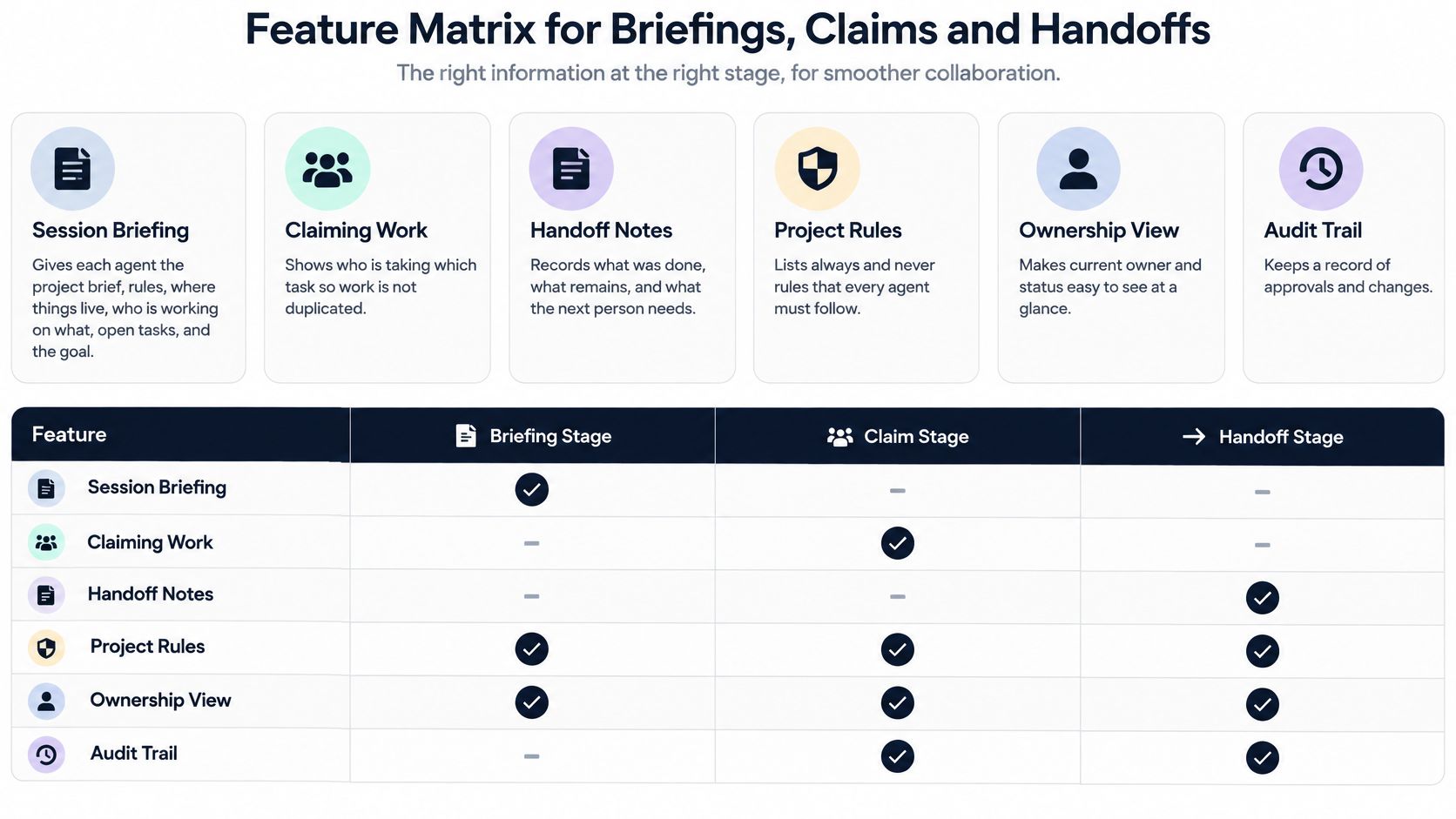
| Feature | Human-first suite | Docs-first workspace | Agent-native board | Solo local kanban |
|---|---|---|---|---|
| Session briefing | Partial | Partial | Yes | No |
| Task claim (lease) | No | No | Yes | No |
| Handoff record | Partial | Partial | Yes | Rare |
| Attribution of agent changes | Partial | Partial | Yes | Rare |
| Decision log with alternatives | Partial | Yes | Yes | Rare |
| Shared pick-up queue | Partial | No | Yes | No |
Yes means built in, Partial means dependent on plan or setup, Rare means the feature exists but isn't designed for team use, and No means it's absent. These are category patterns, not guarantees about individual products. Confirm the actual workflow in each product's documentation before deciding.
Two rows matter most when agents work in parallel. First, a claim reduces the chance that two sessions pick the same task. Treat it as a lease, not a permanent lock: only the holder works on that task, and the claim releases after the holder goes quiet. Projectify uses a 30-minute quiet period as an example. That helps prevent abandoned sessions from blocking work indefinitely, but teams still need a way to notice stale ownership.
Second, a handoff makes work recoverable. Each session should end with four short parts: what was done, what's unfinished, what comes next and which tasks it touched. The next person or agent can continue from the record rather than reconstructing the session from chat.
A decision log serves a different purpose. Record the context, decision, alternatives and consequences; an agent can propose a decision, while a person accepts it. That preserves the reasoning behind a choice, which matters when a later change seems to contradict it.
The value of the matrix isn't the number of checks in the “Yes” column. It's whether the features operate together: the briefing explains the work, the claim assigns ownership, and the handoff leaves the next session with enough context to proceed.
Free for one person. No card. Connected in a minute.
Why Parallel Agents Collide Without Claims
The common collision is simple: two sessions pick up the same task, change overlapping files and leave the team to sort out which version is right. Other failures follow. Each session starts cold and needs another explanation of the project; decisions stay buried in chat, so the next person can't tell why the team chose one approach over another.
Productivity evidence makes the coordination problem more important, not less. A 2024 analysis of three randomized field experiments involving 4,867 software developers found that developers given access to GitHub Copilot completed 26.08% more tasks on average than comparison groups, though the estimate had a standard error of 10.3% and individual experiments were noisy. The same source describes a separate McKinsey study in which time savings fell below 10% for tasks developers considered highly complex, a reminder that AI doesn't remove the need for clarification, planning or review. (The analysis of randomized experiments and developer activities)
A claim works in sequence:
- The first agent claims the task. Its ownership is visible before it starts editing.
- A second agent asks for the same task. The board shows who holds it and when that person or agent was last active.
- Work renews the claim. Ongoing activity keeps the task assigned to its current holder.
- The holder goes quiet. After the configured quiet period, the claim releases so someone else can continue.
That's why a claim should be a lease rather than a hard lock. A stale session can still hold a claim and block progress, so set a reasonable quiet period and review expired or stuck claims regularly. A claim without a briefing also falls short: it tells the next session who owns a task, not why the work matters or what has already happened.
Claims protect tasks, not every file those tasks might touch. If two agents are working in the same part of a codebase, pair task ownership with a short heads-up in the team's project chat before either makes a shared change. Projectify combines claims with briefings and attribution so the team can see who owns work and trace changes to the person and agent behind them. For a concise explanation of the distinction, see why task claims aren't file locks.
Use a practical test: the same task shouldn't be worked twice in one week. If duplicate work still happens, inspect the handoff and task boundaries before adding more agents.
Metrics That Show Whether a Tool Helps
A board that counts closed tasks can hide the cost of AI work. The task may be marked done while an experienced reviewer spends extra time correcting it, reopening it or reconstructing why the agent made a change.
A large analysis of 2,755 projects and 1,699 developers found that AI increased productivity mainly among less-experienced programmers, while senior developers experienced a 19% productivity decline alongside a 6.5% increase in maintenance and repair work. (The analysis of AI productivity, quality and sustainability)
Track recoverability and reviewer load alongside throughput. Set the thresholds against your own baseline rather than assuming a universal target.
| Metric | How to measure it | Healthy sign | Warning sign |
|---|---|---|---|
| Time to claim | Minutes from task ready to task claimed | Falling against your baseline | Tasks sit unclaimed or get claimed twice |
| Blocked time | Hours tasks wait on unresolved dependencies | Falling after each handoff | Blocked time rising week over week |
| Review minutes per AI change | Reviewer time logged per accepted change | Stable or falling | One senior reviewer carries most reviews |
| Reopened-task rate | Share of tasks reopened after being marked done | Falling against your baseline | Rising after agent work |
| Duplicate work | Tasks where two sessions edited the same files | Near zero | Repeated merge conflicts |
| Handoff latency | Time from session end to next pickup | Same day | Next session starts cold |
Measure these separately for human-only, single-agent and multi-agent work. Otherwise, a team can mistake a faster agent workflow for an overall improvement when the review work has shifted to one person.
Dependency-level measures also matter. The AsynCodeBench study tracks whether cross-agent dependencies are ultimately satisfied, along with when each dependency is first resolved; its findings show why completed-ticket counts can miss unfinished integration work. (AsynCodeBench and multi-agent coordination findings)
Take a two-to-four-week baseline before adopting a tool, then compare the same measures during a real pilot. For software teams, these project-management practices help connect task-level metrics to the actual delivery workflow.
Read the warnings as operational signals, not scorecard failures. If review minutes rise and one senior reviewer carries most of the load, reduce the number of parallel agents before adding more. If handoff latency stays high, improve the session-ending record before asking people to pick up work faster.
Team Setups Where Each Tool Type Fits
Start with four questions: how many agents run in parallel, who needs to see their work, must client boards stay in place, and does the data need to stay on your own server? Those answers usually point to a useful category before a long feature comparison does.
| Team setup | Main need | Start with | Trade-off to accept |
|---|---|---|---|
| Solo builder with several AI agents | One place to see all parallel sessions | Agent-native board or solo local kanban | Little value until a second person reviews agent work |
| Software team of 2 to 20 people | Claims, handoffs and shared decisions | Agent-native coordination board | Adoption effort in the first two weeks |
| Agency with client Trello or Azure DevOps boards | Keep client boards while the team works elsewhere | Tool with two-way sync | Sync conflicts need manual resolution |
| Product team with mostly docs and few agents | Shared specs and knowledge | Docs-first workspace with AI | Weak protection against duplicate agent edits |
| Enterprise requiring self-hosting and SSO | Hosting control, compliance and audit export | Coordination board with self-hosting | Higher setup and admin cost |
A solo builder may want one view of several agent sessions, but team features deliver little value until someone else reviews the output. A local board can be enough when there's one operator and no handoffs to another person.
For a software team, a shared coordination board is useful when agents take on real tasks alongside developers. Expect some setup work as people establish project rules, task boundaries and review habits. Teams evaluating a startup workflow can also use this guide to project management for startups to think through how process changes as more people share delivery work.
Agencies often need to preserve a client's Trello or Azure DevOps board while coordinating their own team elsewhere. Two-way sync can keep the client's board in place; Projectify supports two-way sync with Monday, Trello and Azure DevOps, with conflicts surfacing where users already look. Conflicts still need human resolution. For example, if the agency and client update a task at the same time, make sure the conflict is visible on that task rather than lost in a separate feed.
If the project mainly revolves around specifications, briefs and shared knowledge, a docs-first workspace is a reasonable place to start. The trade-off is that shared documents don't, by themselves, prevent two agents from making overlapping edits.
For a team that needs its data on its own server, Projectify can run on its cloud or on a user's own server with Postgres. Self-hosting offers control over hosting and data, but the team takes on the associated setup and administration.
Governance Without Enterprise Bureaucracy
Only 41% of surveyed organizations had published generative-AI policies, according to the adoption research summarized in the study on AI governance and developer concerns. A small team doesn't need a heavyweight compliance program to improve accountability, but it does need to answer five questions after an agent session: who authorized it, which agent changed the task, what context it received, what it proposed and what remains unfinished.
A lightweight audit trail can answer them:
- Who authorized the agent? Name the person responsible for the agent's work.
- Which agent changed the task? Attribute every change to the person and the agent, not just to a generic automation account.
- What context did it receive? Show project rules first and give the agent a session briefing.
- What did it propose? Record decisions with their context, alternatives and consequences.
- What remains unfinished? End with a handoff that names incomplete work and the next action.
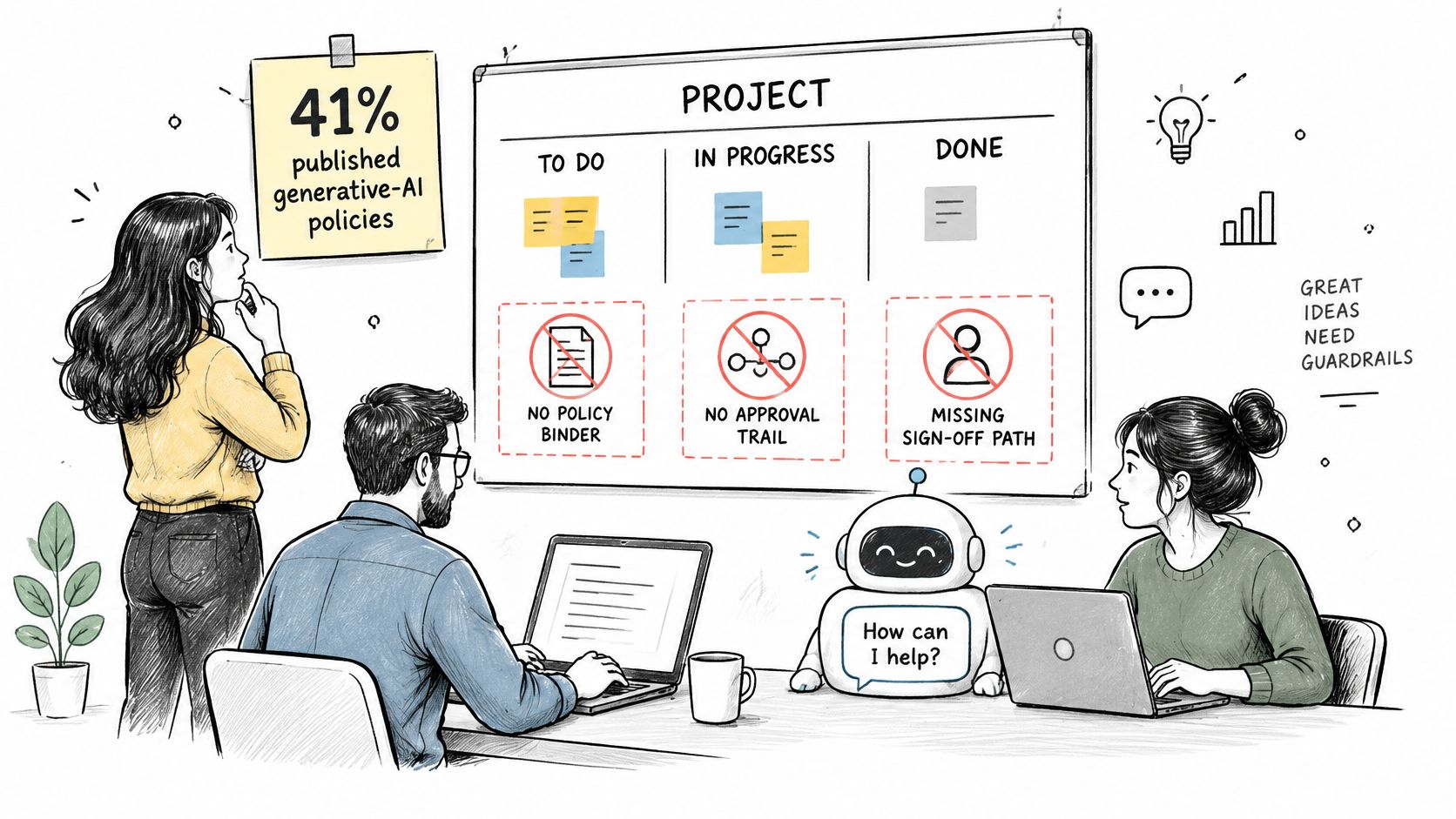
Keep permissions attached to the responsible person. An agent shouldn't be able to do more than its owner can, and a named reviewer should accept changes to shared code or live systems before they merge. That approval gate gives the team a clear human decision point without requiring approval for every low-risk drafting action.
The owner or admin should also be able to export the workspace for review after the chat has closed. Projectify offers a workspace export under People › Workspace: one zip with every project, task, document, decision and file, delivered as a download link that works for seven days.
Practical rule: If nobody can tell who authorized a change, what the agent saw or what it left unfinished, the workflow needs a better record, not a longer policy.
Set Up Your Briefing, Claim and Handoff Workflow
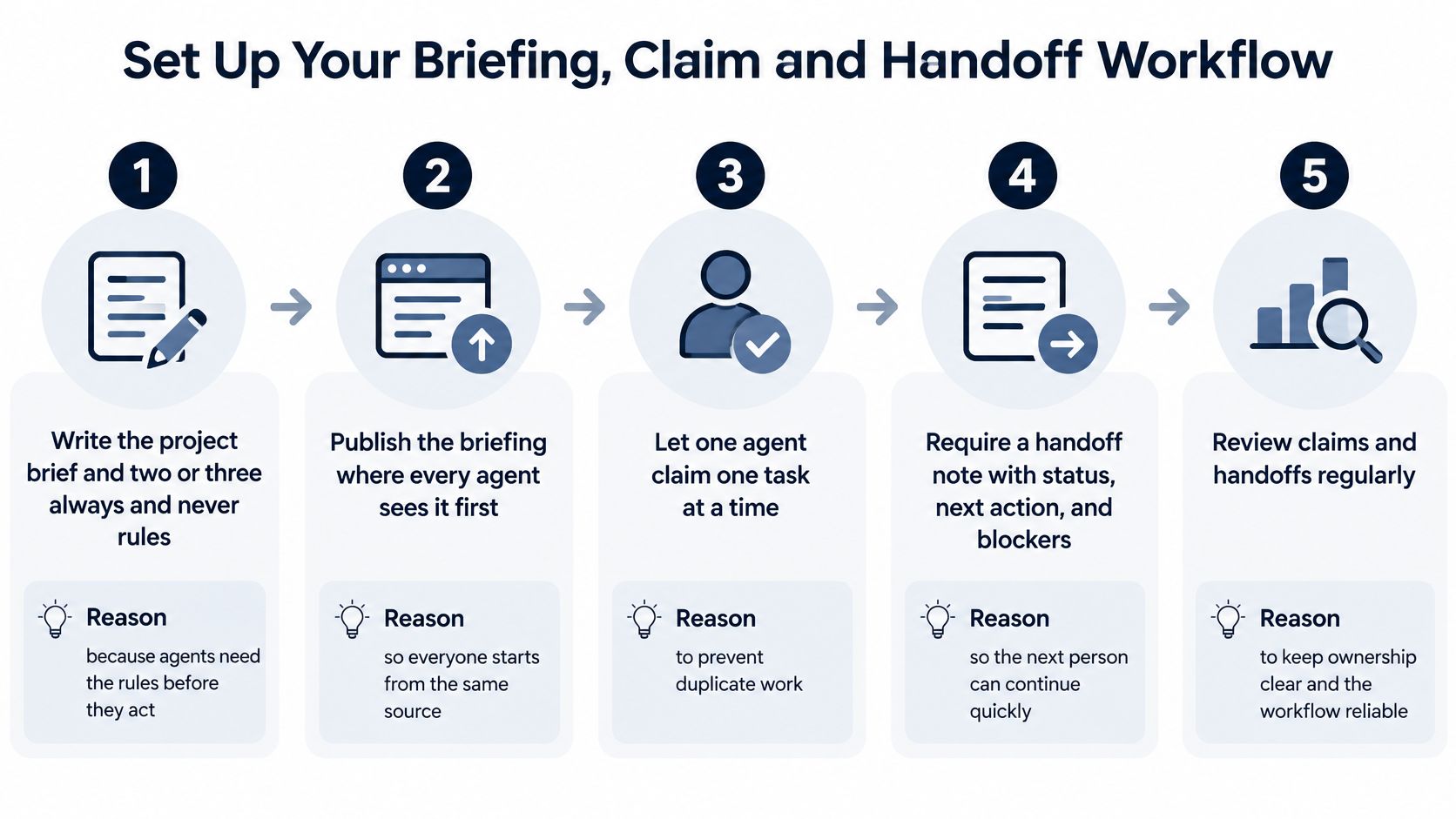
Seven steps, one real project, two to four weeks. That is enough time to see whether the workflow cuts reviewer load and duplicate work before a team commits to a tool.
Write the project brief and project rules. Include the goal, where key materials live and the "always / never" instructions agents must follow. Saved on the project, those rules reach every agent ahead of its own defaults, so constraints arrive before action.
Break the work into epics and tasks. Scope, size and approve each task before an agent starts, so the agent isn't making project-level decisions just to resolve unclear work. Projectify can match a repository to its project or onboard it with a brief, rules and a starter epic; teams can also import a Trello or Azure DevOps board.
Give every agent a named owner. Tie each agent to a person who is responsible for its work and its changes, so access stays with a clear owner rather than with every agent.
Start sessions with a briefing and a free task. Each person or agent reads the project brief, the rules, who is working on what, the open tasks and the latest handoff, then pulls the highest-ranked task that is free and unblocked. Shared starting context ends the re-explaining and makes ownership visible from the first action.
Claim before editing. The agent or person claims a task before changing files, and every action renews the claim. A claim that goes quiet frees itself after 30 minutes, and a second agent asking for the same task is told who holds it and when they were last active.
End with a handoff and decision record. Write what was done, what is unfinished, what comes next and which tasks it touched. When the team makes a decision, record its context, alternatives and consequences so the next session starts from the record, not from chat memory.
Review the metrics every week. Compare review time, duplicate work, blocked time and handoff latency against your baseline. If one reviewer is overloaded, cut parallel agents before adding more.
Run the workflow on one real project for two to four weeks, compare the results with your baseline, and expand only after you can see what changed. Projectify's Solo plan is free for one person and includes every feature, one workspace, unlimited projects, the Orchestrator, external boards, Figma sync, Project Drive and MCP for Claude Code, claude.ai and Claude Desktop, with no card needed.
Projectify gives people and AI agents a shared board with claims, briefings, handoffs and attributed changes, so teams can test coordination rather than count tasks alone. Try the workflow on one real project and see whether it reduces duplicate work and reviewer load by visiting Projectify.