10 Project Management Tasks That Keep Work Moving
The 10 project management tasks that matter most, broken down by role and workflow stage, with tactics, trade-offs, and takeaways for modern teams.
Projects rarely fail because a team picked the wrong framework. They fail because routine project management tasks, planning, refining, reporting, and reviewing, get skipped or done sloppily, so nobody can tell who owns what, what's blocked, or whether finished work meets the goal. A Project Management Institute study summarized in an Australian Productivity Commission submission reported that fewer than two-thirds of projects met their goals and business intent, while approximately 17% failed outright. That's not primarily an engineering problem, and a new tool won't fix it on its own.
The ten tasks below follow the flow of work from planning through development, review, and release. Each one works a certain way for a human team, and each one changes when AI agents plan, build, review, and ship alongside people.
An agent can draft code in minutes, but it can't negotiate scope in a hallway or notice that a teammate already claimed the same task. If your task structure is vague, agents don't make you faster. They make the collisions faster, too.
1. Sprint Planning
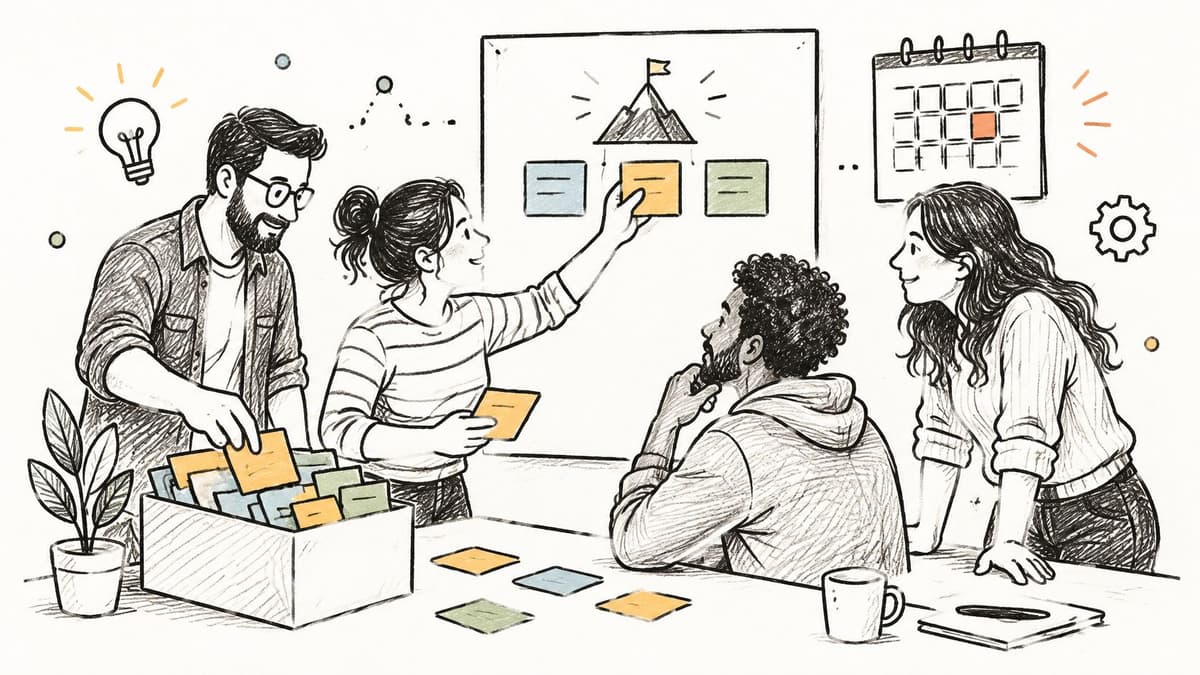
A SaaS team running two week sprints in Linear or Jira doesn't start by grabbing whatever looks urgent. It starts with a written sprint goal, then selects backlog items that serve that goal, estimates them against past velocity, and stops when the commitment looks realistic. If you skip the goal, you'll fill the sprint with unrelated tickets and call it busywork well done.
How It Changes With Agents
Agents need the sprint boundary in machine-readable form, not as meeting memory. Give every committed item a single owner, human or agent, and write its finish line before anyone starts, using clear definition of done examples to set that standard. A 2024 peer-reviewed study in Project Management Journal reported that 76% of 2,314 professionals across 129 countries believed artificial intelligence would transform project management. That transformation starts here, with scope an agent can read.
- Refine before planning: Planning is for commitment, not discovery.
- Track goal hit rate: Don't judge a sprint by raw story points completed.
2. Backlog Refinement
A thin backlog wastes the next sprint before it starts. Refinement means breaking big ideas into smaller stories, writing acceptance criteria, clearing blockers you can already see, and ordering the queue so the next item is ready to pull. Scrum teams keep the top of the backlog refined for the next two sprints. A triage queue in Linear or Jira holds new items until someone has reviewed them.
The Trade-Off Nobody Escapes
Refine too far ahead and you size work that will never ship. Refine too little and planning becomes a guessing game. I'd hold each item to a Definition of Ready, keep detailed refinement inside the next one or two sprints, and archive work that has sat untouched for a long stretch. Attach the decision and the context to the item. The next reader should not have to start cold.
Ready Work, Human Order
Agents will build what is in front of them. People hand them code far more often than the job of coordinating work across teams. What is ready, and in what order, is still a human decision. Write criteria an agent can check, mark the item ready, and rank it before anyone claims it. If two stories both look pullable, record which comes first and why.
Try this on your own backlog.
A month of Premium free. No card. Connected in a minute.
3. Daily Stand-up
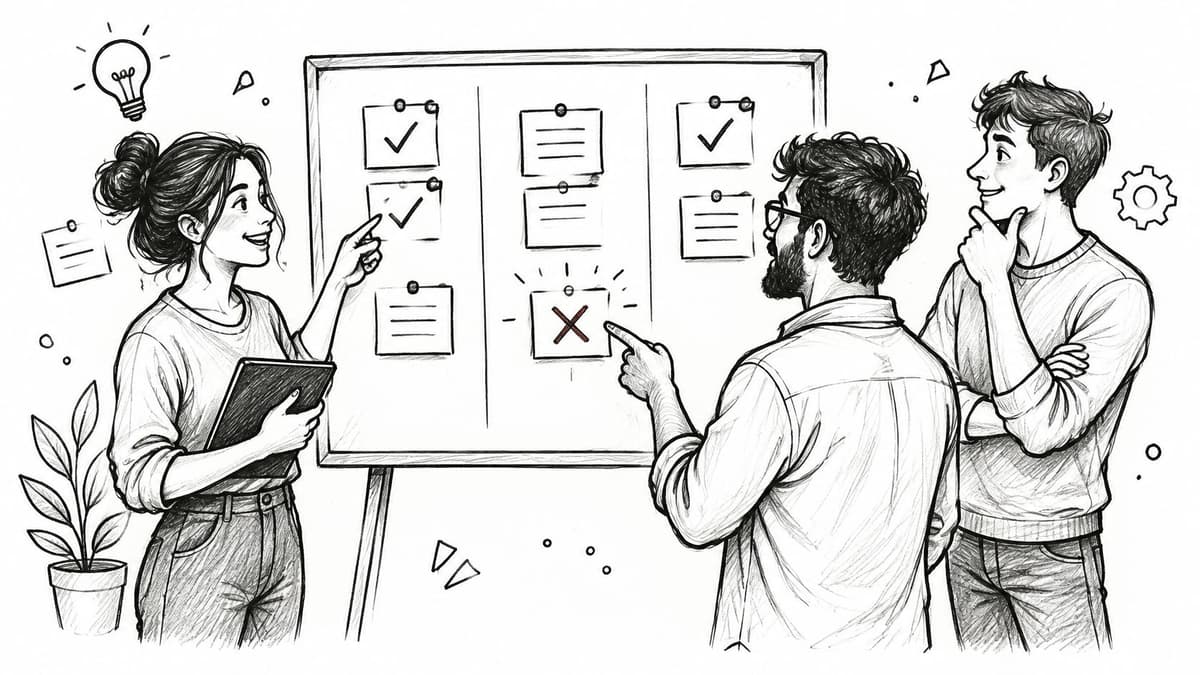
Walk the board, not the people. A good stand-up takes under fifteen minutes, moves across work in flight from right to left, and surfaces blockers while there's still time to clear them. A bad one becomes a status report to a manager, where everyone recites yesterday's calendar and nobody mentions the task that's been stuck for three days.
Running It for People and Agents
Say three agent sessions ran overnight on the same feature. Your stand-up check isn't "what did you do," it's which tasks are claimed, which are blocked, and which handoffs came back incomplete. Park deep discussions for a follow-up with only the relevant people, and make every blocker an explicit item with a named owner.
A blocker without an owner isn't a blocker. It's a delay you've agreed to accept.
Async teams can replace the meeting with a written update in a shared channel. That works fine, as long as the update answers the same question. What's stuck, and who is unsticking it today?
4. Work Breakdown Structure (WBS)
Start from the final deliverable and split it, recursively, until each piece can be estimated, assigned, and verified. That's a work breakdown structure, and the Project Management Institute standard PMBOK Guide treats it as a core planning tool. Large engineering and construction projects build contract deliverables and cost codes directly on it, because it makes the full scope visible before money moves.
Where Teams Overdo It
Decomposition has a stopping point. I stop when a work package can be done and checked in one to two weeks, use deliverable nouns at the upper levels, and map each package to an epic, task, or subtask in the tool. Go deeper and you're maintaining a diagram instead of shipping. Revisit the structure whenever scope changes, and fold it into your wider project implementation plan so schedule and budget stay tied to real work packages.
This decomposition habit is old. A history in the InstaGantt guide to Gantt charts notes Henry Laurence Gantt refined his chart around 1910 to 1915 to display activities as horizontal bars across a timeline. The principle hasn't moved. Complex work gets split into activities with time windows, then monitored against a baseline. Agents need small, well-scoped packages, because a vague epic is an invitation to improvise.
5. Dependency Mapping and Critical Path Analysis
This diagram shows the core idea before any math enters the picture.
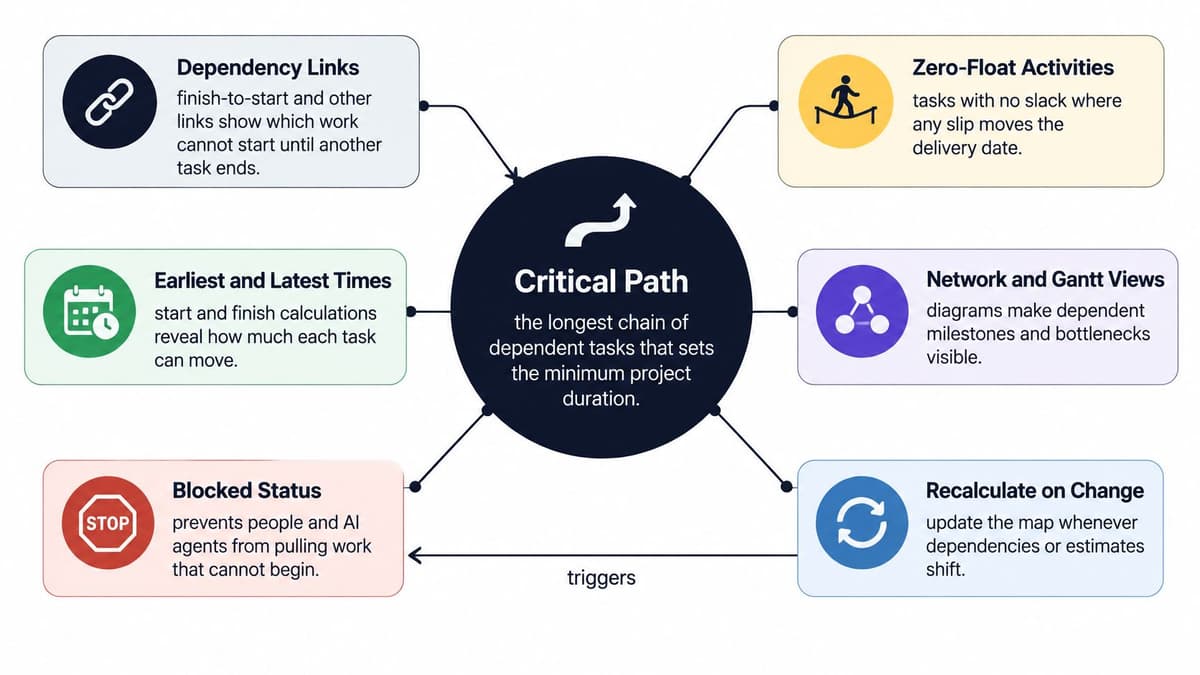
Link tasks with finish-to-start or other dependency types, compute earliest and latest start times, and the critical path appears. It's the longest chain of dependent tasks, the one with zero float, and it sets your minimum delivery date. Construction schedules and software release plans both rely on it, usually visualized in Microsoft Project or Jira's dependency features. A delay off this path costs time. A delay on it costs the deadline.
The Agent Version of the Problem
Record dependencies when you discover them, not at the end of planning, and recalculate when an estimate changes. Use a blocked status so agents and people don't pull work that can't start yet. A 2025 case study in the IEOM Society proceedings on Critical Chain Project Management reported an ammunition-dump project fell from a planned 14 months to 11 months, a 21.4% reduction, after the team managed the resource-constrained chain and consolidated buffers. Treat duration and availability as one constrained system, and watch buffer use as an early warning.
This short walkthrough shows the calculation in action.
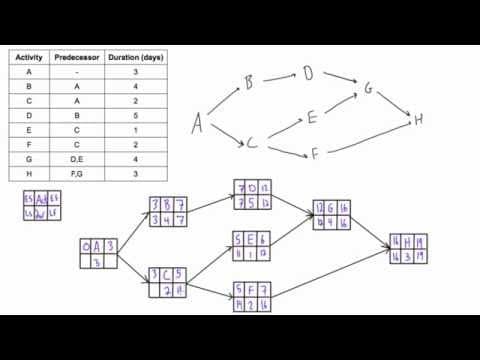
Plays from YouTube. Pressing play loads it from Google.
6. Risk Register Management
"I've got a bad feeling about the vendor" isn't risk management. A risk register turns that feeling into a logged entry with a cause, an event, a consequence, a likelihood, an impact, an owner, and a response plan. NASA and other engineering organizations maintain formal registers across full project lifecycles, while smaller agile teams often track the same content as tagged backlog items or entries in a RAID log.
Keeping the Register Alive
Registers die when nobody reads them. Review the top five risks at every status meeting, assign an owner to every entry even if it's the team lead, and close risks explicitly when they expire instead of letting them linger. If your register hasn't changed in a month, it isn't describing your project anymore.
- Write risks as cause, event, consequence: Vague risks get vague responses.
- Add agent-specific risks: Say your top risk is an agent editing a shared file without a claim. Log it, score it, and set the mitigation, such as a review gate, as a tracked action with a date.
Practical rule: If a risk has no trigger date and no owner, delete it or turn it into real work.
7. Status Reporting
Executives don't want your board. They want one page that answers three questions. Are we on track, what changed since last time, and what do you need from me? Program managers at SaaS companies commonly publish weekly red, amber, green updates for exactly this reason, pulling from Jira dashboards or Azure DevOps reports rather than writing from memory.
What Good Reports Actually Contain
Lead with project health, put explicit asks such as approvals or decisions at the top, and compare against the previous report so movement is visible. A report that only lists completed tasks hides the only thing that matters, which is whether the delivery date still holds. I'd rather read one honest amber than three weeks of green followed by a surprise red.
Visibility has measurable effects on aging work. A medical-physics laboratory case study reported that among projects that had already passed the one-year threshold, only 14 of 24 exceeded two years after a new monitoring process was introduced. Instrument aging explicitly, flag work crossing set age thresholds, and report ownership and handoffs, not just a completion percentage. That applies directly when agent sessions produce work faster than humans can review it.
8. Project Retrospective
Norman Kerth's book Project Retrospectives popularized the structured, facilitated project-end review, and agile teams now run the lighter sprint version as standard practice. You collect observations, group them into themes, and agree on a small number of concrete changes. The format is simple. Following through is where teams often fail.

Making Improvements Stick
Limit the output to two or three improvements per session, each with an owner. Open every retrospective by reviewing the previous session's actions, keep the norm blame-free, and record decision outcomes so the next session builds instead of repeats. A retrospective that produces ten action items produces zero. You've seen that movie.
Say your team keeps hitting the same problem, agent sessions starting with stale context. That's one improvement with one owner, such as writing a session briefing template attached to every epic. Measure whether handoffs get more complete over the next two sprints. If they don't, the retrospective found a symptom, not a cause, and you dig one level deeper next time.
9. Change Request Management
Uncontrolled change is where scope creep, budget overruns, and client disputes come from. Government and defense projects answer it with formal change control boards. Agencies answer it with change orders tied to a contract. Your team probably needs something lighter, but lighter doesn't mean optional. Capture the request, assess its impact on schedule and cost, get approval from whoever owns the decision, and update the baseline.
Scaling Control to the Change
A one-line copy fix shouldn't need a board meeting, and a feature addition shouldn't slip in through a chat message. Scale approval to the size of the change, show schedule impact before asking for sign-off, and record the decision and reason, not just the outcome, using a consistent decision log template so the reasoning survives staff changes.
Decision rights matter more with agents in the loop. An Anthropic report on the state of AI agents found 57% of organizations deploy agents for multi-stage workflows. Let agents propose and prepare low-risk, reversible changes. Keep human approval for anything touching production, security, budget, or external commitments. An agent suggests. A person decides.
10. Kanban Board with Work-in-Progress Limits
Toyota's production system inspired kanban, and the core insight still holds for software. Starting work isn't progress. Finishing work is. A board with columns for backlog, in progress, review, and done makes flow visible, and work-in-progress limits stop new work entering a full system. Teams run this in Jira, Trello, or Linear every day, though plenty set up the board and then ignore the limits.
Limits That People Actually Obey
Start with a limit close to your current team size and adjust based on observed flow, not preference. Swarm on blocked items before pulling anything new, and track cycle time to see whether a change helped. If review is your bottleneck, adding more items to in progress makes delivery slower, not faster. The limit forces that uncomfortable conversation early.
- Use one pull queue: A single ranked queue, such as Start next, means people and agents pull the highest-ranked free task instead of cherry-picking.
- Count agent work in the limit: Five parallel agent sessions produce five items needing review. Your limit has to cover that load, or review becomes the hidden queue where finished work goes to wait.
10 project management tasks at a glance
| Workflow stage | Primary owner | Core output | Best cadence |
|---|---|---|---|
| Sprint Planning | Scrum team | Sprint goal and committed sprint backlog | Start of each sprint |
| Backlog Refinement | Product owner and team | Prioritized, ready backlog items | Once per sprint |
| Daily Stand-up | Delivery team | Shared progress, next steps, and blockers | Daily |
| Work Breakdown Structure (WBS) | Project manager and project team | Hierarchical scope and work packages | During initial planning; revisit when scope changes |
| Dependency Mapping and Critical Path Analysis | Project manager or scheduler | Dependency map and critical path | During planning; update when dependencies or estimates change |
| Risk Register Management | Project manager and risk owners | Prioritized risks with owners and response plans | Review regularly, such as at each status meeting |
| Status Reporting | Project manager | Concise project health and stakeholder decisions needed | Weekly |
| Project Retrospective | Facilitator and team | Agreed process improvements with owners | End of each sprint, milestone, or project |
| Change Request Management | Change owner and approver | Approved or rejected change with updated baseline | For each proposed change |
| Kanban Board with Work-in-Progress Limits | Delivery team | Visual workflow with WIP limits and visible blockers | Continuous |
Make These Tasks Work for People and Agents Alike
Those ten tasks only hold as a closed loop. You plan the sprint, refine what is coming, sync daily, structure the scope, map dependencies, track risk, report status, review what happened, control change, and manage flow. Break one link and the others take the hit. Skip refinement and planning turns into guesswork. Skip dependency mapping and the status report describes a project that does not exist. Skip the retrospective and the same failure returns next quarter, only with a new sprint name on it.
A human team can paper over a loose loop. Someone asks across a desk, spots a clash in a pull request, or carries the context in their head. Agents will not. They execute what the board says, at speed, often in parallel. Precise structure is an advantage. Vague structure is how two sessions overwrite the same task, how a new chat starts from last week's notes, and how a change ships with nobody's name on it. Those are process failures. The model did what the board allowed.
Where to Start
I would not rebuild all ten tasks in one sprint. Repair the two your team does worst. For most agent rollouts, that means ownership and handoffs. One ranked queue, one named owner per item, and a written handoff (done, unfinished, next) stops the Friday cleanup of collisions and lost context.
A strict queue feels slower on day one, because someone has to rank the work before anyone pulls it. The alternative is five sessions arguing in chat while the same card gets picked up twice.
- Make the next task unambiguous. One queue that hands out the highest-ranked free, unblocked item ends the daily argument over who does what. People pull from it. Agents pull from it.
- Attribute every change. When each board change names a person, and the agent when one was involved, a review is a lookup, not a reconstruction.
- Collect human decisions in one place. A single view for approvals, agent questions, and pending reviews keeps people deciding without sitting in the middle of every keystroke.
A board built for people and agents together, such as Projectify, puts those rules on the work itself: task claims so only the holder edits, a Start next queue both sides pull from, an activity feed that names who changed what, and a Needs you view for everything waiting on a person. Judge any tool by the loop. Does ownership stay explicit, does context stay on the task, and can you see what is blocked right now? If yes, the ten tasks still produce a delivery date you can defend. If no, a framework poster will not.
Put the loop on a board where people and agents claim work from the same ranked queue, hand off with what is done, what is open, and what comes next, and leave every change on a named person. Visit Projectify to set up the first project, connect agents over MCP, and run the next sprint with claims instead of collisions.