How to Write a Project Implementation Plan That Works
Build a project implementation plan step by step: scope, milestones, owners, handoffs and the template to track progress and replan when work changes.
You're three weeks into a client launch. Two people and an agent session have edited the same spec. The milestone still reads "design approved," and nobody signed it. The sponsor asks if you're on track, and the task list can't answer. A project implementation plan can, if you treat it as a control system: what success means, who answers for each piece, what blocks what, and how a change gets recorded.
Plan Components at a Glance
A complete plan has seven parts. If a row is empty, the plan isn't finished, even when the task list looks full. Run your draft against this checklist before anyone starts building.
| Component | Question It Answers | Output | Signed off by |
|---|---|---|---|
| Scope and outcomes | What are we delivering and why? | Scope statement with success criteria | Sponsor |
| Work breakdown | What work does delivery require? | Work breakdown structure with tasks and subtasks | Project lead |
| Milestones | What must be true, and by when? | Dated milestones tied to outcomes | Project lead |
| Dependencies and critical path | What blocks what? | Dependency map and critical path | Project lead |
| Resources and owners | Who does each task? | Named human owner and agent per task | Team lead |
| Risks and assumptions | What could break the plan? | Risk register with owners and triggers | Sponsor |
| Change and handoff rules | How do we change the plan safely? | Change log and handoff template | Project lead |
Scope and outcomes state the result and how you'll know it landed. The sponsor signs that, because only they can accept the business case. The work breakdown is the project lead's map of tasks and subtasks, not a wish list of features. Milestones are dated checkpoints tied to those outcomes, also signed by the project lead.
Dependencies and the critical path show what blocks what. Resources and owners name a human and, where an agent helps, that agent, with the team lead signing the assignment. Risks and assumptions go to the sponsor, because they decide which threats are acceptable. Change and handoff rules say how the baseline moves and what the next person or session must receive. The project lead owns that log.
PMI research published in 2013 found that fewer than two-thirds of projects met their original goals and business intent, while approximately 17% failed outright. The same research found high-performing organizations achieved original goals on 90% of projects, compared with 34% among low performers. Most weak plans miss one row, not all of them. Build scope and success criteria first, then the breakdown, the sequence, the owners, and the rules for changing any of it.
How to Define Scope and Success Criteria
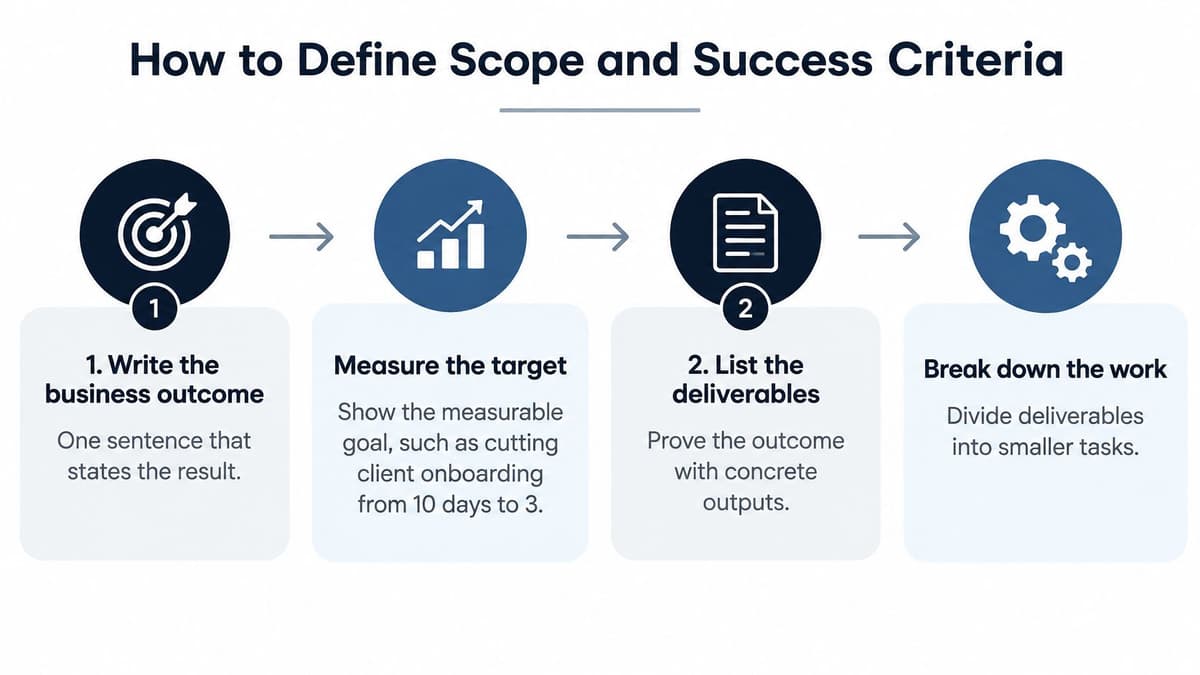
Start with a sentence someone can reject. "Cut client onboarding from 10 days to 3" is a target. "Improve onboarding" is not. The measurable target is what the sponsor is buying, and every later task has to trace back to it.
The U.S. Government Accountability Office recommends capturing all activities in the work breakdown structure, sequencing them, assigning resources, validating the critical path, and running schedule-risk analysis on large or high-risk programs. That sequence is the one I would follow on a small job too.
- Write the outcome and the number. One sentence, plus the target it implies. If you can't measure it, you can't tell a slip from a success. A common slip is a goal that only the author understands.
- List the deliverables that prove it. For the onboarding cut, that might be a shorter form, an automated welcome, and a trained support rota. Then split those into a product-oriented work breakdown. Teams often stop at the shiny outputs and forget the enabling work.
- Turn each element into activities. Include access requests, training, data migration, and supplier sign-off. Those tasks are where surprise delays hide. If a contractor or a stakeholder has to act, put that action on the breakdown.
- Write a done condition a second person can check. "Staging link signed off" or "test run with zero critical defects" works. "Looks good" does not. Hide the checker and the task will be marked done by its author alone.
- Record each assumption with its basis, then freeze the baseline. Note whether the basis is last quarter's cycle time or a vendor's quoted lead time. The GAO's point on risk is to use a quantitative assessment, not an arbitrary percentage contingency. At approval, freeze scope, schedule, and cost together. After that, a change is a logged decision, not a quiet edit.
Say a small agency is launching a client site. The outcome is "the client can take paid bookings on the new site by 2 June." One deliverable is the booking form. Its done condition is a staging URL the client has signed, with a test booking that lands in their inbox and creates no critical defects. The form task traces to that deliverable, and the deliverable traces to the June outcome.
Practical rule: If a task doesn't trace to a deliverable, and that deliverable to an outcome, it doesn't belong on this plan.
Write the outcome the way you would in a project briefing template, so the next session doesn't reopen the argument.
Try this on your own backlog.
A month of Premium free. No card. Connected in a minute.
How to Sequence Milestones and Find the Critical Path
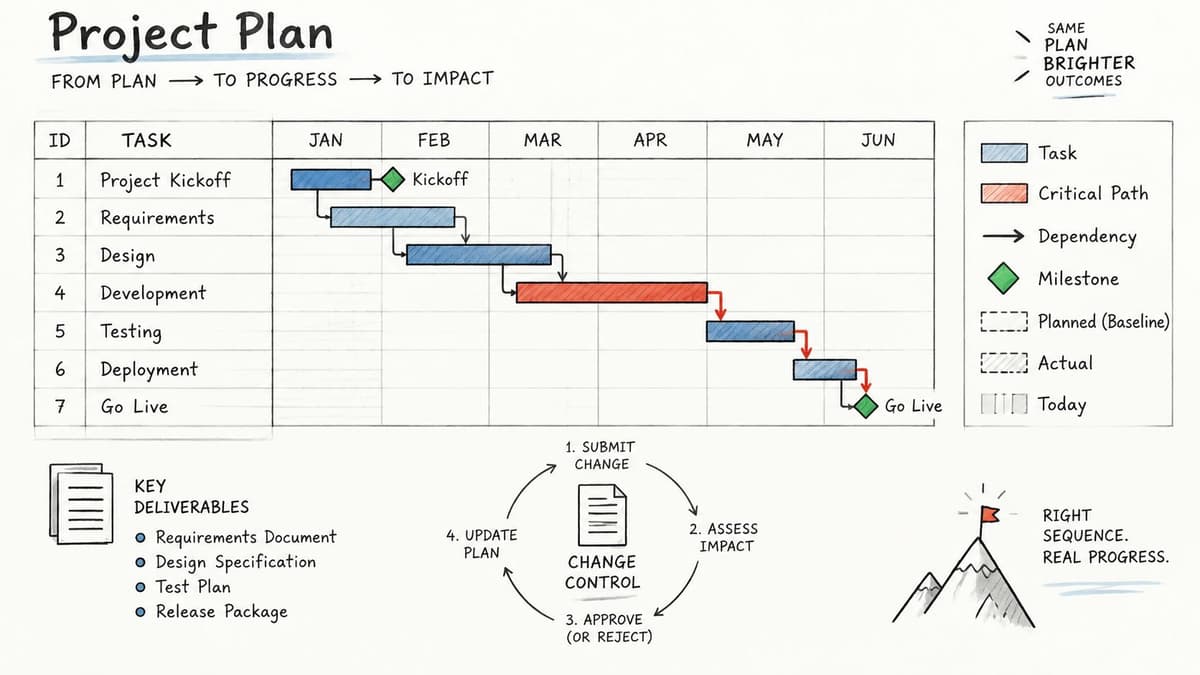
Henry Gantt's charts, from the early twentieth century, put activities against calendar time so managers could compare planned progress with actual progress. A modern plan keeps that comparison and adds milestones, dependency maps, and change control.
PMI's 2017 Pulse of the Profession found that 69% of projects met their original goals and business intent, while 57% finished within budget. Organizations that emphasized benefits realization achieved 58% more projects completed on time and saw 34% less scope creep. A milestone that isn't tied to a benefit is just a date.
Five moves that set the sequence
Name every dependency by type. Finish-to-start is the default: copy can't start until the brief is accepted. Start-to-start fits parallel design and content. Finish-to-finish fits a test suite that must end with the release build. Mark any link that crosses a team or a supplier, because those are the ones people forget.
Date the checkpoints and tie each one to an outcome. "Design approved on 14 March" is a milestone. "Design in progress" is a status. The date should sit at the end of a phase, and the outcome should be one you already wrote in scope.
Estimate from hours people have. A developer with 20 free hours this week cannot absorb a 40-hour task by Friday. Add external lead time on its own line: vendor delivery, legal review, app-store review. Padding the engineering estimate to hide that wait makes the path look shorter than it is.
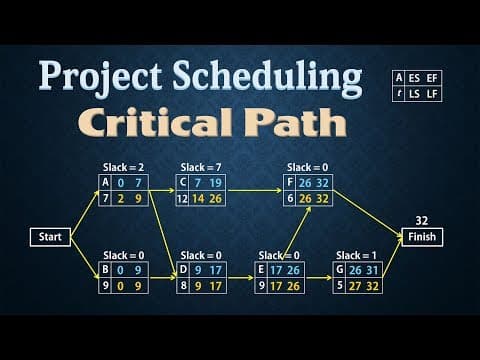
Find the longest chain. That chain is the critical path. A slip there moves the end date. A slip off the path may not. On a product launch I would check legal review before I trust the engineering bars. If counsel must clear the claims before you ship, that review is the path, even when coding looks longer on the chart.
Add buffers only where the risk register justifies them. A buffer with no named risk is hidden slack. It gets spent, and nobody can say on what.
Each week, ask whether the critical path moved. If a non-critical task became critical, the end date just changed and the status report should say so.
Plays from YouTube. Pressing play loads it from Google.
Assigning Owners and Agents with Clear Accountability
Adding an agent does not mainly call for more automation in the plan. It calls for a named human who accepts the result. An agent can draft, code, and summarise. It cannot be the person who answers when the work is wrong.
A 2025 survey reported by IT Pro found that 93% of organizations use AI, yet only 7% had fully embedded AI governance, and just 9% reported alignment between IT leadership and governance ownership. Treating the agent as another "resource" skips the split between doing the work and being responsible for it.
The responsibility map
Every task type needs six fields: human owner, authorised agent, reviewer, approval threshold, evidence required, and an escalation path. The permission rule is simple. An agent can only do what its person can. If that person isn't an owner, the agent suggests a change and waits.
| Task type | Human owner | Agent role | Reviewer or approver | Evidence to keep |
|---|---|---|---|---|
| Scope and success criteria | Sponsor | Drafts criteria only | Sponsor approves | Signed scope version |
| Feature code change | Developer on the task | Implements in a claimed session | Peer reviewer | Pull request and attributed activity log |
| Research or specification draft | Analyst | Drafts from listed sources | Subject expert | Source list and revision notes |
| Customer-facing copy | Account lead | Drafts copy | Account lead approves | Approved version and date |
| Data or security change | Team lead | Proposes change only | Security owner approves | Change record and rollback plan |
| Status and reporting | Project lead | Summarises activity | Project lead checks | Dated handoff note |
Say a freelancer uses an agent to draft a client specification. The agent writes from the listed sources. The freelancer reads the draft, edits the claims, and only the approved version goes to the client. The sent file, the date, and the source list are the evidence.
Attribution is the audit trail: who authorised the agent, what it changed, which sources it used, and who accepted the result. When several agents and people touch one task, the person who accepts it owns it. The others contributed. They don't share the accountability.
The person who accepts an AI-generated task owns it, even when three sessions helped produce it.
Tracking Progress and Replanning Without Losing Control
PMI reported that projects with success criteria defined upfront and a well-established performance-measurement system have success rates nearly twice as high as projects without those practices. The same benchmark found high-performing organizations reported project success rates of 92%, compared with 33% among underperformers, while organizations wasted an average of US$97 million per US$1 billion invested because of poor project performance.

Before execution, write a benefits hypothesis, baseline metrics, target thresholds, a measurement owner, a reporting frequency, and acceptance criteria for each major deliverable. Metrics that count activity ("tickets closed") will look healthy while the outcome stalls.
The control loop
Run it in this order, every time the numbers move.
- Collect actual progress and quality data, not a verbal "we're fine."
- Compare that result with the frozen baseline for scope, schedule, and cost.
- Diagnose the root cause of each variance. "Slipped" is not a cause.
- Decide the corrective action and name who will do it.
- Record the decision and the owner. A decision log template keeps the reason next to the change.
- Reforecast completion from updated durations and remaining risk, not from hope.
What the week should look like
Review dependencies and critical-path movement on a fixed day. Log why each variance happened. Replanning triggers are specific: a critical-path task slips past its buffer, a logged risk materialises, or a requirement changes. Only the project lead reprioritises the queue. A blocked task goes to its owner the same day, not at the next monthly steer.
Say an integration with a payments vendor stalls and the launch moves five days. The team logs the cause (vendor sandbox credentials, not engineering speed), reforecasts the end date, and pulls the next unblocked task to the front of the queue that week. The baseline stays visible. The forecast sits beside it. Nobody pretends the original date is still true.
A healthy review is short. Three questions: what moved on the critical path, which variance has no owner, and which decision needs a signature before Friday.
Common Plan Failures and How to Fix Them
A plan that can't change is already failing. A 2025 study of project-management implementation challenges found that teams often struggled to make plans flexible enough for contingencies, and it named stakeholder involvement, resource allocation, communication, changing requirements, unrealistic deadlines, and difficulty measuring success as recurring problems.
Adaptability has to be designed. Write which assumptions you are testing, which events trigger replanning, who may reprioritise, how a blocked task reaches its owner, and how the decision is recorded. Too much detail creates false confidence, because people treat every line as certain. Too little detail leaves two contributors unable to coordinate when the requirement moves.
That collision is the failure most templates skip. Two people, or two agent sessions, pick up the same changing requirement and overwrite each other. The fix is one claim per task and a single prioritised queue of unblocked work. The second session is told who holds the task. It takes the next free item instead.
| Symptom | Likely cause | Fix |
|---|---|---|
| Tasks marked done but not accepted | Vague done definition | Rewrite done as a checkable condition with a named checker |
| Two people or agents work the same task | No claim or single owner | Assign one holder per task and release it when idle |
| Milestones slip every week | Durations ignore real capacity | Re-estimate using available hours and external lead times |
| Surprise delays from a supplier | Supplier activities missing from the plan | Add supplier tasks and approval dates to the work breakdown |
| Plan out of date after three weeks | Baseline never updated | Reforecast on a fixed weekly cadence and log each change |
| Stakeholders reject work late | Approvals not scheduled | Put each approval on the plan as a dated milestone |
| Changing requirements ignored | No change rule | Define triggers and who may reprioritise |
Excessive detail and a vague one-pager fail for the same reason: neither tells the next person what to do when the assumption breaks.
If you can't name the trigger and the person who may reorder the queue, you don't have a flexible plan. You have a timetable that will be ignored by week three.
Put Your First Implementation Plan on a Board This Week
You don't need a long workshop. You need one place the next session can read.
- Copy the seven components into one board or document, with an empty row for each.
- Fill scope and success criteria with the sponsor in a single sitting, and keep the signed version.
- Build the work breakdown and milestones in a second session, and tie each milestone to an outcome.
- Assign a human owner and, where you use one, an agent, and name the reviewer for each task type.
- Put the first weekly review on a fixed day and log the first variance, even if the variance is "none."
A shared board is where those rows should live, not a slide nobody opens. We built Projectify as a project management board for people and agents together: agents join over MCP, claim work so two sessions don't collide, start from a briefing, and hand off with attribution on every change. Setup for a small team takes minutes, and a kanban board is enough to hold the queue. The plan works when the next session can start without asking what happened last time.
Projectify keeps the implementation plan on the same board as the work, with claims so people and agents don't collide, a briefing so nobody starts cold, and attribution on every change. If your current list can't say who owns the task and what the last session finished, put the plan where the work already happens. Visit Projectify and run the first handoff this week.