Law Firm Workflow: Stages, Owners and Approvals
A practical guide to law firm workflow: the stages of a matter, who owns each one, where approvals belong and how to measure cycle time.
85% of surveyed lawyers use AI, yet 77% say much of their work remains manual and 73% report workflows with too many steps, according to the Wolters Kluwer Future Ready Lawyer survey. That gap is the whole problem in one line. Tools arrive faster than the process they're meant to sit inside.
Adoption of the plainer layer underneath is slower. The American Bar Association's 2024 Legal Technology Survey Report found that 53% of responding lawyers reported their firms had case or practice-management software available, which means nearly half did not. In firms running several matters at once, that work still lives across email threads, shared drives, spreadsheets and personal calendars.
A law firm workflow isn't a diagram on a wall. It's a record of who did what and when: who owns the matter, who approved the draft, when the deadline was set, which version reached the client. When that record is scattered, nobody can answer "where is this matter" without asking three people.
Working rule: every stage needs one named owner and one gate. If either is missing, you have a conversation, not a process.
The Seven Stages of a Law Firm Workflow
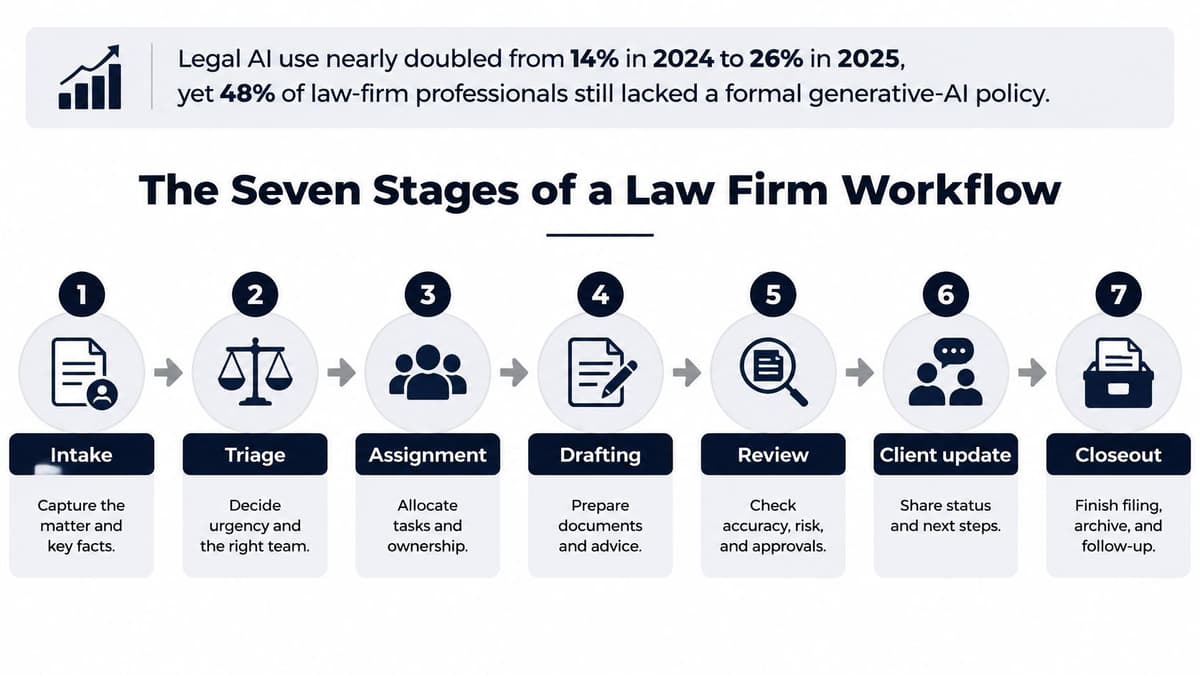
Legal AI adoption is moving from experimentation into operational workflow integration. Thomson Reuters reported that legal-sector generative-AI usage nearly doubled from 14% in 2024 to 26% in 2025, that 45% of law-firm respondents said they already use generative AI or expect it to become central to workflow within a year, and that 48% of law-firm professionals still lacked a formal generative-AI policy. Firms are buying tools faster than they're writing down the stages those tools serve.
A stage is a chunk of work with an entry condition, one owner and an exit gate that a named person opens. Seven stages cover most of what a firm handles, from first enquiry to archived file. Write them down once and everything else hangs off that map: intake fields, approval points, the numbers you track.
The first three are setup, and that's where most slippage hides. A matter that arrives by email, a conflict check started after the first call, deadlines set from memory. The middle stages produce the work. The last two turn it into money and a closed file, which is where billing lag and unarchived documents pile up.
| Stage | What happens | Typical owner | Approval gate |
|---|---|---|---|
| Intake | Capture client, matter type, jurisdiction, urgency and opposing parties on one form | Intake coordinator or paralegal | Required fields complete before saving |
| Conflict check and engagement | Search names against existing matters, then issue the engagement letter | Conflicts team and responsible lawyer | Responsible lawyer clears the conflict and signs |
| Matter setup | Open the matter, set deadlines, assign the owner and budget | Practice support | Supervising lawyer confirms deadlines |
| Research and document review | Summarize uploaded documents, search facts and collect authorities | Associate or paralegal | Lawyer verifies every source before reliance |
| Drafting and revisions | Prepare first drafts, merge comments and track versions | Associate | Reviewing lawyer approves each version |
| Filing or client delivery | Send the advice, file with the court or release the document | Responsible lawyer | Named lawyer signs before release |
| Billing and close | Record time, issue invoices and archive the file | Billing or finance | Billing reviewer approves the final invoice |
Delivery has already gone digital, which raises the bar on the gate in front of it. The ABA's 2024 litigation technology findings report that 86% of respondents filed documents electronically with state or local courts, up from 84% in 2022. An electronic filing lands instantly and is hard to pull back, so the signature gate matters more than it did when a clerk stamped paper.
Stages can overlap. Research runs while drafting, and client updates run alongside both. The gate doesn't move with them. If a draft rests on a case the associate is still checking, the reviewing lawyer signs only after that check comes back, and the file shows which check it was.
This map is the baseline every measure later compares against. Without it, a firm can't tell whether a change made things faster or just moved the delay somewhere less visible.
How to Set Up Intake So Matters Start Clean
Intake is where a workflow either becomes data or stays a conversation. The ABA Center for Innovation's trends report describes the pattern: client or matter information gathered through a portal or access link, organized in a database, and automatically routed according to matter type or other attributes. That chain is causal. Standard fields make classification possible, classification picks the route, and the route decides who owns the matter and which template and approval path apply.
The payoff is measurement. Persistent matter data lets you compare negotiation turns, elapsed time from intake to execution, historical outcomes and fee estimates by matter type, rather than trusting an anecdote about how long a conveyancing file usually takes.
Six steps that hold up
- Fix the mandatory fields first. Client identity, conflict-search identifiers, matter category, jurisdiction, urgency, opposing parties, estimated value and the responsible lawyer. Everything downstream depends on these being captured at the point of contact, not rebuilt later from a call note.
- Use one form for every referral. The moment a partner forwards a client email straight to an associate, you've created a second intake path with no fields and no owner. One form, even for matters that "obviously" don't need it, keeps the count honest.
- Route by matter type, not by whoever is free. A personal injury enquiry belongs with the injury team and a commercial lease with the transactional group. The routing rule should say so before a human reads the file.
- Start the conflict check before substantive work. Record the check's identifier on the matter so a later reviewer can see which names were searched. The usual cause of a late conflict hit is a missing opposing party, so make that field mandatory rather than nice to have.
- Put a timer on first contact. A response deadline visible to the whole team turns "we'll get to it" into a number someone owns. Firms that skip this step tend to discover the delay only when a client chases.
- Gate the engagement letter. Nothing goes out until the responsible lawyer confirms parties, scope, exclusions and fee basis. This is the last cheap moment to catch a mismatch between what was sold and what the client expects.
The test: hand the intake record to someone who has never met the client. If they can say who owns the matter, what it is and when it's due, the record is clean.
Each step should state who does it and when it's done, so whoever picks up the work next, person or agent, gets the brief, what came before and its instructions rather than a bare task title. That's the structure behind our law firm workflow pages, where a matter moves through stages with a check wherever a person has to approve.
Which Steps an AI Agent Can Run and Which a Lawyer Must Decide
The interesting question isn't whether an agent can draft a letter of advice. It's who signs it, and what the file shows afterwards. A blunt rule works better than a long policy: an agent may draft anything and release nothing.
Human approval has to be an explicit control, not an informal expectation. NIST's AI Risk Management Framework says processes for human oversight should be defined, assessed and documented in accordance with organizational policies, and it calls separately for mapping and documenting legal risks that involve AI components, third-party data, software, intellectual property and other rights. In a firm, that means consequential actions, such as sending advice, filing a document, accepting a settlement position or relying on an AI-generated conclusion, route to a named lawyer before they complete.
The demand for this is already in the work. Document review is the leading generative-AI use case reported by legal professionals at 74%, ahead of legal research at 73% and document summarization at 72%, per Thomson Reuters. The same publisher notes in its review of how professionals use AI for work that using generative AI for tasks traditionally requiring a licensed attorney raises ethical and legal concerns. The split below is where most firms land once they think it through.
| Task | Agent can run it | Lawyer decides | Record kept |
|---|---|---|---|
| Collect intake data and check required fields | Yes | Nothing beyond accepting the matter | Field log with timestamp |
| Summarize uploaded pleadings, contracts and correspondence | Yes, as a draft summary | Lawyer checks key facts against source | Source-linked summary |
| Search and sort documents for a review set | Yes | Lawyer sets relevance criteria | Search log |
| Fill a template from a completed questionnaire | Yes | Lawyer approves the final draft | Document version identifier |
| Issue spotting and legal conclusions | Draft only | Yes, always | Lawyer sign-off note |
| Privilege decisions | No | Yes, always | Named reviewer and reason |
| Client advice or demand letters | Draft only | Yes, before anything is sent | Approval before send |
| Court filings | Prepare only | Yes, before filing | Signed filing record |
| Billing entries from timers | Yes | Billing reviewer approves | Invoice audit trail |
Every action in the left column should leave something behind: a signed record of who or what made the change, the brief the work started from, and a handoff note for the next person. Every work session, whether a person or Claude runs it, starts from a briefing and ends with a handoff. In Projectify an agent that changes a task signs the change as Claude for the person it works for, and its note stays on the task.
The exceptions are the point. Privilege calls and final sign-off don't get delegated to a faster process. If you want the mechanics of how a session pauses for a decision, human in the loop for AI agents covers the approval states and the audit trail behind them.
Measures That Show Whether a Workflow Works
Record a baseline before you change anything, because a template can speed drafting while an added approval step slows release. Judge the workflow on the pair of numbers, not on the one someone is proud of.
Measure each matter type separately. A firm-wide average hides the practice group that's three weeks behind, and it flatters the group that's fine.
| Measure | How to record it | What a change suggests |
|---|---|---|
| Time from intake to engagement | Timestamps on the intake form and engagement letter | Slow front end or conflict checks waiting on a person |
| Document preparation time | Time from draft request to approved version | Templates saving time, or review absorbing the gain |
| Rework rate | Share of drafts returned for changes | Stale clauses or unclear instructions |
| Missing-field rate | Share of intake forms submitted incomplete | Form not used, or fields unclear to staff |
| Approval to release time | Time between sign-off and sending or filing | Sign-off waiting on a busy reviewer |
| Billing lag | Gap between work date and time entry | Time recorded at month end instead of each step |
Where to keep the numbers
Keep them in the same workspace where the matters live, not in a spreadsheet someone updates on Fridays. A table or tracker view lists each matter with its timestamps, a timeline view shows where time passes between stages, a workload view shows which person is holding too many open tasks, and a dashboard view gives the monthly figure for each matter type.
Then run four steps. Pull the timestamps for the last ten matters of one type to set the baseline. Record the six measures in the same fields for every new matter. Review them monthly, per matter type. Compare the first month against the baseline before deciding whether a change stays.
The signals are readable once you have two months of data. A rising rework rate after a template change points to stale clauses. A long approval-to-release time points to an overloaded reviewer, and the workload view names who. When a number moves, you want to trace it to the change that caused it, which is what observability for AI agents is for: a record of what each session did, in order.
How to Standardize Document Production
Document production is a practical place to standardize a law firm workflow: repeated fields, clause choices and formatting can follow rules, while legal judgment stays with the lawyer. The goal is a record of who prepared, reviewed and released each version, with those actions visible on the matter.
Use Gavel's document automation savings calculator to explore potential savings, then set your own baseline: median preparation time, rework rate, missing-field rate and attorney review time. An estimate is useful for choosing where to start; your own results determine whether a template earns its upkeep.
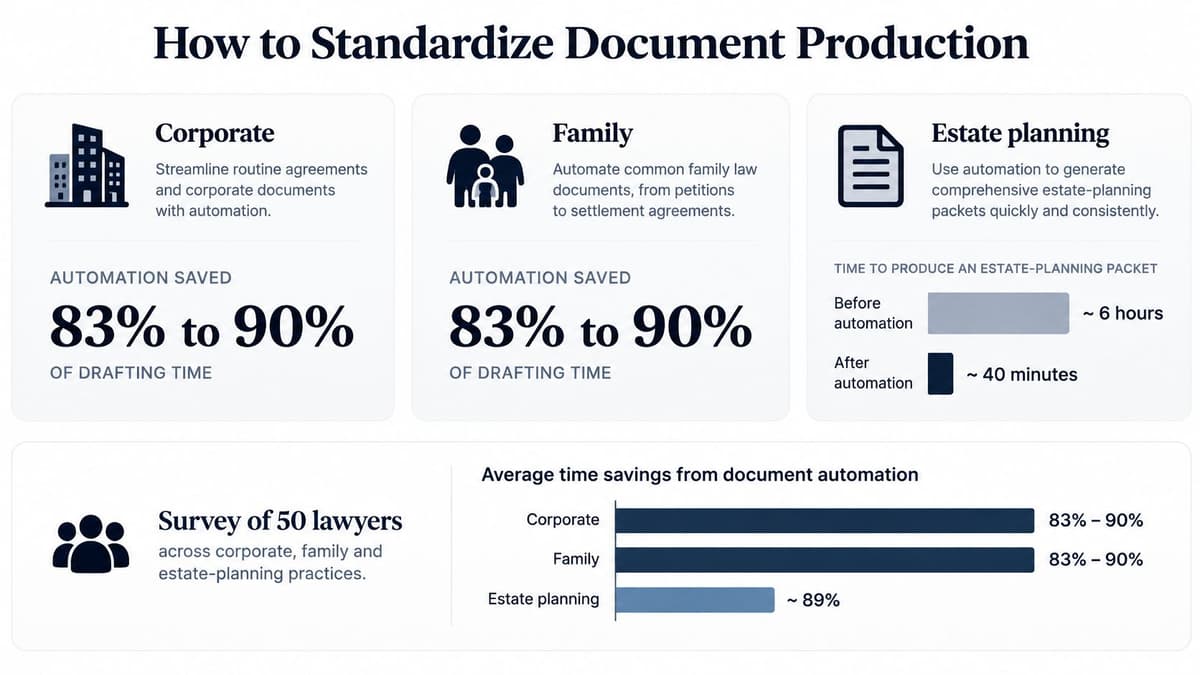
Separate mechanical work from judgment before building the template. Questionnaire fields, approved conditional clauses, formatting and version generation can follow defined rules. Issue spotting, bespoke negotiation, privilege decisions and final approval need a lawyer. Clause selection belongs in the mechanical path only when the approved conditions settle the choice.
Seven steps to a controlled template
- Pick the documents you produce most often. Engagement letters, standard agreements and estate packets are candidates. Start with three, not thirty, so template maintenance stays manageable.
- Split each one into deterministic and judgment steps. Record who handles each step and where the lawyer must decide before drafting continues.
- Build an approved template with conditional logic. Include a clause when the questionnaire triggers it, rather than asking the drafter to delete irrelevant paragraphs manually.
- Add validation rules. Block generation when a required field is blank. Resolve missing information before it becomes a reviewer's correction.
- Give every generated version an identifier. Attach approval to that specific draft, so the matter record shows exactly what the reviewer checked.
- Require a named lawyer's sign-off before release. Record the approver and approval time against the version being sent. Delivery follows that approval.
- Keep the sent copy and its version history on the matter. Preserve the released document alongside its drafting and approval record, rather than relying on the current template.
Stale clauses create avoidable rework. Give each template one owner and a fixed review schedule: monthly for high-volume templates and quarterly for the rest. Faster generation is useful only while the underlying template remains current.
Common Workflow Breakdowns and How to Fix Them
The most common failure is quiet. A matter stops after intake because nobody named an owner, or the owner was named in a conversation and never notified. The file doesn't announce itself. It just sits, and the client calls three weeks later.
The AI-specific version is worse, because the output looks finished. Wolters Kluwer's 2026 Future Ready Lawyer survey report found that 69% of U.S. legal professionals reported using general-purpose AI tools for work, but fewer than half of firms provided training on responsible use. Untrained use plus no approval gate is how an unchecked draft reaches a client.
| Symptom | Likely cause | Fix |
|---|---|---|
| Matter stalls after intake | No owner named or owner not notified | Make the responsible lawyer a required field before saving |
| Two people draft the same document | No claim on the task before work starts | Claim the task first, with a lease that holds it until renewed |
| Deadlines missed | Deadlines kept in email, not on the matter | Set deadlines in matter setup with a named owner |
| AI draft goes out unchecked | No approval gate before send | Make lawyer sign-off a required step before release |
| Billing weeks behind work | Time entered at month end | Record time at each stage as the work happens |
| Staff keep asking the same questions | Summaries never saved to the matter | Store the summary and key facts with the file |
Fixes in order of effort
Two of these take about a day to put in place: the owner field and the sign-off gate. They're configuration, and they close the two failures that cost the most. The other four are habits, and they take about a week to settle before people stop routing around them.
The claim rule is the one teams resist and then can't live without. Whoever claims a task holds it under a 30-minute lease that renews on every call, and other sessions are told who holds it and kept out. Two associates stop drafting the same letter, and two agent sessions stop overwriting each other's edits.
After each fix, name the measure that should move. Rework rate after a claim rule. Missing-field rate after a required owner field. Approval-to-release time after a sign-off gate. If the measure doesn't move in a month, the fix didn't take and people are working around it.
Map One Matter Type This Month
Pick one matter type with steady volume, residential conveyancing or standard contract review, and map that instead of the whole firm. Copy the stages from the first table, then write an owner and an approval gate beside each one.
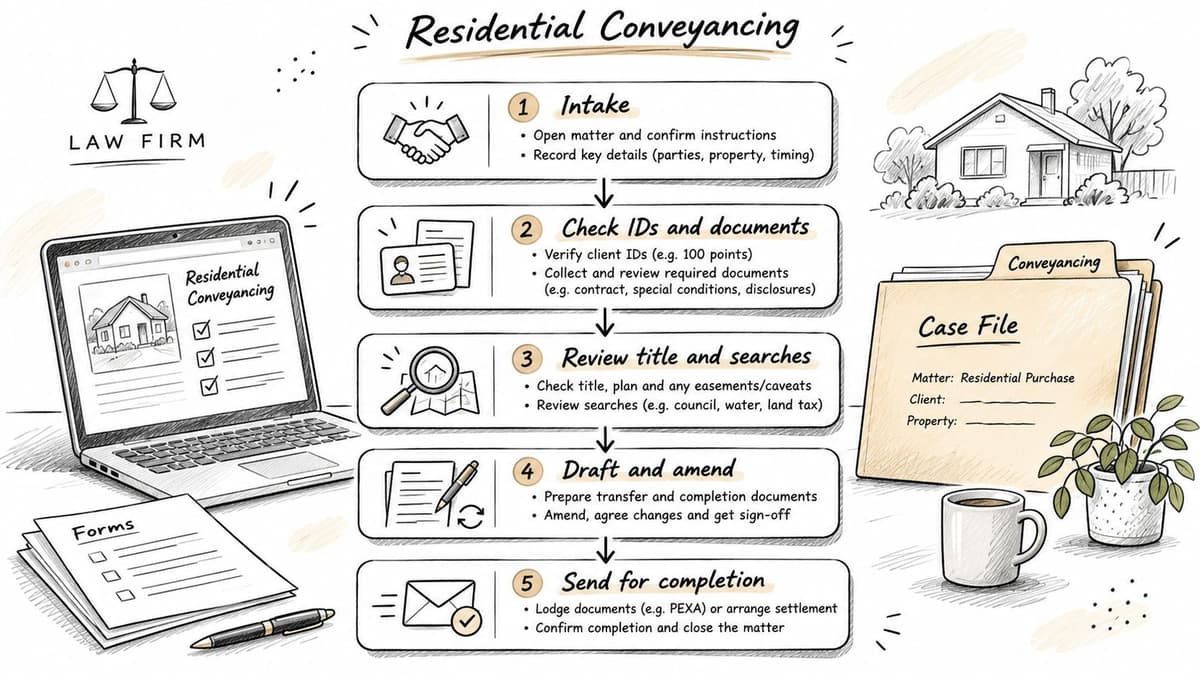
Set the mandatory intake fields and the sign-off rules at the same time, because a stage map without fields is just a list of nouns. Record the baseline for the six measures before the first matter enters the new process, or you'll have nothing to compare against.
Run the pilot for two matters or two weeks, whichever comes first. Review the rework rate and the missing-field rate together. One without the other tells you very little: a fast draft that comes back twice isn't faster.
Our use-case pages cover 40 industries and workflows, law firms among them, and workflows turn a recorded walkthrough of your process into steps with a check wherever a person approves. Here's a short walkthrough of how that works in practice.
Plays from YouTube. Pressing play loads it from Google.
A successful pilot has three marks. Every matter has a named owner from the moment it saves. No draft leaves without a signature attached to it. And the measures move in the right direction for that matter type, which is the only comparison that means anything.
Projectify keeps a matter, its stages and its approvals in one workspace, shared by your people and their Claude agents, so the record of who did what stays on the matter instead of in a thread. Drop in a recording or a document of how your firm runs a matter and Projectify turns it into a workflow with a check wherever a lawyer has to approve; every new workspace starts with a month of Premium free, no card, then Free up to 1,000 items or Premium at $8 a seat a month. Agents never take a paid seat, and every change an agent makes is signed for the person it works for.