MCP vs Function Calling: Which Fits Your AI Agent Stack
Learn how MCP vs function calling differs in architecture, portability, latency and security, and when to use each one in your AI tools.
Most advice about MCP vs function calling picks a side. Either MCP is the new standard and your function-calling layer should be retired, or MCP is just function calling with extra network hops and you should skip it. Both versions treat two different layers as rival products, and both lead teams into rework.
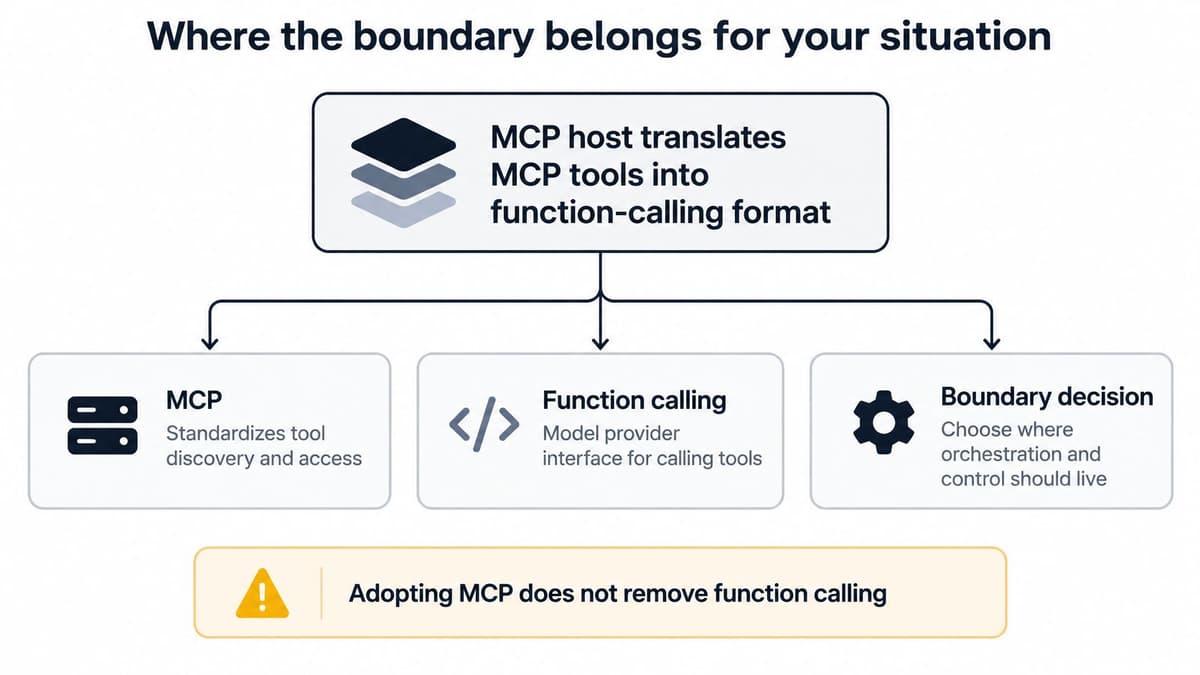
The layers are distinct. Function calling is how a model expresses intent: it returns a structured request naming a function and its arguments. MCP is how a host discovers, transports, authenticates and executes that capability across applications. An MCP host usually translates an MCP tool into the model provider's function-calling format, so adopting MCP doesn't remove function calling from your stack. It moves the boundary.
That makes the useful question narrower than the headline debate. Not "which one wins", but where the split should sit for your tools, your clients and your risk tolerance.
MCP vs Function Calling at a Glance
| Criterion | Function calling | MCP |
|---|---|---|
| Layer | Model API feature | Protocol between an AI host and its tool servers |
| Defined by | The developer, inside each application | A server published once and reused |
| Discovery | A fixed list sent with each request | tools/list, resources and prompts |
| Context and templates | Not part of the API; context goes into the prompt text | Resources and reusable prompts, retrieved by the client |
| Transport | Runs inside the application | stdio locally, Streamable HTTP for remote servers |
| Portability | Tied to the model API and the app | Works across compatible clients |
| Setup effort | Low for one application | Higher: server lifecycle, auth and transport |
| Best fit | One app with a small, stable toolset | Several clients or agents sharing the same tools |
Read the first five rows as mechanism and the last three as what the mechanism costs you.
Function calling is a feature of a model API. Your application sends function names, descriptions and JSON Schema parameter definitions alongside the request, the model returns a JSON object of arguments, and your own code executes it. OpenAI announced the mechanism on June 13, 2023, for the GPT-4-0613 and GPT-3.5-Turbo-0613 models, so developers on that API met tool use first inside a single application. A year later, Structured Outputs with strict: true began constraining those arguments to the supplied JSON Schema, and OpenAI's published evaluation reported a sharp gain in schema following for GPT-4o-2024-08-06 with it enabled.
MCP sits one layer out from the model. It is an open client-server protocol built on JSON-RPC that standardizes capability discovery, tool invocation, resource and context exchange, prompts and capability negotiation, connecting over stdio locally or Streamable HTTP for remote servers, as the MCP transport specification defines.
The MCP specification then defines three server-side primitives. Resources carry context and data. Prompts carry reusable templated instructions and workflows. Tools are the functions the model can execute. One connection therefore carries the brief, the procedure and the action, a wider remit than any single function schema. If the protocol's own vocabulary is still fuzzy, our guide to what the Model Context Protocol is covers hosts, clients and servers from first principles.
The Discovery row is where the two layers pull apart. With function calling, the model sees exactly the list you shipped, and it sees nothing else until you redeploy. With MCP, the client asks the server what it can do at connection time, so the toolset can change underneath a running session. That is the flexibility the Defined by row buys, and the versioning discipline the Setup effort row prices in.
A plain rule to start with: keep function calling for one application with a small, stable toolset, and move a capability to MCP when several clients or agents need it.
Integration cost and portability across clients
The first integration costs about the same either way. The tenth is where the two diverge, and that is the number to plan around.
With function calling, every application that wants a capability ships its own schema, its own dispatch handler and its own mapping from the provider's response format into code. Two clients means two copies. Three means three, each drifting slightly on enum values and error handling. Swap model vendors and you re-test the parsing, the tool-call response shape and the retry logic in every copy.
MCP changes the unit of work. Publish a server once and any compatible client connects, discovers what it offers and calls it. The saving is real, though it relocates. The server now needs a maintainer, a versioning scheme, a transport decision and an upgrade path: the same checklist an internal API already carries, with the same failure modes when nobody owns it. The layers also coexist. A client that speaks MCP can still expose a few local tools through function calling, so the honest unit of comparison is cost per integration.
What the ecosystem numbers actually show
Growth has been fast and maturity has not kept up. An ACM survey of the MCP ecosystem describes Anthropic's launch of the protocol in late 2024 as an effort to standardize how external tools are defined, discovered and invoked, and reports a 14-day MCPCrawler study that collected 17,630 raw entries and identified 8,401 valid projects: 8,060 servers and 341 clients, with more than half of the listed projects classified as invalid or low-value. In the same dataset, 80.9% of clients, 276 of them, supported only one connection, while 19.1%, or 65 clients, supported multiple connections. And although the older SSE transport has been superseded by Streamable HTTP, it kept appearing widely, with only 27.9% of clients on the recommended Streamable HTTP transport.
Directory counts are not adoption. A server you find today may be built for a transport your client no longer prefers.
Practical rule: before any listed server touches real work, read its last commit date, its supported transports, whether its versions are pinned and who answers issues. A pinned tag from a named maintainer beats a star count every time.
Projectify works with anything that speaks MCP, and Claude Code, claude.ai and Claude Desktop connect today with one command or one connector, each acting for a named person. That is also the practical test of portability, and a narrower one than directory size suggests: how many listed servers would you let an agent use on a Tuesday afternoon with a customer watching.
What to Measure
No authoritative, cross-provider benchmark with comparable MCP-versus-function-calling latency or task-success figures turned up while researching this piece, which the MCP architecture documentation implicitly supports by treating performance as a transport question rather than a protocol verdict. Any single latency number you read online describes someone else's workflow. You'll have to build the comparison yourself, and it's a day's work.
Run the same workflow four ways
Take one real workflow, ideally one that touches a person, and benchmark it under four configurations with everything else held constant.
- Direct in-process function call. No protocol framing, no discovery, no authorization step. Usually the lowest-latency path for a single local tool.
- MCP over stdio. Local process messaging with no network overhead, so you pay for protocol framing but not for a hop across a wire.
- MCP over Streamable HTTP, local. HTTP request handling on the same machine, plus streaming when the server uses it.
- MCP over Streamable HTTP, remote. Network round trips, authorization and the widest variance.
| Configuration | Extra work per call | Expected overhead |
|---|---|---|
| Direct in-process function call | None beyond the function itself | Lowest path for a single local tool |
| MCP over stdio | Local process messaging, no network | Protocol framing, no network hop |
| MCP over Streamable HTTP, local | HTTP request handling | Request processing, plus streaming when used |
| MCP over Streamable HTTP, remote | Network round trips and authorization | Highest and most variable overhead |
Record p50 and p95 time to first tool call, total completion latency, tokens spent on tool schemas, error and retry rate, and the delay a human approval adds. Percentiles matter more than averages here, because one slow authorization handshake drags an average and barely moves a p95.
Expect model inference, tool execution, payload size and network round trips to dominate the totals. JSON-RPC encoding is rarely where the seconds go. That's why the interesting differences show up as the number of clients and tools grows, when discovery starts replacing bespoke integration work rather than as a millisecond gap on a single call.
Run each configuration at least 30 times per workflow, on the same machine, with the same prompt and the same data, and keep the raw traces. Then compare, and distrust anyone who compares for you.
Security differences most comparisons skip
The assumption worth testing is that MCP's standardized authentication and tool discovery make it safer than direct function calling. Standardized plumbing sounds like a safety feature, and it is not the same thing as one.
Comparative research complicates the picture. Studies that run attack scenarios against both architectures suggest that success rates depend on how each deployment is built rather than on which protocol carries the call. Chained attacks, where one successful step feeds the next, reach high success rates against both. Neither architecture is the safe default.
Function calling concentrates exposure inside the host application, where the schemas, permissions and credentials all live in one process. One prompt injection that reaches that process can reach everything the app can reach. MCP spreads the boundary outward to remote servers, tools advertised at runtime, transport security and authorization decisions. A compromise there tends to be narrower, and the surface you must reason about is wider. Smaller blast radius, larger perimeter to audit. Most comparisons flatten that trade into a scoreboard.
Controls to apply before the first real run
Treat tool descriptions as untrusted input, because a server can change what it advertises between sessions. Then work through the controls that most comparisons leave out.
- Per-tool least privilege. Grant each tool the narrowest scope that does its job, not the scope of the server.
- Provenance and version pinning. Know who published the server and pin the version you vetted.
- Approval gates for irreversible actions. A delete, a push, a migration or a message to everyone gets a person's answer first.
- Audit logs that name the agent. Tie every change to the identity that made it, not just to the workspace.
- Input and output validation. Check arguments before execution and results after, since a tool can return anything.
- Timeouts and rate limits. Cap how long and how often an agent can hammer a server.
- Isolation of untrusted servers. Keep anything unvetted away from credentials it shouldn't see.
A fuller treatment of each control sits in our guide to MCP security best practices.
Approval gates are the control teams skip first because they feel like friction. In Projectify, risky steps such as a push, a migration, a delete or a send to everyone stop in Needs you with a recommended answer until a person responds, and every change Claude makes is signed "Claude for" the person who ran it and can be undone. Signed, reversible actions turn a governance policy into something an auditor can read.
Where the boundary belongs for your situation
Most comparisons frame the decision as either/or, even though the technologies operate at different layers. That framing survives because it makes for a clean article and a bad architecture. An MCP host commonly translates an MCP tool into the model provider's function-calling format, so adopting MCP doesn't eliminate function calling, as this analysis of how the two work together points out. The boundary is the design decision. The protocol is just where you draw it.
| Situation | Better fit | Why |
|---|---|---|
| One app, five fixed functions | Function calling | Lowest overhead, no server to run |
| Same tools for Claude Desktop, Claude Code and an in-house agent | MCP | One server serves every client |
| Latency-critical lookup inside a product | Function calling | No protocol hop on each call |
| Several agents sharing tasks, files and approvals | MCP | Discovery and task claims live in one place |
| Parallel coding agents on separate branches | Worktrees per session | Separate checkouts reduce collisions |
| Team expects to change model vendors | MCP | Capabilities survive a provider swap |
One question sorts most capabilities. Will another application or another agent need this? A support chatbot with five fixed functions inside one product stays on function calls, because it needs no server, no transport and no lifecycle to manage. The moment the same project tools have to work in Claude Desktop, Claude Code and an in-house agent, they move behind one server so all three clients read the same definition.
Here's how the layers connect in practice, from the host down to the model's tool request.
The hybrid most teams actually run
Say an accounting firm's agent needs three things. It needs the status of every filing, which Claude Desktop, Claude Code and an in-house review app all ask for. It needs a tax calculation that has to return inside the review app before a page renders. And it needs a summary format only that review app uses.
The filing status goes behind an MCP server, because three clients want it and one of them is a person's laptop. The calculation stays an in-process function call, because a protocol hop inside a render path is a latency tax with no benefit. The summary format stays a function too, since nobody else will ever call it. That's the hybrid: shared context and governed actions behind the protocol, latency-critical and app-specific work inside the app.
The hybrid carries a cost that deserves naming. MCP adds connection state, authentication, timeouts and serialization failures that a plain in-process call never meets. You're trading operational simplicity for portability, and the trade is only worth it for capabilities that travel.
Here's a walkthrough of how these layers fit together when an agent is doing the calling.
Plays from YouTube. Pressing play loads it from Google.
Approvals belong in the protocol, not the chat
A chat message asking "shall I proceed?" is not a control. The MCP tools specification supports something better: a tool call may return an InputRequiredResult when more information is needed before completion, and structured results must conform to a declared output schema when one is provided. The agent pauses, a person supplies the missing decision, and the run continues with a machine-readable result rather than a sentence scraped out of a transcript.
That matters most where a wrong automatic action is expensive: approving a legal filing, a construction change order, a hiring decision or a financial exception. Claude Code connects over MCP and reads the brief, the project rules, who is working right now and the last handoff before it touches anything, so the pause happens with context rather than in a vacuum.
Reusable instructions work the same way. The MCP prompts specification lets clients discover prompt templates, retrieve them with prompts/get and pass arguments to customize them, and prompt messages may include resource links with a valid URI, MIME type and content. A session can open with the current brief assembled from project instructions and documents, instead of a person pasting the same context every morning.
Parallel coding agents need their own checkout
Worktrees solve a collision problem that no protocol can. Claude Code documentation defines a worktree as a separate working directory with its own files and branch while sharing the repository's history and remote, creatable with the --worktree or -w option, and it can be created from a specific pull request into a .claude/worktrees/pr-<number> directory, per the Claude Code worktree documentation. Each session gets its own branch, each task ends as a pull request, and a person reviews before anything merges.
For orchestration patterns across agents, sessions and approvals, our piece on agent orchestration patterns goes further into claims, handoffs and review.
Choose the boundary for your own stack
Real stacks rarely pick a side, so the practical question is where the line between the two layers sits. Work through this in order and write the answers down, so the next person inheriting the workspace does not relitigate them.
- List every capability your agent needs. Be concrete: read a task, update a status, search files, post a summary, open a pull request.
- Mark who consumes each one. A single application, or several clients and agents.
- Keep single-consumer, latency-sensitive calls as function calls. They stay inside the app, where execution and credentials already live.
- Move shared context, governed actions and anything a second client needs behind an MCP server. One definition, many consumers.
- Apply the security controls before the first real run. Least privilege, pinned versions, approval gates, audit logs, validation, timeouts.
- Run the four-configuration benchmark on one real workflow and keep the numbers. Revisit them when the tool count or the client count changes.
Then connect something. Projectify connects to Claude Code with one command, or through a connector in claude.ai, and you approve it in your browser.
Review the boundary after the first month of real use. The split that looked right with one agent and four tools looks different once several agents want the same task: the first claims it, and the second is told who holds it and when they were last active. That is the point where shared context stops being optional.
Projectify is one place for any kind of work, shared by people and their Claude agents, and Claude Code, claude.ai and Claude Desktop all connect to it over MCP with one command or one connector. The boundary you just drew can be running today, with agents claiming tasks, pausing in Needs you before risky steps, and leaving a signed handoff for whoever comes next. Claude runs on the workspace's AI key or your own, every new workspace starts with a month of Premium free with no card, and agents never take a paid seat, so visit Projectify to put the split to work on a real project.