Critical Path Scheduling: A Step-by-Step Guide for 2026
Master critical path scheduling: map your longest chain of dependent tasks, measure float, and catch near-critical risks before they delay you.
You're three weeks from launch and one workstream has been amber for eleven days. Every other status report is green. When your director asks whether the date still holds, "we're monitoring it" is not an answer, and a list of finished tasks doesn't explain why the finish line moved.
A schedule isn't a list of work. It's a set of promises about order, and only some of those promises control the date. Seeing which ones is the whole of critical path scheduling, and it's a skill you can pick up in an afternoon and then spend years sharpening.
What the Critical Path Tells You About Your Deadline
The kitchen fit-out is late again, and the electrician finished two days early. The homeowner stands in a half-built room asking a fair question: if the trades are ahead, why has the completion date moved further away than it was last month?
Because the fit-out can't start until the cabinets arrive, the cabinets can't be ordered until the design is signed off, and the design waited four weeks on a planning query nobody logged. The electrician's early finish bought nothing. That work sits on a side branch, and side branches have room to move.
Think of a relay race. Four runners each carry a leg, and the team's time is the sum of the legs, not the fastest one. A sprinter who runs a brilliant second leg doesn't help if the third runner is still waiting for a handoff. Projects work the same way: tasks link through dependencies, and the team finishes when the slowest linked chain crosses the line.
The definition worth memorising: the critical path is the longest chain of dependent tasks from project start to project finish. Its total duration is the earliest date the whole project can possibly complete.
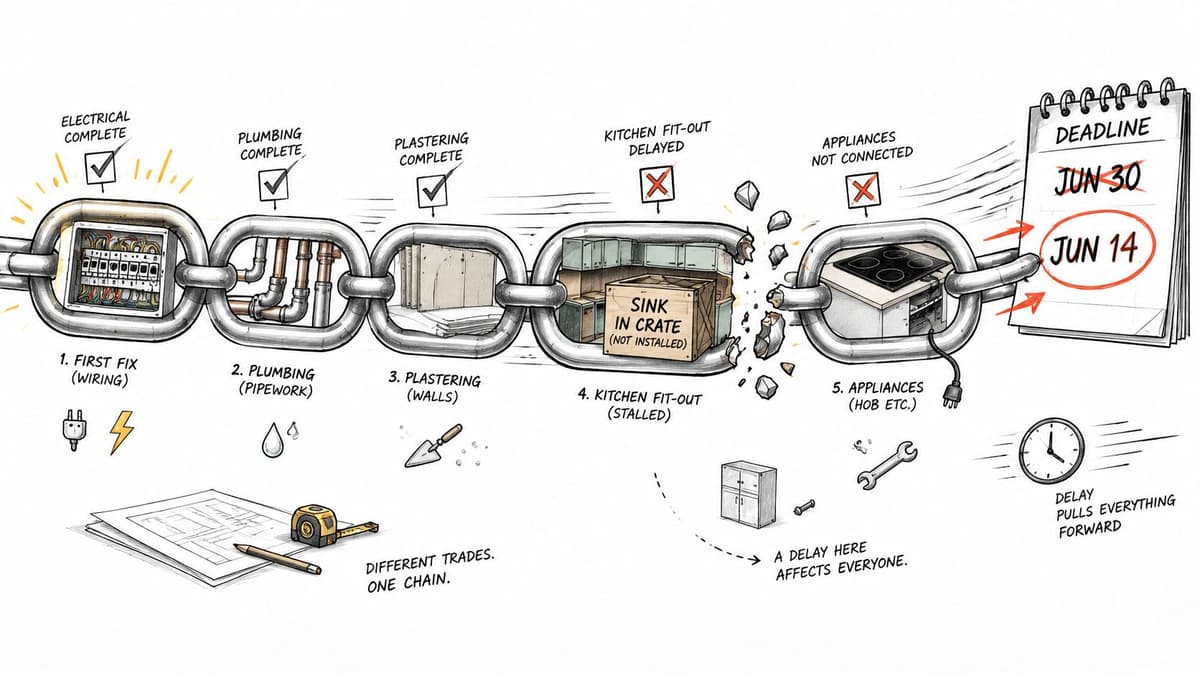
The most common link is finish-to-start: task B can't begin until task A ends. Cabinets before fit-out, fit-out before snagging, snagging before handover. Start-to-start, finish-to-finish and start-to-finish links also exist, and each needs its own rule in the calculation. Mixing them without saying so is how a schedule becomes a decoration.
The method isn't new. Critical Path Method came out of scheduling research at E. I. du Pont de Nemours and Remington Rand across 1956 and 1957, and was first used operationally in 1958 on a chemical-plant construction project, as the AIC Journal's account of CPM's origins records.
So at the next status meeting, name the chain and not the task. "Fit-out is late because the cabinet order sits on the same chain as the planning query" explains a date. "The electrician is fine" explains nothing.
How to Find the Critical Path in Six Steps
Take a small building project with seven tasks. Site survey takes 3 days with no predecessor. Design takes 5 days after the survey; permits take 10 days after the survey. Foundation takes 4 days after design; frame takes 6 days after both permits and foundation; interior fit-out takes 4 days after frame; landscaping takes 2 days after design.
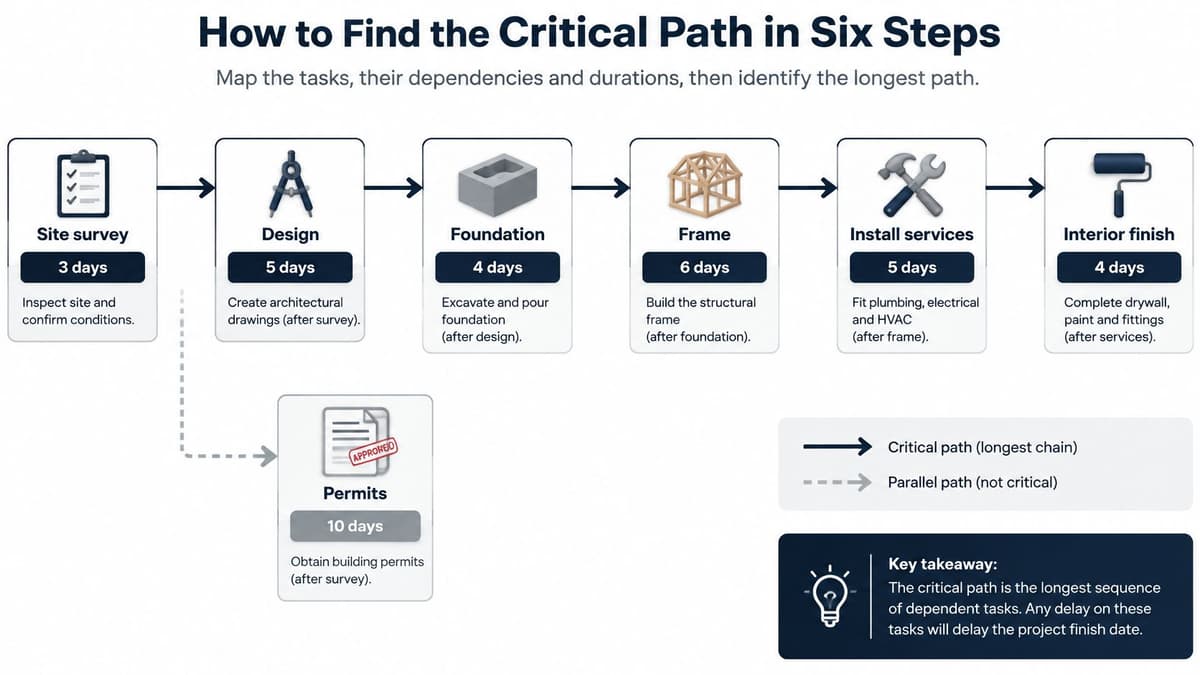
That's small enough to do on paper and messy enough to teach the traps.
1. List every task with a duration in days. Seven rows, one unit, no ranges yet. A task you forget to list can't be scheduled, but it still needs doing, and it will surface at the worst moment.
2. Map each dependency by asking what must finish first. Record immediate predecessors only, not everything that came earlier. Design waits on the survey, not on the survey and whatever preceded it. A missing link hides a real constraint; a guessed link invents one and lengthens the schedule for no reason.
3. Run the forward pass. Earliest start equals the latest earliest finish among a task's predecessors, and earliest finish equals start plus duration. Work left to right. The largest number you write down is the earliest date the project can finish.
4. Run the backward pass from the finish. Set the last task's latest finish to the project finish date, then move right to left: latest start equals latest finish minus duration, and latest finish equals the earliest latest start among that task's successors. The later numbers are the latest dates that still protect the deadline.
5. Calculate total float. Total float is latest start minus earliest start, and it tells you how many days a task can slip without moving the end date. Do this for every row, including the ones you assume are critical.
6. Mark the zero-float chain as critical. Here the survey, permits, frame and fit-out run 3 + 10 + 6 + 4 = 23 days, and nothing on that chain has a day to spare.
Two slips account for most bad calculations. The first is forgetting that the frame waits on two tasks, so its start must be the later of permits at day 13 and foundation at day 12. The second is treating a dependency as same-day when it really means the next morning, which steals a day from every link in the chain.
Here is the same project as a table, with the arithmetic already done.
| Task | Duration (days) | Depends on | Total float (days) | On critical path |
|---|---|---|---|---|
| Site survey | 3 | None | 0 | Yes |
| Design | 5 | Site survey | 1 | No |
| Permits | 10 | Site survey | 0 | Yes |
| Foundation | 4 | Design | 1 | No |
| Frame | 6 | Permits, Foundation | 0 | Yes |
| Interior fit-out | 4 | Frame | 0 | Yes |
| Landscaping | 2 | Design | 13 | No |
Read down the float column. Design can lose 1 day, foundation 1 day, and landscaping can lose 13 without touching the 23-day finish. Everything else is locked.
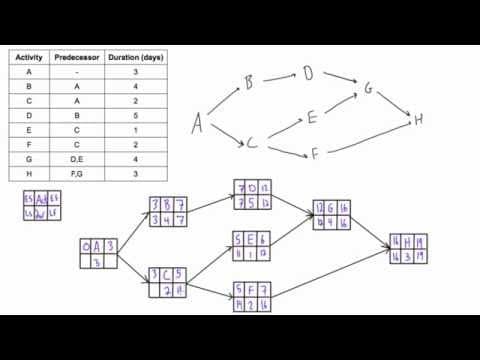
Plays from YouTube. Pressing play loads it from Google.
The walkthrough above runs a forward and backward pass over a drawn network. Watch it after you've done the six steps by hand once, because the arithmetic only sticks when you've made the mistake yourself.
Before you trust any software output, do the check that never fails: the critical tasks should form one unbroken chain from start to finish. If your zero-float list has a gap in it, something is wrong with the logic or the maths, and the finish date is fiction.
Try this on your own backlog.
A month of Premium free. No card. Connected in a minute.
Float and the Near-Critical Paths That Can Take Over
| Path | Duration (days) | Gap to critical path (days) |
|---|---|---|
| Site survey, Permits, Frame, Interior fit-out | 23 | 0 (critical) |
| Site survey, Design, Foundation, Frame, Interior fit-out | 22 | 1 |
| Site survey, Design, Landscaping | 10 | 13 |
The second row is where schedules die. Twenty-two days against twenty-three leaves one day of cover, and that cover is calculated from estimates that were probably rounded to the nearest comfortable number.
Say foundation runs two days over because the ground is worse than the survey suggested. The design route becomes 24 days and takes over as the critical path. The chain you've been managing all month stops controlling the date, and nobody notices unless someone recalculates.
Total float is not the same as a safety margin. Float comes out of the estimates you wrote down. A path with three days of float built on wildly uncertain durations is riskier than a path with five days of float built on work you've done a dozen times. Optimising only the nominal longest path can raise your risk if a near-critical path carries more uncertainty.
The weekly habit: list every complete path whose gap is two days or less, then watch those tasks as closely as the critical chain. Near-critical work is where the next delay comes from.
Classical CPM with fixed durations is inadequate for dynamic projects, which is why recent work tests combinations of CPM, PERT, Monte Carlo simulation and machine learning rather than CPM alone. One study of critical-path volatility under uncertainty ran 10,000 project-duration scenarios and reported P10, P50 and P90 outcomes. That reframes the useful question from "what is the critical path" to "which paths are most likely to control completion under different scenarios".
CPM, PERT and Monte Carlo Compared
| Method | Duration input | What it tells you | Best fit |
|---|---|---|---|
| CPM | One fixed estimate per task | Longest chain and earliest finish date | Work with well-known durations, such as shutdowns and fit-outs |
| PERT | Optimistic, most likely and pessimistic estimates | Expected duration and variance for each task | New work with uncertain estimates |
| Monte Carlo simulation | Duration ranges, run thousands of times | Probability of finishing by a date, such as P10, P50 and P90 | Programs with many near-critical paths and high risk |
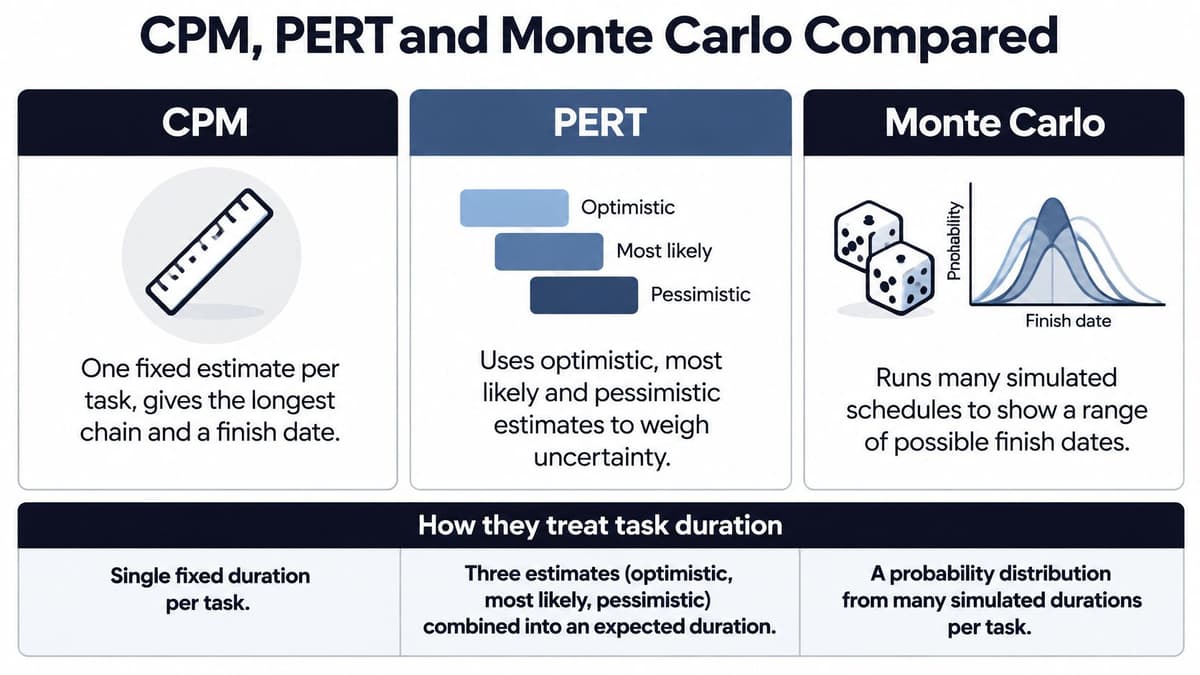
Run all three against the seven-task project and the difference is clear.
CPM says 23 days, full stop. That's the right answer for a fit-out where your team has installed the same cabinets twenty times.
PERT asks for three numbers per task: optimistic, most likely, pessimistic. Permits might be 8, 10 or 15 days depending on the authority's queue. The expected duration is (8 + 4×10 + 15) ÷ 6, which is 10.5 days, and the spread across the three estimates gives you a variance. Add the variances along a path and you can say something about the chance of missing a date, rather than pretending the estimate is exact.
Monte Carlo takes those ranges, samples them thousands of times and reports a distribution of finish dates. You stop saying "23 days" and start saying "26 days at P70", which is a sentence a stakeholder can plan around.
The methods also combine. A 2024 study of a construction project at PT Freeport Indonesia found a 13.9% probability that the project would be completed in 164 days using a crashing CPM-PERT method combined with Monte Carlo simulation, as published by the European Proceedings of Business and Management.
Read that number carefully. A 13.9% chance means the target date is a stretch, not a plan. The project either needs a later date or deliberate crashing, which is the cost of accelerating selected activities to buy back days.
Decision rule: fixed, well-known durations get CPM. New work with wide estimates gets PERT. A programme with several near-critical paths and real money at stake gets Monte Carlo, because you need a probability and not a single point.
Shortening the Critical Path When Work Runs Late
The deadline on the building project is 21 days. The current path is 23, so the job is to buy back two days without pretending every day can be bought at the same price. Two levers exist: change the network so dependent work overlaps, or shorten critical tasks by adding resources at a cost.
Overlap usually deserves the first look. Compressing a task attacks one activity; re-sequencing can remove waiting between activities. The gain comes from seeing which work can run in parallel, then checking what the parallel work now shares: people, equipment, information, approvals.
Here is where the path moves. Cut permits from 10 days to 8 and the original chain falls to 21. If design and foundation still total 22, that route becomes the controlling path and the finish improves by one day. The second day has to come from the new critical chain.
The sequence that holds up:
- Confirm the gap in days between the controlling path and the target. Two days here, not “a few”.
- List critical tasks that can shrink without cutting quality, and ask the people doing the work first. Define the tasks and their owners before compressing anything, or faster work can still drift when nobody owns the handoff.
- Price each option per day saved. A change that buys three days for the cost of one beats a heroic push on a stubborn task.
- Test overlaps that run dependent work in parallel, then look for the dependency the overlap created: shared crew, shared data, rework risk, safety limit.
- Recalculate the whole network and confirm which path now controls the finish date. If the 22-day route has taken over, the next conversation is with that team.
Crashing has a floor. Concrete, permits and paint all stop responding at some point, and the last day bought is usually the most expensive one. When the cheap days are gone, the honest options are a later date, different scope, or a different sequence.
Why Schedules Slip and How to Re-Forecast
A baseline is a promise made about a plan that no longer exists. The evidence is blunt: a 2025 analysis of more than 70,000 construction schedules found that 88% of project schedules were failing, according to the Construction Owners Association, citing SmartPM's State of Construction Scheduling 2025 report. The baseline is wrong by default.
The causes repeat across projects. Durations get estimated optimistically because nobody wants to be the person who says eight weeks. Dependencies go unmapped because the handoff lives in someone's head. Approvals sit in queues that appear on no chart. Scope arrives after the baseline was frozen and gets absorbed instead of re-planned.
That last one is the quiet killer. Take a task on a side path carrying six days of float. A change request adds eight days of work to it, the task absorbs the scope, burns through the float, and lands on the critical chain two days over with no history explaining how it got there. The slip was decided the day the scope was accepted, weeks before it showed up on the schedule.
Re-run the path when any of these happens:
- A critical task finishes late, even by a day. Every downstream date was built on the old finish.
- A new dependency appears, such as a review nobody scheduled or a vendor lead time that grew.
- A resource becomes unavailable: a person, a crane or a test environment.
- A milestone passes. Treat it as your regular checkpoint even when nothing else changed.
The routine takes twenty minutes:
- Record actual start and finish dates for everything complete, since the forward pass recalculates from dates.
- Recalculate the forward pass from today, using remaining durations for open work.
- Check whether the critical chain changed hands. After a slip it often has, and the work now controlling your finish may sit with a different crew than the one that ran late.
- Log the variance against the baseline, so the next estimate is informed by this one and the project implementation plan reflects what happened.
- Share the new finish as a range, with a confidence level attached.
Say it as a range: "mid-March, with a 60% chance of meeting it" lets a stakeholder plan around the risk. A single date hides the risk and transfers it to whoever believed you.
How to Check an AI-Built Schedule Before Trusting It
An AI tool can produce a network and a critical path in seconds. The hard question isn't whether it can, it's whether the logic underneath is right. Recent work still flags open research gaps around whether AI systems correctly determine project duration, slack and the critical path, and a 2026 systematic review of machine learning in schedule creation finds the field advancing without a full account of its own limits.
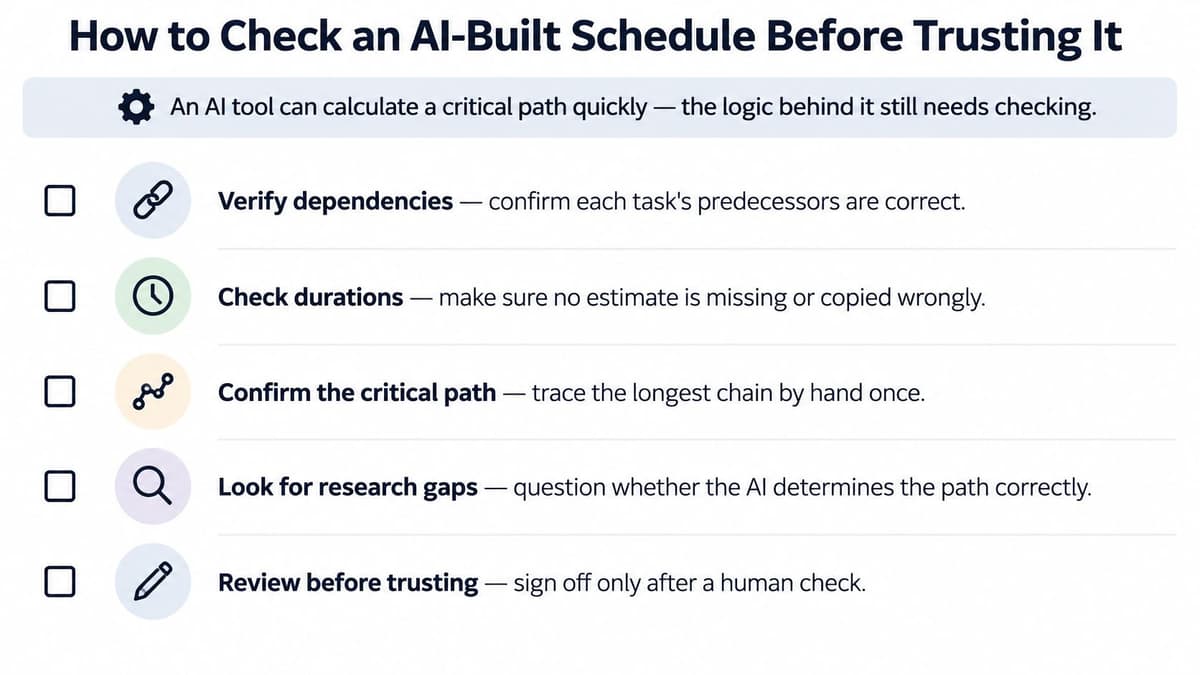
These are the failure points worth checking, in the order they usually appear.
Missing activities. A generated schedule reflects what was in the source, not what happens on site. Commissioning, snagging, training and sign-off are the usual omissions, and each one adds days the plan never counted.
Wrong link assumptions. Every dependency gets defaulted to finish-to-start unless something overrides it. For a lot of work that's correct. For curing, testing or inspection windows that can overlap with the next trade, it inflates the schedule and hides real float.
Circular logic. Task A waits on B, B waits on C, and C waits on A. Software may resolve the loop rather than refusing to compute, and the finish date that comes out is meaningless.
Dependencies with no source. Ask, for each link, who confirmed it and on what basis. A link nobody can explain is either an invention or a memory, and both cost you the same when they're wrong.
Hidden approvals. The network shows work. It doesn't show the three weeks a client's legal reviewer sits on a document, unless someone adds that as a task.
The standard to hold is auditable automation: the tool proposes activities, links, durations and risk adjustments, and a person verifies the network and approves material changes. Version history matters as much as the calculation, because a critical path that moved without a record explains nothing later. That's the same discipline that makes managing AI agents on project work safe in any delivery team.
The decisive test: pick the longest chain the AI produced and add it up by hand. If your total and the tool's total disagree, stop. Find the difference before anyone uses that schedule to make a commitment.
The strongest use of AI here isn't generating a plan once. It's continuous maintenance and exception detection: flagging the task that slipped, the dependency that appeared, the path that changed hands, so a person can decide what to do about it.
Confirm Your Critical Path Before the Next Milestone
Four actions, in order, before the next milestone lands.
- Mark the zero-float chain and list every path with a gap of two days or less beside it.
- Assign one owner to each critical task and each near-critical task. Unowned work is unmanaged work, whatever the chart says.
- Set a re-forecast date at the next milestone and record the new finish as a range with a confidence level.
- Run the hand-calculation test on any AI-built schedule before it informs a commitment.
Teams running people and AI agents in parallel get the most from a single ranked queue. Projectify's Start next queue hands out the highest-ranked task that is free and not blocked, so critical work gets picked up first and nobody spends the morning deciding who does what. The free plan covers one person, which is enough to test the routine on a single project before you roll it out.
The critical path is confirmed when every zero-float task has an owner, a date, and a check at the next milestone.
A schedule that moves needs a board that keeps up with it. Projectify gives every task an attributed owner, person or agent, and its Start next queue pulls the highest-ranked unblocked task first, so the critical chain doesn't wait while someone works out what's next. It's free for one person, connects in a minute, and your first handoff can happen tonight. Visit Projectify and put the next milestone on a board that shows who is doing what.