What Is Agentic Workflow: Parts, Examples and Limits
A plain guide to what is agentic workflow: how AI agents plan steps, use tools, check results and pause for approval, with examples.
An agentic workflow is a multi-step process in which an AI agent pursues a goal, chooses its next action from each result, and stops for a person when a choice belongs to them.
You might already have a process that needs this: a weekly client report assembled from scattered updates, documents and unanswered messages. You know what finished work should look like, but you're still the person fetching information, deciding what's missing and chasing approval.
The useful question isn't whether AI can write the report. It's which work you can delegate, what evidence you need back, and where the agent must stop.
What an Agentic Workflow Is in Plain Terms
An agentic workflow is delegated work with a goal, an adaptive path and defined boundaries. A chatbot reply usually ends when the answer appears. A workflow continues through connected tools until it reaches its completion condition or needs human input.
Say a team lead asks for a weekly client report using project updates, support records and campaign results. The agent retrieves the records, notices that a campaign name doesn't match, checks the supporting document and drafts the report. If the explanation requires a judgment about the client relationship, it asks the account lead rather than inventing one.
A Business & Information Systems Engineering article describes five capabilities behind this kind of workflow:
- Goal interpretation: Understand the requested outcome and what counts as finished.
- Iterative reasoning: Decide what to investigate or do next as information arrives.
- Tool use: Read information and interact with connected systems.
- Memory: Preserve useful context and task state between steps.
- Action execution: Make permitted changes rather than only suggest them.
The path can change, but the boundaries shouldn't
If the support records are incomplete, the agent might retrieve another source before drafting. That choice separates an agentic run from a fixed script whose designer has already specified every branch.
However, choosing the next useful step doesn't mean choosing its own authority. The agent may investigate a discrepancy without gaining permission to email the client.
A meeting-ready explanation: Give the agent an outcome, let it work through permitted steps, and require it to bring consequential choices back to a person.
That's a more useful definition than treating agentic as a synonym for advanced chat.
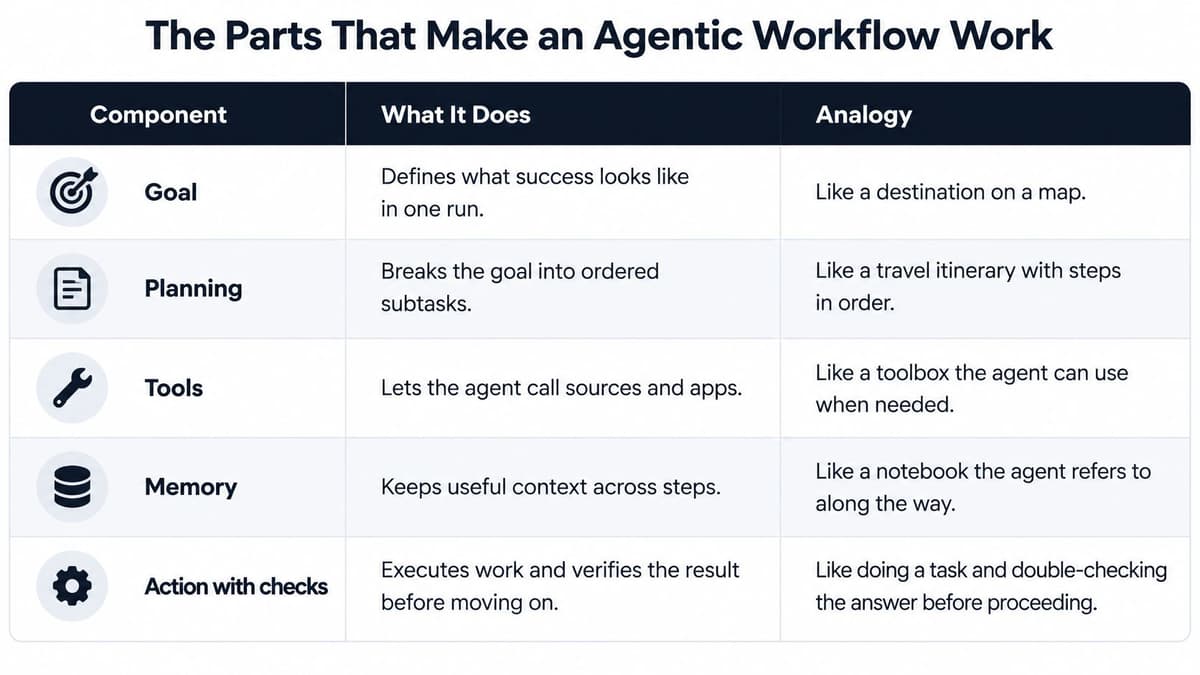
The Parts That Make an Agentic Workflow Work
| Part | What it does in a run | Everyday analogy |
|---|---|---|
| Goal | States the outcome and what success looks like | A brief handed to a new assistant |
| Planning | Breaks the goal into ordered subtasks and dependencies | A checklist written before the work starts |
| Tools | Reads from and writes to other systems through connections | The keys, phone and files an assistant uses |
| Memory | Keeps state between steps, so later steps know what came before | A shared notebook the team reads |
| Action and checks | Carries out each step and tests the result before moving on | Inspecting the work before passing it along |
The components work together rather than as separate features. Memory without checks can preserve a mistake; tools without a clear goal can let an agent make unnecessary changes.
This visual puts the parts alongside their everyday equivalents.
Separate judgment from workflow controls
An agentic-workflow architecture paper describes three layers: an interface for intent and feedback, workflow management for orchestration and state transitions, and agent collaboration for delegation and coordination.
Think of an assistant working inside an office with established procedures. The interface is where you give the brief. The workflow layer is the office procedure: who can approve, which information must exist first and what happens after a failure.
The agent layer handles open-ended work, such as interpreting an unclear document or choosing a useful search. The workflow layer should enforce dependencies, so a validation step can't be marked complete before its required records have arrived.
A plausible checklist isn't necessarily an executable plan. If approval depends on a completed review, that dependency must exist in the system, not merely in prose the agent might overlook.
When several agents share the work
A searcher might gather material, a filter remove irrelevant records, a planner arrange the remaining work and a validator inspect the result. An orchestrator coordinates their handoffs and shared state.
Different agent orchestration patterns suit different dependencies. Adding specialists is useful only when their responsibilities are distinct enough to inspect.
For another explanation of the moving parts, watch the walkthrough below.
Plays from YouTube. Pressing play loads it from Google.
Before accepting a design, ask: Can I see the steps, their order, their owners and the places where execution stops? If not, you're looking at an intention, not yet a dependable workflow.
How an Agentic Workflow Runs From Goal to Handoff
A healthy run doesn't just produce an output. It leaves enough evidence for someone to understand how that output was produced.
The diagram shows the main route, including the handoff to a person.
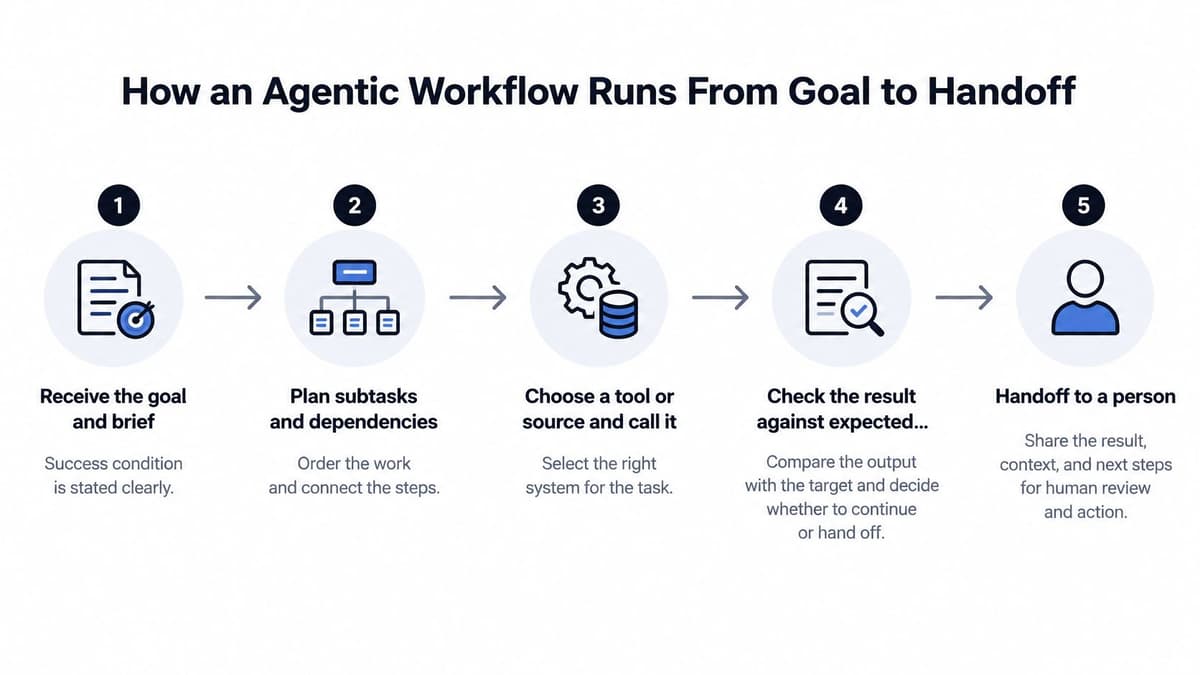
Receive the goal and brief. The team lead supplies the reporting period, intended reader and required sources. Intake is done when the agent can identify the deliverable and its acceptance conditions.
Plan subtasks and dependencies. The agent identifies retrieval, reconciliation, drafting and review work. Planning is complete when each step has an owner and the required inputs are explicit.
Choose and call a tool. The agent requests the relevant project records, using typed inputs such as a project identifier and date range. Retrieval is done when the tool returns a valid response, not merely when a call has been attempted.
Check the result. The agent verifies coverage, dates and expected fields before using the records. An empty response must be distinguished from confirmed absence of activity.
Recover within limits. A failed connection can trigger a bounded retry or an approved alternative source. Use an idempotency key, a unique operation identifier, so retrying a write doesn't create duplicate records.
Pause for consequential choices. If the draft includes a disputed explanation, the account lead reviews the evidence. The run resumes only when that named reviewer resolves the question.
Record and hand over the result. The agent delivers the report with its sources, unresolved issues and approval record. Completion means the named owner receives the agreed doc, task, file or message.
Make failure handling explicit
The RobustFlow paper describes how semantically equivalent instructions can produce structurally different workflows and reports a separate evaluation under probabilistic tool failures: average success was 62.1% for MDP-optimized workflow prompts, 54.3% for flawed workflow prompts and 50.8% for chain-of-thought prompts. The engineering lesson is to encode recovery policies rather than ask the model to reason harder.
Define typed tool outputs, postcondition checks that verify the expected result, retry limits and escalation routes. Keep the execution graph so someone can diagnose a failure without trusting the agent's retrospective explanation.
In Projectify, a process shown in a video, link or document becomes steps with human checks and a final handoff. Each step states who acts and when it's done; Claude receives the brief, earlier context and instructions, while task claims, handoff records and Needs you checkpoints preserve accountability.
A run can cover one case or many rows without bypassing its checks. Its log should show each step's result, retry count and timestamp.
How Agentic Workflows Differ From Automation and Chatbots
| Aspect | Rule-based automation | Chatbot | Agentic workflow |
|---|---|---|---|
| Who sets the path | The designer fixes every step | A person types each instruction | The agent plans steps toward the goal |
| Handling surprises | Stops or fails on unexpected input | Answers, then waits for the next prompt | Reads results and chooses the next action |
| Taking action | Yes, along fixed paths | Usually no | Yes, through connected tools |
| Typical example | Sends an email when a form is submitted | Drafts a reply a person must paste and send | Triages an inbox, looks up orders, routes exceptions |
| Main risk | Breaks when inputs change | Output needs manual checking | Acts on a wrong assumption unless gates exist |
These are useful working distinctions, not rigid product categories. A chatbot interface can connect to an agentic system, and a rule-based process can contain an AI drafting step without becoming agentic.
Rule-based automation fits a predictable form submission. A customer completes the required fields, the system creates a record and sends a predefined invoice email. There's no reason to have an agent reconsider that sequence each time.
A chatbot fits a person who wants help composing a sensitive reply. The person supplies context, checks the wording and sends it themselves. Keeping that person actively involved may be exactly right.
Choose by the uncertainty in the work
An agentic workflow fits an inbox where the next action requires investigation. The agent reads a request, looks up an order, checks whether the delivery information answers the question and prepares a response or routes an exception.
The important distinction is who handles the next decision. In a chatbot conversation, the person generally decides what to ask next; in an agentic run, the agent can choose an allowed next action based on what it finds.
That flexibility has a cost. More tool calls, model decisions and checks create additional latency, expense and opportunities for mistakes. Use a fixed rule when a fixed rule can do the job.
Choose the least autonomous approach that can complete the work reliably.
Before choosing a system, ask:
- Does the path change with the input? If not, ordinary automation may be simpler.
- Does the work need tools? Drafting text alone may not require a workflow.
- What happens when the agent is wrong? If the consequence is serious, design the approval and recovery path before granting access.
Agentic isn't a quality rating. It describes how decisions and actions are delegated.
Agentic Workflows at Work in Real Teams
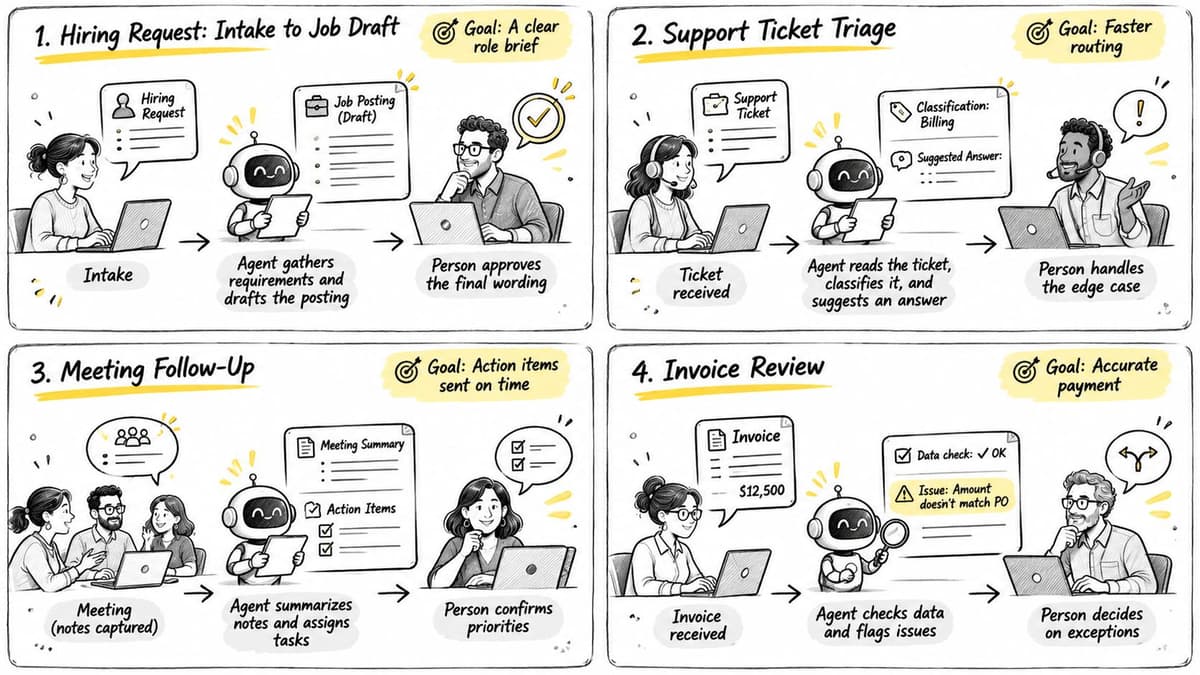
Hiring a teammate. Say an HR lead records the role-opening process. In Projectify, that becomes a workflow from hiring-manager intake through a job description, HR wording check, interview plan and scorecard, a logged board request and hiring-manager sign-off. On day one, supply an approved role brief and assign the HR reviewer. The agent can prepare materials, but HR checks the wording and the hiring manager authorizes the request.
Employee onboarding. A people-operations manager records onboarding once, then uses the workflow for each new teammate. The agent prepares the task list and supporting information, while the manager signs off at the designated checks. Start with an upcoming hire and inspect whether the instructions make sense without relying on the person who originally wrote them. A missing equipment decision should become a question, not an invented preference.
The illustration groups several everyday delegation scenarios.
Keep the decision owner visible
Client onboarding. An agency's goal is a project ready for delivery, not merely a completed intake form. The agent gathers documents, identifies missing information and prepares the project structure. The account lead approves the proposed plan before delivery work starts. On day one, use a familiar engagement with a clear scope so the reviewer can spot omitted requirements.
Creative review. The agent collects stakeholder notes and merges them into a change list. When one stakeholder wants shorter copy and another wants additional detail, the creative lead settles the conflict; the designer then revises, the revision is checked against the brand book and the requester signs off. Start with a contained review round and provide the current brand book, not a folder of contradictory drafts.
A larger team might separate research, checking and publishing between specialist agents. The orchestrator should pass along evidence and unresolved questions, not just a polished summary that hides disagreements.
The same pattern applies beyond these examples to construction checklists, legal matters, accounting work, events and personal projects. The useful starting point is a recognizable process with a clear finish and a person who can judge it.
Repeatable preparation can run across many records. Judgment belongs to a named person who receives the context needed to decide.
Where People Stay in Control of Agent Steps
| Type of step | Risk if wrong | Autonomy level |
|---|---|---|
| Gathering and summarizing files | Low, easy to reread | Agent runs freely |
| Drafting internal notes or task lists | Low to medium, easy to edit | Agent runs, a person reviews the output |
| Updating records in shared systems | Medium, reversible with an audit trail | Agent runs within its permissions and logs each change |
| Sending messages to clients or the public | High, hard to undo | Run pauses for explicit approval |
| Payments, contracts, deletions or legal filings | Very high, may be irreversible | Agent prepares only, a named person decides |
Treat this as a starting policy for authorized information, not permission to gather any file. Confidentiality and access restrictions still apply, even when the output is only a summary.
Human-in-the-loop isn't a control until someone can explain how the loop stops. Decide which actions may proceed independently, which require sign-off and which the agent must never perform. Name the decision-maker before the run begins.
The NIST AI Risk Management Framework treats oversight as something organizations must define, assess and document, with clear roles and intervention when an AI system can't detect or correct errors. A reviewer's name on a policy page isn't enough if that reviewer never receives the decision.
Turn the policy into enforced limits
Give agents scoped permissions, not a broadly privileged account. An agent preparing a client response shouldn't automatically have permission to send it.
Build controls around the actual actions:
- Approval gates: Pause execution and show the proposed action, evidence and consequences.
- Stop conditions: Halt when required information is missing, contradictory or outside scope.
- Rate limits: Restrict repeated calls and bulk changes.
- Audit trails: Identify the actor and preserve before-and-after records.
- Recovery paths: Explain how to undo a change or contain an action that can't be reversed.
A practical human-in-the-loop agent design also makes refusal meaningful. Rejecting a proposal should leave the workflow in a clear state, not cause the agent to try a slightly different route to the same forbidden action.
Prevent competing work and premature starts
Task ownership matters when agents work together. In Projectify, the first agent claims the task; another agent sees who holds it and when they were last active, then leaves a comment or asks for the claim rather than duplicating the work.
Before creating work, the agent states what it understood, sizes the work and asks at each gate, starting only after the person says go. Changes are signed with the responsible person, such as Claude for Isaac, so review doesn't depend on guessing who acted.
The best workflow is often less autonomous than marketing suggests. Watch for an agent sending external messages without approval, a workflow without an owner, or a completed run without a log.
Common Misconceptions About Agentic Workflows
An agentic workflow is a chatbot with more steps. The difference is execution responsibility, not conversation length. A reporting agent can retrieve source material and investigate gaps without someone typing each intermediate instruction.
More autonomy is always better. Drafting a client message and sending it are different permissions. You can delegate the preparation without delegating the external commitment.
One approval at launch is enough oversight. Processes, source documents and connected tools change. Someone must keep inspecting outcomes and reviewing exceptions after deployment.
These ideas didn't begin with modern chat interfaces. The history of agent systems traces foundations through distributed task allocation, formal agent architectures and systems designed to perceive, plan and act. Natural-language models make those patterns easier to interact with, but don't remove the need for coordination.
A long prompt isn't an execution system
A prompt can describe the intended procedure, but it doesn't by itself preserve state, enforce dependencies or prevent an unauthorized action. Those responsibilities belong in the surrounding system.
Keep the actual execution trace, including failed calls and rejected proposals. Useful AI agent observability lets a reviewer inspect the run rather than accept a convincing completion message.
Recurring evaluation matters too. MIT Sloan Management Review's guidance on agentic management recommends ongoing assessments, technical audits, monitoring and explicit escalation protocols.
A single AI answer isn't an agentic workflow. Neither is a fixed macro or a script that makes no adaptive decisions. The distinguishing feature is goal-directed action within enforceable limits.
Choose One Process to Turn Into a Workflow
- Choose a familiar process. Start with a written checklist for client onboarding, a weekly report or a hiring request.
- Mark the authority of each step. Label it run alone, review or never. Assign a person to every review.
- Test a small batch. For example, try a handful of representative records, including an incomplete one, and read the execution log before expanding.
Projectify is one place for people and their Claude agents to manage any kind of work. Its workflows run once or across many rows, pause at checks in Approvals, and bring choices that belong to a person into Needs you.
A new workspace starts with a month of Premium free, no card, and there's a free desktop app for Mac and Windows. Begin with a process you can explain and a result you can inspect.
Which step must never run without a person?
Projectify turns a video, link or how-to document into workflow steps with human checks and a final handoff. Visit Projectify and bring one repeatable process, then decide exactly where your Claude agents should work independently and where they should ask you.