What Is AI Orchestration? a Plain Guide for Teams
What is AI orchestration? Learn how it coordinates models, agents, tools and human approval, with a worked example for software teams.
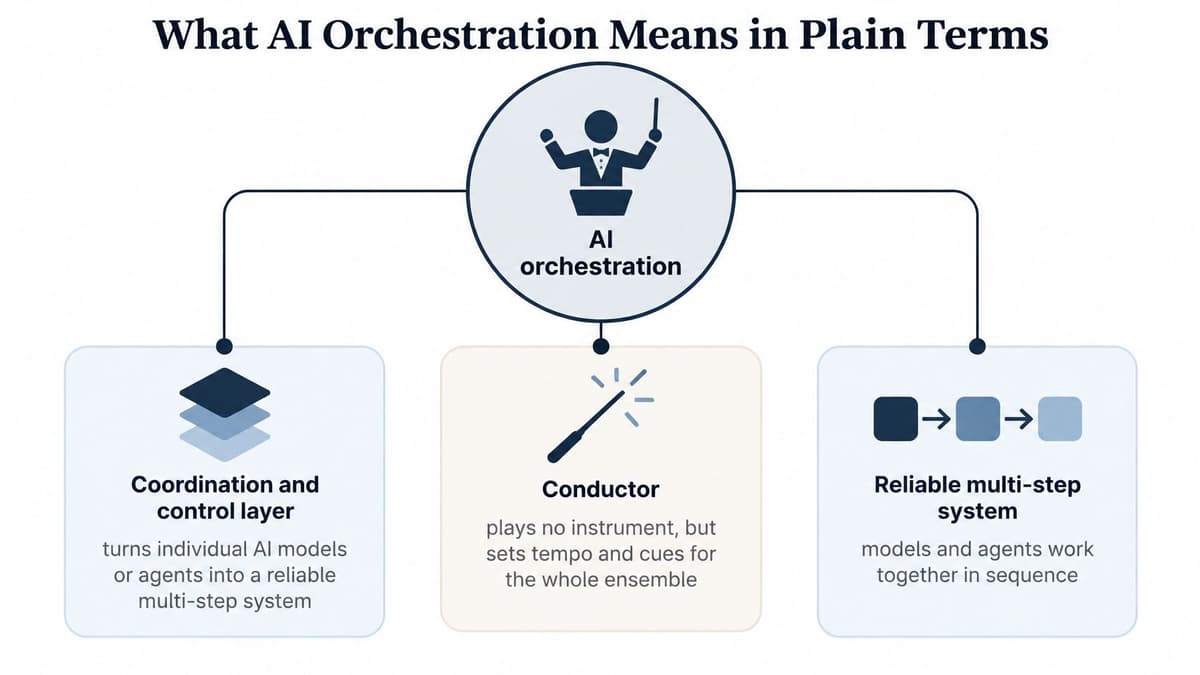
Is your AI problem really the model, or the workflow around it? AI orchestration is the coordination and control layer that turns individual models or agents into a reliable multi-step system. It decides who or what handles each step, where a person approves, and what record exists when work moves on. Many organizations were scaling or experimenting with agents in 2025, which made the coordination question hard to ignore.
"So which model should we use?" That question opens most internal AI conversations, and it aims at the wrong target. A stronger model won't fix a workflow where nobody can say who approved the invoice, where two agents edit the same client record, or where a failed step vanishes without a trace.
Think of orchestration as the conductor's score and cues. The model is a musician, the tool is an instrument, and the agent is a player who can keep going through a piece. The conductor decides when the section starts, who enters, and when a person in the room has to nod before the next passage.
That control work matters because real team work isn't a single exchange. It's a brief, a claim, an approval, a handoff and a record. In Projectify, for example, an agent says what it understood, sizes the work, asks at each gate and starts only when the person says go. Orchestration adds that accountability layer, so the number of agents or the quality of the model matters less than clear approvals, permissions and audit records.
What AI Orchestration Means in Plain Terms
Picture an orchestra warming up. Every musician in the room is excellent, and the noise is still a mess, because nobody is setting the tempo, cueing the entries or deciding when the piece stops. A conductor plays no instrument. The conductor's job is the coordination layer that turns a room of skilled players into one performance.
That's the cleanest way to hold AI orchestration in your head. A model can produce a paragraph. An agent can chase a goal across several steps. Neither one knows, on its own, what happened three steps ago, who owns the next decision, or when to stop and ask a person.
Where orchestration sits among the layers
The terms get mixed up constantly, so here they are side by side, with what each layer does alone and a team example of it.
| Layer | What it does | Team example |
|---|---|---|
| Model | Generates text, code or a decision for one prompt | A model drafts a client email from a short brief |
| Tool | Performs one action when called | A file reader that extracts the totals from an invoice |
| Agent | Pursues a goal across several steps using tools | An agent reads a support ticket and drafts a reply |
| Automation | Runs fixed rules in a fixed order | A form submission copies a row into a spreadsheet |
| Orchestration | Assigns work, passes state, routes between models and tools, and pauses for people | Routes a contract review across a drafting model, a legal reviewer and a filing tool |
The bottom row is the one that turns capability into something a firm can put in front of a client. McKinsey's 2025 global survey reported that 23% of respondents said their organizations were scaling an agentic AI system in at least one business function, while another 39% had begun experimenting with AI agents. Both groups are running work that needs coordination beyond a single prompt and response.
An orchestrator adds three things a model cannot supply on its own:
- Shared state. A running record of what has finished, so the next step doesn't repeat it or contradict it.
- Routing. A decision about which model or tool suits each subtask, made once and applied consistently.
- A pause for people. A defined point where the run stops because the choice belongs to a person, not a model.
Say a law firm opens a new matter. One model reads the engagement letter, a tool pulls the client record, a drafting model writes the opening memo, and a partner approves it. Without orchestration that's four disconnected chats and a partner wondering which version is current. With it, the work moves as one file with a visible state. That's why orchestration sits much closer to workflow management than to chatbot features.
How an Orchestrator Runs a Multi-Step Task
Hand a multi-step goal to a well-built orchestrator and the same six things happen, in the same order, whether the work is a sales proposal, a hiring pack or a compliance review. The steps barely change between industries, which is what makes them worth learning once.
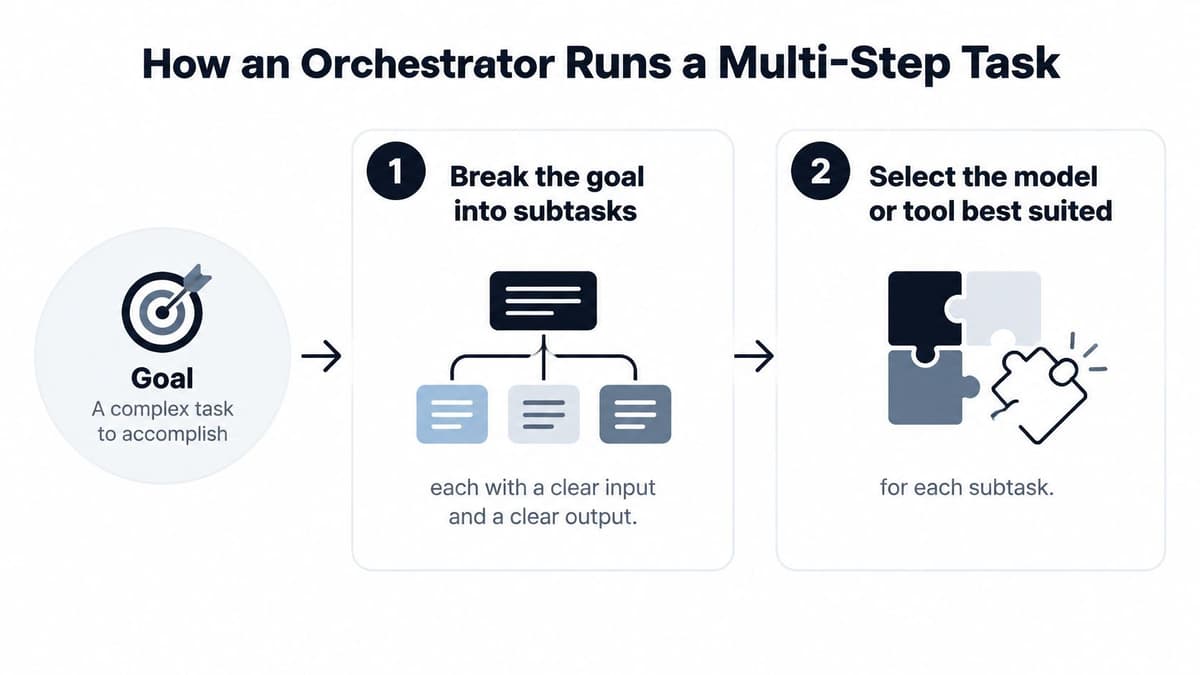
Take a proposal that needs pricing from a rate card, a written narrative and a final terms check. Here's the sequence.
- Break the goal into subtasks. Each subtask needs a clear input and a clear output, or the next step inherits the ambiguity. For the proposal, that means three jobs: pull the pricing, write the narrative, check the terms against the standard contract.
- Select the model or tool that fits each subtask. A spreadsheet reader for the rate card, a writing model for the narrative, a retrieval step against the contract library. Sending everything to the largest model wastes money and adds noise to the answer.
- Pass context from step to step. The writer needs the numbers the reader extracted, in the same units and the same currency. The orchestrator carries that forward so nobody explains the deal twice and the writer never guesses a rate.
- Validate each output before moving on. Totals are checked against the source sheet, not against the writer's summary of it. NIST's Generative AI Profile recommends comparing generated output against known ground-truth data and using more than one evaluation method, which here means a numeric check on the figures and a human read on the prose.
- Retry once, then escalate. A step that fails twice rarely fixes itself. Good orchestration retries a single time with the error attached, then hands the failure to a person along with the input, the error and the attempted output, so nobody debugs blind.
- Record each decision. Every step writes down what it did and what it checked, and that record travels with the work, so a reviewer six weeks later can see the sequence without interviewing anyone.
Why shared state does most of the work
Without a record of what has finished, agents repeat work and contradict each other. One writes a proposal using last quarter's rate card while another updates the same client record from a different starting point. Neither is wrong on its own terms, and together they are a mess.
You can tell an orchestration is working without opening a single prompt:
- Every step has a named owner, whether that's a model, a tool or a person.
- Every step has a check that has to pass before the next one starts.
- Every step leaves a logged result that someone else can read.
If any of those three is missing, you have automation with extra steps, not orchestration.
Autonomy Levels and Where Human Approval Goes
Teams don't choose between full autonomy and fully manual work. They live in the middle, where an agent runs the routine stretches and stops at defined points. NIST's AI Risk Management Framework treats that oversight as a defined operating mechanism rather than an optional review step, and it sets out configurations that range from fully autonomous operation to fully manual decision-making.
The framework also recognizes a middle model in which the system makes recommendations and a human expert decides. It asks organizations to document and differentiate the roles of the people who use, supervise and govern the system. That's a structural instruction, not a mood.
| Level | Who decides | Example | Suits |
|---|---|---|---|
| Fully manual | A person does every step, with no AI in the loop | A partner writes an opinion letter without AI drafting | Regulated, high-stakes decisions |
| Recommend, then human decides | The model proposes and a person chooses | A model ranks candidate CVs and the recruiter picks who to interview | High-impact decisions that are costly to get wrong |
| Act with approval gates | The agent runs routine steps and waits at defined checks | An agent drafts a client proposal and a partner approves it before sending | Most team workflows |
| Autonomous with audit | The agent acts within set limits, and every action is logged and reversible | An agent tags and files incoming support emails | High-volume, low-risk, easily reversed work |
The third row is where many teams belong, and it's the one that needs the most design work. This is the same thinking behind careful human in the loop design for AI agents, where the person sits inside the process instead of rubber-stamping it at the end.
Placement rule: pause the run when an action is hard to reverse, touches money, customers or personal data, or falls outside the brief the agent was given.
A gate also needs a person's name attached to it. "Partner approval" is a hope. "The matter partner on this client" is a checkpoint that either happens or shows up as a blocked task. NIST recommends identifying which capabilities require oversight, defining approval policies, and evaluating whether the oversight works before deployment. In practice, that means running a case the agent should refuse and watching whether it stops.
Watching a Bug Fix Move Through an Orchestrated Workflow
A customer reports that invoices above a certain amount export with the wrong currency. The report lands in the tracker at 9am on a Tuesday, and by the afternoon it's a merged fix. Software teams are the furthest along with this pattern, so it's the clearest place to watch it happen.
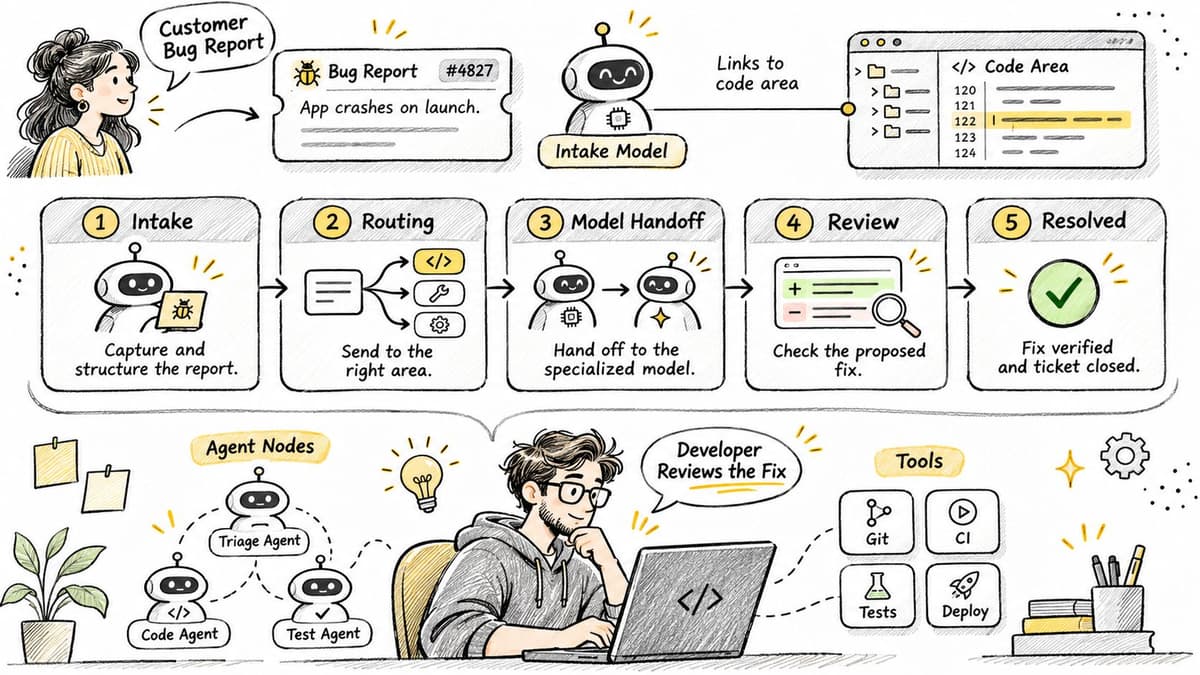
The intake model reads the report, links it to the repository and finds the failing test. From there, each stage has one acting party and one check that gates the next stage.
| Stage | Acting party | Check before moving on |
|---|---|---|
| Intake | Intake model links the report to the repository and failing test | Report has steps to reproduce |
| Plan | Coding agent drafts a fix plan | Developer approves the plan |
| Implement | Coding agent edits a branch | Test suite passes |
| Review | Second agent summarises the diff and flags risky files | Human reviewer checks flagged files |
| Merge | Human maintainer | Maintainer merges, the agent never does |
The design decision that matters most isn't the model choice. It's that the coding agent never merges. A human sees the diff and the test output before anything reaches the main branch, and the agent's permissions make that structural rather than a matter of good behaviour.
Plays from YouTube. Pressing play loads it from Google.
Now delete the plan stage and watch the same workflow turn expensive. The agent finds a plausible edit in the wrong module, patches the invoice formatter instead of the currency conversion, and the test suite goes green for the wrong reason. The reviewer then spends an afternoon reviewing a fix that solves nothing, which is exactly the kind of failure that makes teams distrust agents.
The gains are less dramatic than the failures, and more durable. Every step leaves an attributable record, so the standup question changes from "what happened here?" to "who reviews the flagged file?". Reviews get shorter because the reviewer already knows which checks ran and what they returned. Teams running this pattern in earnest tend to start with a careful read of how AI coding agents fit into a development workflow before they widen the scope.
Where Orchestration Projects Go Wrong
The common belief is that more agents means more capability: specialize the work, add a planner, add a reviewer, and the system gets safer as it gets bigger. The evidence points the other way. The hardest problems in orchestration are organizational and integration problems, and each extra agent adds another place where work can go wrong.
A Cloudera analyst report on the future of enterprise AI agents cites an enterprise survey where privacy concerns came in at 53%, integration with existing systems at 40%, and implementation costs at 39%. Notice what's absent from that list. Model quality doesn't appear, because a better model doesn't reconcile a legacy system, fix an inconsistent client list or settle who owns the handoff.
The silo problem is the other half of it. The same report notes recent coverage finding that 50% of agents operate in isolated silos rather than in multi-agent systems, which produces duplicate automation and shadow AI: three teams each building their own invoice reader, none of them aware of the others. Curiously, only 19% ranked connecting agents across applications and workflows among their top challenges, which suggests many teams haven't hit the coordination problem yet because they haven't connected anything.
So when does a team need more than one agent? Work through this in order:
- One agent with tools when a single owner runs a short sequence of steps and the output is easy to check.
- Several specialised agents when subtasks run in parallel, or when a failure in one must not spread into another, such as a drafting step and a legal review.
- No autonomous agent when the task is short and a person reviews the output anyway, because you'd be adding a control layer to save nothing.
The work process sets the answer, not the agent count. Start with the brief, the claim, the approval, the handoff and the audit trail, then ask how many agents the process needs. Usually it's fewer than the first design suggested.
Keeping an Audit Trail That Shows Who Approved What
There's one question that separates a controlled workflow from an expensive demo: how do you prove what an agent did, why it did it, and who approved the consequential step?
Recent research on the governance-to-action closure gap names the problem precisely. Evaluations measure whether an outcome was successful, governance says what should be permitted, and neither reliably maps obligations to individual actions or proves compliance afterward. The gap isn't in the model's accuracy. It's in the runtime that's supposed to record the work.
That's why accuracy doesn't substitute for control. A highly accurate model can still create unacceptable risk if permissions, handoffs and audit evidence are weak, because nobody can show a client or a regulator what happened on the one case that mattered.
A provable record needs seven fields, and none of them is optional:
- Action: what changed, described in plain language rather than a tool name.
- Actor: the named agent or person, such as "Claude for Dana" or "Dana Whitfield".
- Input: the document, row or message the step worked from, with a version reference.
- Timestamp: when it happened, in the reader's timezone.
- Approver: who said yes, and when they said it.
- Outcome: what the check returned, pass or fail.
- Rollback: how to undo the action, and whether it's still possible.
An approval that names no one fails the test. "Approved by legal" with no name and no time can't answer a client question six months later, and a record that says "sent proposal" without the version that went out is worse than no record, because it looks like evidence. Good AI agent observability is built from these small, boring entries, not from a dashboard that summarizes them away.
Here's the test worth running this week. Pick one action an agent took in the last month and try to fill in all seven fields without asking anyone for help. If you have to guess, the orchestration is missing a checkpoint, not a feature.
Start With One Workflow and Map Its Checkpoints
You don't need a platform decision to begin. Pick one recurring workflow with a clear owner, write its steps down in order, and mark the two or three points where a person has to say yes before the work moves.
A checklist you can finish in one sitting:
- Name the owner of every step, by role rather than by team, so the approval has somewhere to land.
- Write down what the agent may do without asking, in plain sentences someone outside the project can read.
- List the actions that need approval before they happen, not after.
- Decide where the record lives, so a run can be read later without hunting through chats.
- Run it for one week before widening the scope, and note every place you had to intervene.
Starting narrow matches how teams adopt this technology. Stanford HAI's 2026 AI Index reports that 88% of surveyed organizations used AI in at least one business function in 2025, while AI-agent deployment remained in the single digits across nearly all business functions. Broad autonomous rollouts are rare for a reason: one workflow with visible checkpoints teaches you more in a week than a company-wide launch teaches you in a quarter.
If you want somewhere to run the first one, Projectify's workflows take a recorded process, a video or a document, explain it, and turn it into steps with checks where a person approves, which Claude can then run once or across a whole list.
Orchestration adds control work rather than magic. The first mapped workflow will feel slower than the ad hoc version for about a week, and after that it will be the only version anyone can explain to a new hire.
Projectify is one place for any kind of work, shared by people and their Claude agents, so the coordination layer sits on the board where everyone can see it. Every agent session starts briefed, claims a task before it works, asks a person in Needs you when a choice is theirs, and ends with a handoff, with each change signed and reversible. Map your first workflow with checkpoints at Projectify and see where the approvals belong.