What Is Context Engineering? a Plain Guide for AI Teams
What is context engineering? Learn how it differs from prompt engineering, where AI context comes from, and how teams build it for agent work.
Context engineering is designing everything an AI model receives when it works, not only the wording of the prompt. You're about to ask for a draft, a plan, or a next step, and most of what the model needs is still sitting in a file, a thread, or someone's head.
That gap shows up on ordinary work. A marketer wants a launch email. A coordinator wants a client update. An operations lead wants the weekly status written from the board, not from memory. The sentence in the chat box is clear enough. The brand rule, the last decision, and the approval that still hasn't happened never arrive with it. The model fills the holes, and the team spends the afternoon correcting a confident draft.
What is context engineering, then, if it isn't a fancier way to phrase a request? It is the job of choosing the information environment for each step an agent takes, including who is allowed to say yes.
What context engineering means in plain terms
Think of a colleague on their first morning. You can tell them "write the client update" and get something generic. Or you can hand them the brief, the files, the rules, and where the job stands before they start. The sentence you type is only one of those things. The rest decides whether the work is usable.
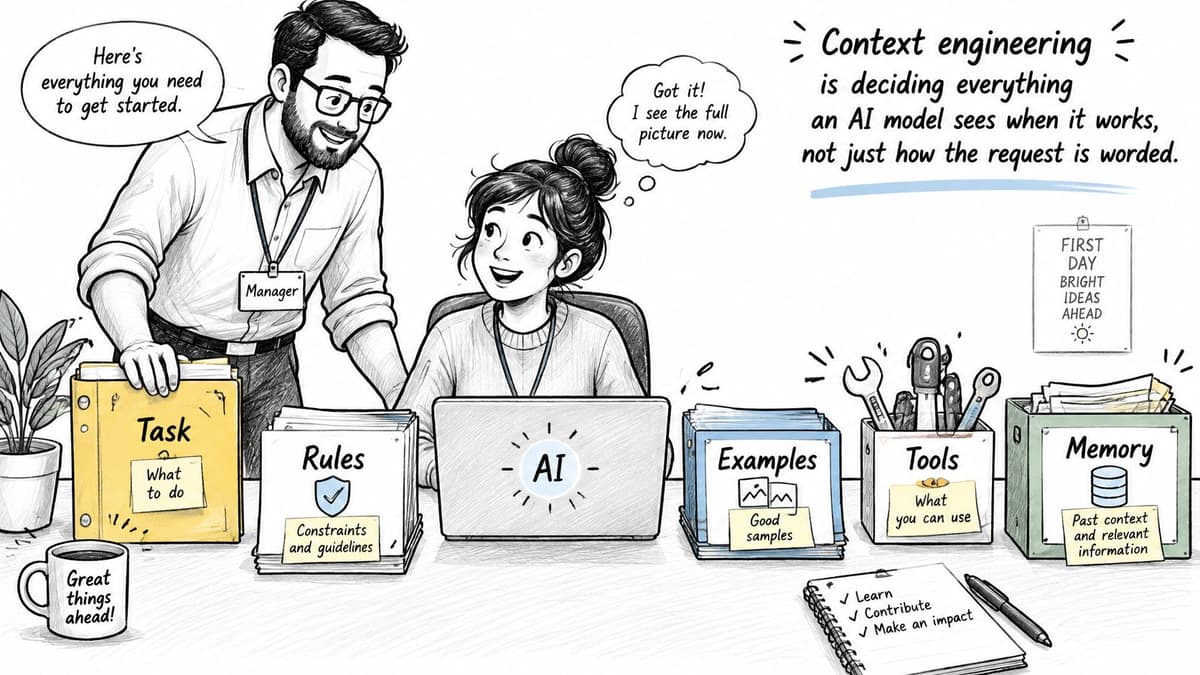
Simon Willison's note on the term treats context engineering as the broader discipline of designing and optimizing everything a model receives at inference time, not only the wording of a prompt. That package can include system instructions, retrieved documents, conversation history, examples, tool definitions, tool results, structured data, memory, and formatting. Prompt engineering tunes a written instruction. Context engineering manages the full information environment that lets an agent finish a task.
Three decisions define the work.
What the model sees. Standing rules, the task, evidence, and the names of people who must approve.
When it sees each piece. A brand rule belongs at the start. A search result belongs after the search, not in every later message.
In what order, and how much. Space in the context window is shared. Instructions, history, retrieved knowledge, tool schemas, and intermediate results all compete for it. Poorly organized context can reduce relevance, raise cost, and make an important instruction harder to follow. The aim is the smallest sufficiently complete set of reliable information for the next action, not the largest pile.
Where the name came from
The practice is older than the label. An Upsolve guide to the 2025 shift traces how the phrase spread: on 18 June 2025, Shopify CEO Tobi Lütke described giving a model all the context needed for a task to be plausibly solvable, and on 25 June Andrej Karpathy amplified the idea. Cognition had already, on 12 June 2025, described context engineering as prompt engineering done automatically inside a dynamic system. On 6 October 2025 the paper "Agentic Context Engineering: Evolving Contexts for Self-Improving Language Models" introduced ACE, a framework in which an agent's context evolves through generation, reflection, and curation rather than by changing model weights.
That history matches how teams work now. A one-off chat can survive on a careful sentence. An agent that calls tools, keeps state, and hands work to a person cannot.
If the model had to finish this with only what is in front of it, would it succeed?
Run that test on the next task you give an agent. If the answer is no, the missing piece is context, not a cleverer verb.
How it differs from prompt engineering
Prompt engineering tunes the instruction a person writes. Context engineering starts where that instruction stops being enough, which is usually once an agent works over several steps, calls tools, and keeps state.
| Aspect | Prompt engineering | Context engineering |
|---|---|---|
| Main object | The wording of one instruction | The full information the model sees for each step |
| Question it answers | What should I ask, and how? | What does the model need to know, when, and in what order? |
| Typical scope | One request or chat turn | A multi-step task with tools, state and handoffs |
| Main artifacts | Instructions, examples, output format | Instructions, retrieved documents, history, tool results, memory, approval records |
| Main constraint | Clarity of the wording | Token budget shared across every source |
| Typical failure | Vague or ambiguous instruction | Irrelevant, stale or missing information |
| Who usually owns it | Anyone writing prompts | Whoever designs the agent workflow and its inputs |
A prompt writer rewrites a request so the summary comes back in three bullets. A context engineer decides that the summary should use the client's approved tone guide, the last two decisions, and only the payment-terms section of the contract. Same task, different job. One changes the sentence. The other changes the packet.
Where retrieval fits
People often treat retrieval-augmented generation as the whole discipline. It isn't. Retrieval-augmented generation is one way to find documents. Context engineering decides which documents, rules, and tool results reach the model at each step, and in what order. A search that returns twelve files has not finished the job. Someone still has to drop the eleven that don't change the answer.
The two skills overlap. A clear prompt is still part of the context. Examples and an output format still matter. When a bad answer comes back, check the wording first. Then check what the model was given. A vague verb is a prompt problem. A missing approval, a stale price, or a thread the model never saw is a context problem.
Practical rule: If rewriting the sentence three times doesn't fix the answer, stop editing the sentence and inspect the packet.
Ownership follows the same split. Anyone can write a prompt. The person who designs the workflow owns the inputs, the order, and the points where a human has to decide.
Where the information in an agent's context comes from
Context has sources, and each source has a job. Take one running task: a marketing agent drafting a launch email for a client.
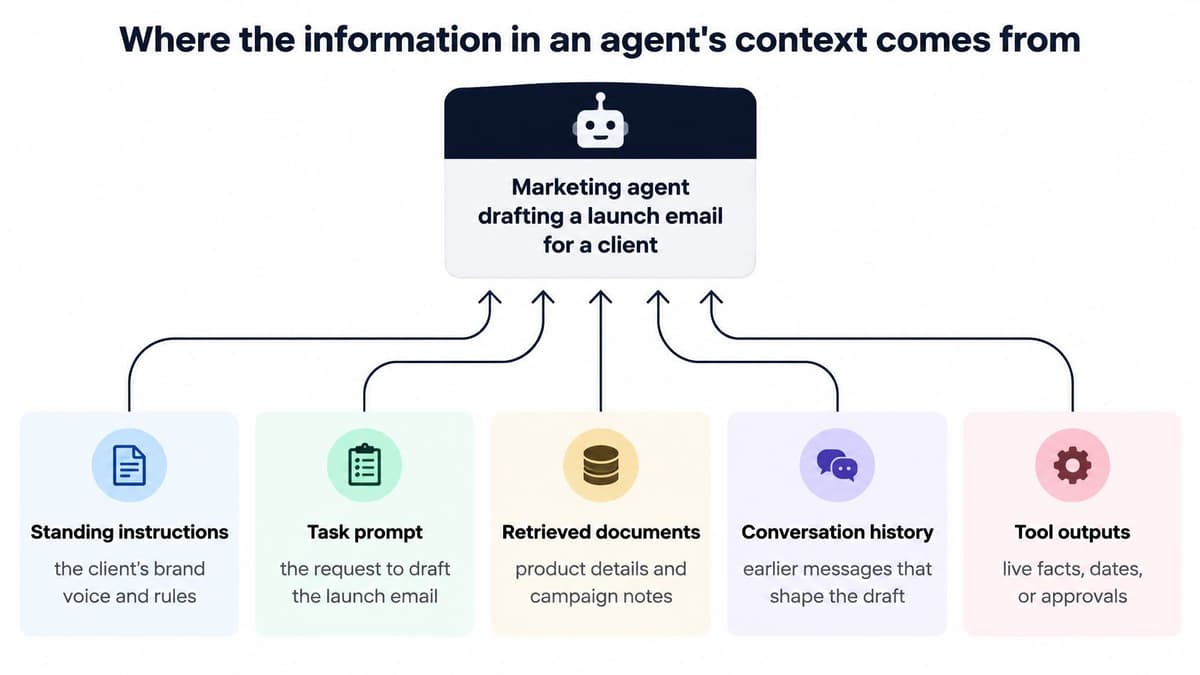
| Context source | What it holds | Example from a launch email task |
|---|---|---|
| System instructions | Standing role and rules for the agent | Never send anything to a client without a person's approval |
| Task brief | Goal, scope and success criteria | Launch email, due Friday, under 150 words |
| Retrieved documents | Passages pulled in for this step | Brand book section on pricing claims |
| Conversation history | Earlier messages and decisions | Client asked to drop the second hero image |
| Examples | Past outputs that show the standard | Two approved launch emails from last quarter |
| Tool definitions | What the agent can call and how | Search files, create a draft, post a comment |
| Tool results | Output from the last action | List of three matching files returned by search |
| Structured data | Status, owner and dates | Status Review, owner Priya, due 14 May |
| Memory | Facts kept across sessions | Client prefers British spelling |
| Formatting | Layout and order of every source | Headings and labels for each block of context |
Standing instructions don't change every morning. The brief does, because Friday's email is not last month's email. Retrieved passages should be narrow. The pricing-claims page belongs in the draft. The whole brand book does not. History carries the decision to drop the second hero image, which a fresh prompt will forget. Examples show the standard better than adjectives like "punchy" or "on brand."
Stable sources and volatile ones
Rules, the brief, and approved examples are relatively stable. Tool results and recent messages are not. A file list from this morning can be wrong by the afternoon if someone uploads a new deck. Carry stable facts forward. Refresh volatile ones instead of pasting yesterday's tool output into today's request.
That split is why a connection matters more than a longer paste. When Claude Code connects to Projectify over MCP, it reads the brief, the project rules, who is working right now, and the last handoff before it touches anything. The same pattern is what the model context protocol is for: a shared way for the model to read the workspace instead of waiting for someone to copy it into chat. Claude can connect that way from Claude Code, claude.ai, and Claude Desktop.
Files, chat, and the board
Some sources live in the work itself. A file read on upload can yield a summary, key facts, and the questions it answers, so search finds words inside the file rather than only the filename. A channel message can become a task, a decision, or a doc, which is how a client comment stops living only in chat. Structured fields, owner, status, and due date, keep the email from drifting after Priya has already moved it to review.
Ask one question of every source before you include it. Does this help the next action, and is it still current? If either answer is no, leave it out.
Why more context can make an agent worse
A common belief is that a bigger context window solves the problem. It doesn't. A model can have the right fact in the input and still miss it, because position changes what it uses.
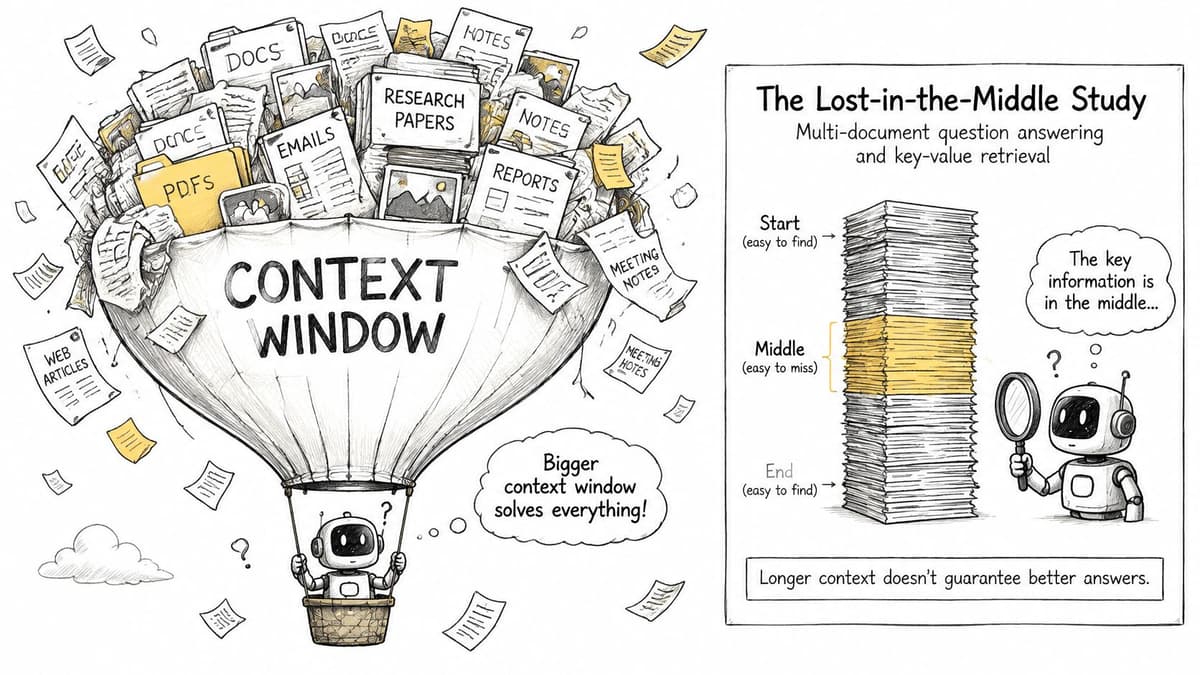
The Lost-in-the-Middle study evaluated multi-document question answering and key-value retrieval. Performance degraded significantly when relevant evidence moved within a long input. Models were generally weakest when the answer-bearing material sat in the middle, and stronger near the beginning and the end. The pattern is U-shaped.
Say the contract is sixty pages and the clause that governs the email is on page thirty-one. You paste the whole file "so the agent has everything." It answers from the opening summary or the signature block, both easy to see, and it sounds sure. The governing clause was present. It was just buried.
Volume is not access
Extra tokens raise the bill and can dilute the facts that govern the action. Adding more tokens can increase nominal information while reducing effective access to the facts that matter. Context engineering is not stuffing. It is ranking, compressing, and placing critical constraints where the model is more likely to use them. Retrieve a narrow passage. Restate a high-risk rule at the moment of the decision, not only in a preamble from an hour ago.
This is also why an ever-growing transcript is a weak memory. Teams do better with stored artifacts: acceptance criteria, a current-state summary, dependency links, and approval records. Those stay short. A transcript does not.
Judge the context separately from the answer. Three checks are enough.
Required fact. Did the agent retrieve the clause, the price rule, or the due date?
Noise. Did irrelevant material come along for the ride?
Use. Did the draft follow the evidence, or only sit next to it?
A polished paragraph can still fail all three. Fix the packet before you blame the model.
The same idea shows up when people walk through long-context failures in plain language. Position and noise, not raw capacity, are what break the draft.
Plays from YouTube. Pressing play loads it from Google.
Team examples and who owns the context
Facts are not the whole packet. An agent can be grounded in the right files and still do something the team would not accept, because it never learned who owns the work, which policy applies, whether the note is current, or when a person must approve.
An Omdia and Enterprise Strategy Group study cited by Cognizant reported that 81% of organizations found scaling agents into production more complex than they first expected, and that security and compliance were the most significant implementation challenge. The same discussion argues that enterprises have to redesign how data is contextualized, governed, and distributed, because agents build context from raw inputs rather than only from application logic.
A creative review, step by step
A standard creative review runs in a fixed order. Collect stakeholder notes. Merge them into one change list. The creative lead settles conflicts, and a person checks. The designer revises. Someone checks the work against the brand book. The requester signs off, and a person checks again.
Each step changes what the agent needs. After the merge, the change list is the new brief. Older notes are background, or they become noise. At the brand check, retrieve the relevant brand-book passage, not the stakeholder thread. At the two gates, the agent stops. It does not invent a compromise between two stakeholders, and it does not send the file because the draft looks finished.
A client implementation follows the same shape, with different names. Kickoff and success criteria. Requirements from the statement of work. The lead approves the plan. Configure and migrate. User acceptance testing. The customer signs off go-live. Then a handoff to support. The statement of work is evidence for the plan. It is not a license to skip the lead's approval. Go-live is a person's decision, recorded so the next session doesn't reopen it.
How you prove why an agent acted
"How can an organization prove why an agent acted?" needs a paper trail, not a vibe. Source lineage, timestamps, access boundaries, model and tool records, explicit approval points, and an activity trail you can review or reverse. For an agency that means the client boundary and the named approver. For a law or operations team it means the matter boundary and the person allowed to accept a decision.
Code teams hit the same gap in public. In a study of 21,454 agent-authored GitHub pull requests, fewer than half, 9,568, received any review, and only 453, or 4.7%, contained vulnerability-related discussion. The researchers' conclusion is the workflow rule: AI-generated code should get the same security review and approval standards as human-written code, because reviewers can presume correctness. An agent claims the task, pauses when a human decision is required, and presents the work. It does not merge it.
On our side, that pause is the point of a handoff. A project handoff template keeps status, open decisions, and the next action in a form the next person, or the next session, can read without replaying the thread. Every change can be signed to the person the agent acted for, such as "Claude for Priya," so the trail names a human, not a vague bot.
How to assemble context for one task
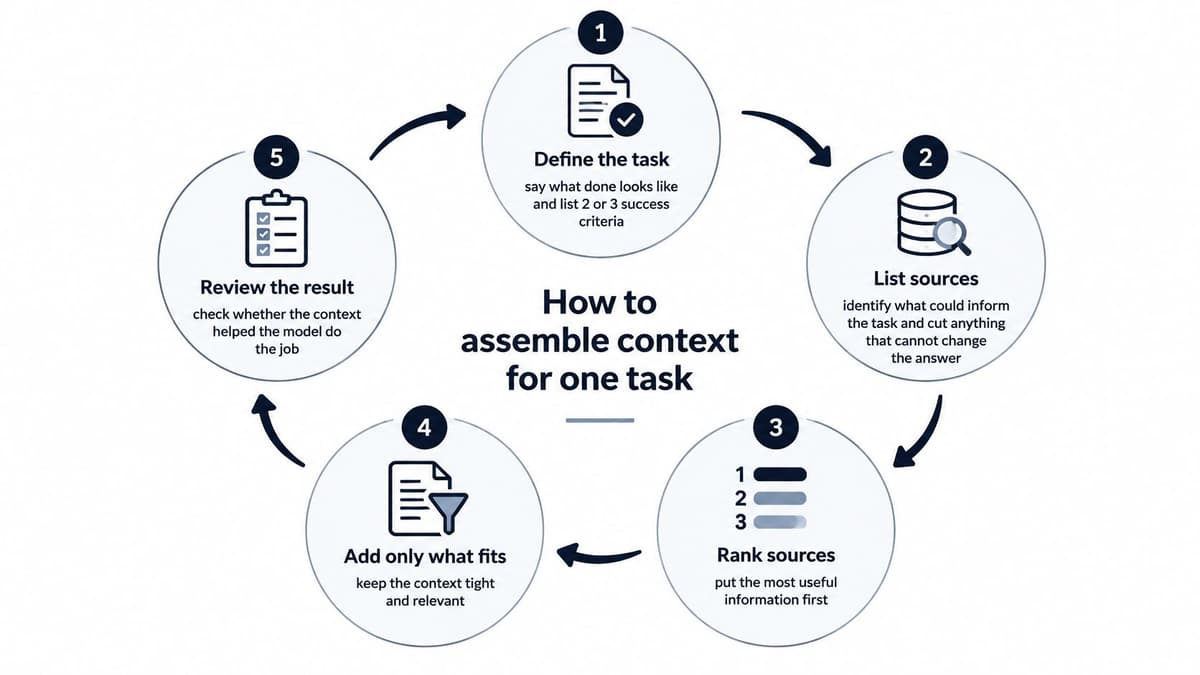
Treat context as a constrained pipeline. Each piece enters when a step needs it, then leaves when it would only compete for attention. Anthropic's research on effective context engineering describes the job as selecting relevant knowledge, deciding when to retrieve it, choosing representation and order, and managing lifespan. Workspace state, task requirements, prior decisions, tool outputs, files, policies, and human approvals are assembled just in time rather than dumped into every request.
The effort pays off in fewer loops. A 2026 observational study of 200 documented interactions across Claude, ChatGPT, Cowork, and Codex found that incomplete context was associated with 72% of iteration cycles. The study defined the work as assembling and sequencing the full informational payload, using five roles, Authority, Exemplar, Constraint, Rubric, and Metadata, and a four-stage Reviewer, Designer, Builder, Auditor process.
| Measure | Result |
|---|---|
| Iteration cycles linked to incomplete context | 72% of cycles |
| Average iteration cycles | Down from 3.8 to 2.0 with structured assembly |
| First-pass acceptance | Up from 32% to 55% with structured assembly |
Those moves, from 3.8 to 2.0 average cycles and from 32% to 55% first-pass acceptance, are what a one-page brief is for. The agent starts with rules, examples, constraints, and success criteria, not a short prompt and a hope.
The seven moves
Define done. Write the task in one sentence and add two or three success criteria. For the launch email, done means under 150 words, no unapproved pricing claim, and a draft waiting for Priya, not a message already sent.
List sources, then cut. Name everything that could inform the step. Drop anything that cannot change the outcome. Last quarter's open rates might matter for a performance recap. They don't change this email's claims.
Retrieve for this step only. Pull the pricing-claims passage when you are checking claims. Don't preload the entire campaign folder "in case."
Order for attention. Goal and hard constraints first. Evidence next. Background last. The middle of a long packet is the wrong place for "do not send."
Budget the categories. Give instructions, evidence, and history each a share. History must not crowd out the rules. If the thread is long, keep the decisions and drop the chatter.
Act, then record what changed. After the draft exists, write down the new status and any decision the agent proposed. A person accepts a decision. The agent doesn't mark it final.
Write the handoff. Status, open decisions, and the next action. The next session starts from those facts. A compact brief, immutable decisions, current status, ownership, approval gates, and a handoff summary are the artifacts. Inject only the subset the next action needs.
A session that starts briefed should claim the task before it works, with a short lease so two agents don't grab the same row, and it should ask before it builds when the choice belongs to a person. In our workspace that ask shows up as Needs you. You connect Claude Code with one command, or through a connector in claude.ai, and you approve the connection in the browser.
A one-week test
Pick a recurring task, a weekly client report or that launch email. Write the brief on one page. Include the goal, three to five standing rules, the sources the agent may use, two examples of good output, the points where a person must decide, and the handoff format. A project briefing template is a reasonable skeleton if you don't want to invent the headings.
Run the task twice. Once with the old short prompt. Once with the brief. Count revision rounds, and note whether the first draft already respected the approval gate. If the brief wins, turn it into a workflow of steps with checks, which you can do from a video, a link, or a document of how you already work on Projectify workflows. Claude can run that workflow once, or down a list of rows, and still stop where a person has to approve.
Keep the brief, the decisions, and the handoffs in one shared place. The alternative is pasting the same background into every new chat and hoping this time the middle of the paste gets read.
Projectify is one place for any kind of work, shared by people and their Claude agents, so a brief, a decision, and a handoff stay with the task instead of living in a chat you have to reconstruct. Every new workspace starts with a month of Premium free, no card, and agents never take a paid seat. If you want that packet in place before the next draft, visit Projectify.